


If you want your WordPress website to remain discoverable in Google and major AI search systems, don’t treat all AI crawlers as one group. Googlebot handles Google Search, while services such as OpenAI, Anthropic and Perplexity use different crawlers for different purposes. GPTBot, OAI-SearchBot, ClaudeBot, Claude-SearchBot and PerplexityBot should therefore be evaluated separately rather than blindly blocking every bot with “AI” in its name.
For most public business websites, the safest starting point is to keep important content crawlable, allow normal search engines, allow the AI search crawlers you want to be discoverable through, and make a separate decision about training crawlers.
Table of Contents
What is robots.txt?
robots.txt is a plain-text file located at the root of your website:
https://example.com/robots.txtIt tells compliant crawlers which URLs they may request.
The important word is request.
A robots.txt file is not a password, firewall or security system. The Robots Exclusion Protocol is designed as a crawler-control mechanism, not an access-control mechanism. RFC 9309 explicitly states that robots.txt rules are not a form of authorization.
For example:
User-agent: *
Disallow: /private/
means compliant crawlers are being asked not to request URLs under /private/.
It does not make /private/ secure.
If information is genuinely private, use authentication, authorization or another server-side access-control mechanism.
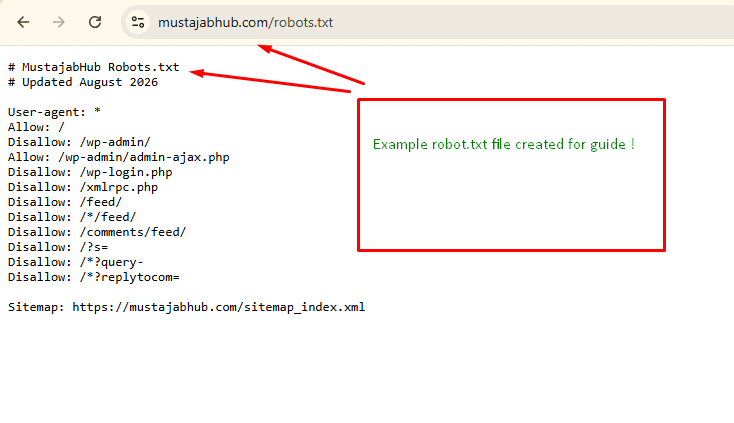
MustajabHub’s live WordPress robots.txt configuration, checked in August 2026.
Why robots.txt matters more in 2026
For years, most website owners thought about robots.txt mainly in terms of Googlebot.
That is no longer the complete picture.
A modern website may receive requests from:
- Googlebot
- Bingbot
- DuckDuckBot
- GPTBot
- OAI-SearchBot
- ChatGPT-User
- ClaudeBot
- Claude-SearchBot
- Claude-User
- PerplexityBot
- Perplexity-User
- Applebot
- Google-Extended
- Amazonbot
- other specialized crawlers
Cloudflare’s current AI crawler reference separately identifies AI crawler, AI search and AI assistant categories.
The mistake is assuming:
AI crawler = one thing
It isn’t.
The three types of AI crawlers you need to understand
This distinction is the most important part of this guide.
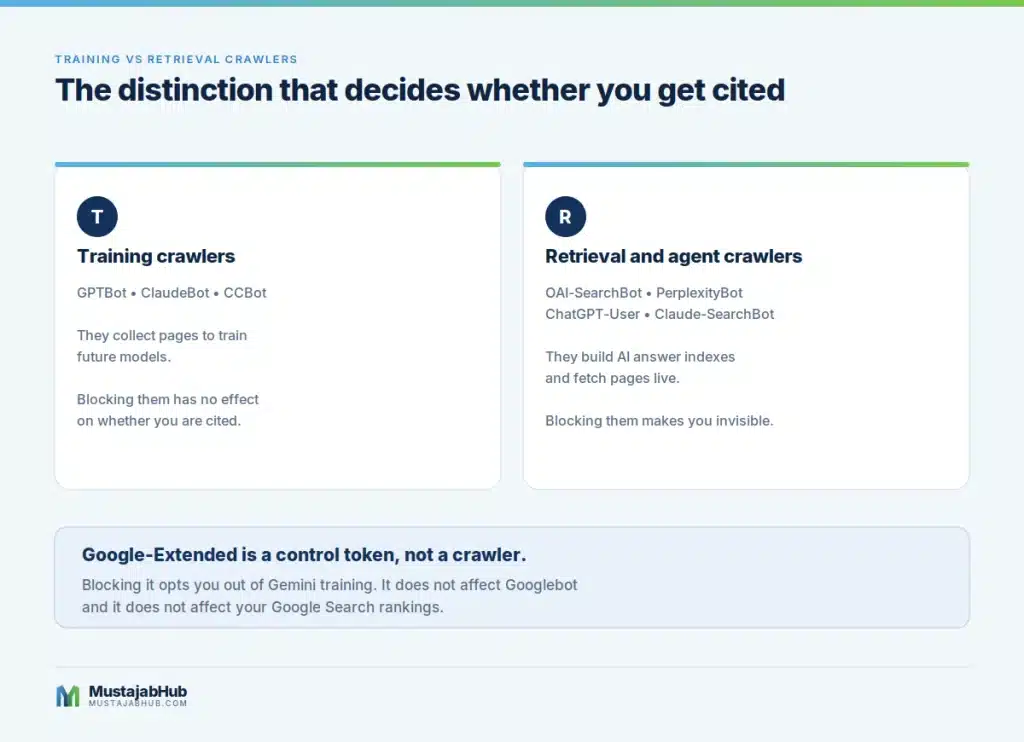
1. Training crawlers
These collect publicly available information that may be used in model development or training.
Examples include:
GPTBotClaudeBotCCBot- some vendor-specific training crawlers
Whether you allow these is largely a content-use policy decision.
If your objective is simply to appear in today’s AI search results, don’t assume that allowing a training crawler is what makes that happen.
2. AI search crawlers
These are more directly relevant to AI-powered search visibility.
Examples include:
OAI-SearchBotClaude-SearchBotPerplexityBot
Cloudflare currently classifies OAI-SearchBot, Claude-SearchBot & PerplexityBot as AI search crawlers.
If you intentionally block an AI search crawler, you may reduce that service’s ability to discover and retrieve your content for its search experience.
That is why a blanket:
User-agent: *
Disallow: /
is obviously dangerous for a public business website.
3. User-triggered AI fetchers
Some AI services can also retrieve a page because a user specifically asks the system to look at it.
Examples include:
ChatGPT-UserClaude-UserPerplexity-User
These are different from scheduled search crawling.
This distinction matters because a user asking:
“Read this website and tell me what the company offers.”
is a different technical event from an AI search engine building its search index.
Anthropic, for example, documents Claude-User as being used when individuals ask Claude questions that require website access, while Claude-SearchBot is used to improve search-result quality.
Googlebot and Google-Extended are NOT the same thing
This causes a surprising amount of confusion.
Googlebot
Googlebot is Google’s main Search crawler.
Google Search uses Googlebot to crawl websites and then discover content for searches.
If you want your website indexed by Google, you need to make sure important content is crawl-ready.
Google-Extended
Google-Extended is different.
Google says that Google-Extended does not have a separate HTTP crawler user agent. It is a robots.txt control token that lets publishers control certain uses of content crawled by Google, including use for future Gemini model training & grounding-related purposes, which are not 100% disclosed yet. It does not affect Google Search.
So this:
User-agent: Google-Extended
Disallow: /
does not mean:
“Remove my website from Google Search.”
Googlebot is a different crawler.
This distinction should be understood before anyone edits their robots.txt.
What should a WordPress business website allow?
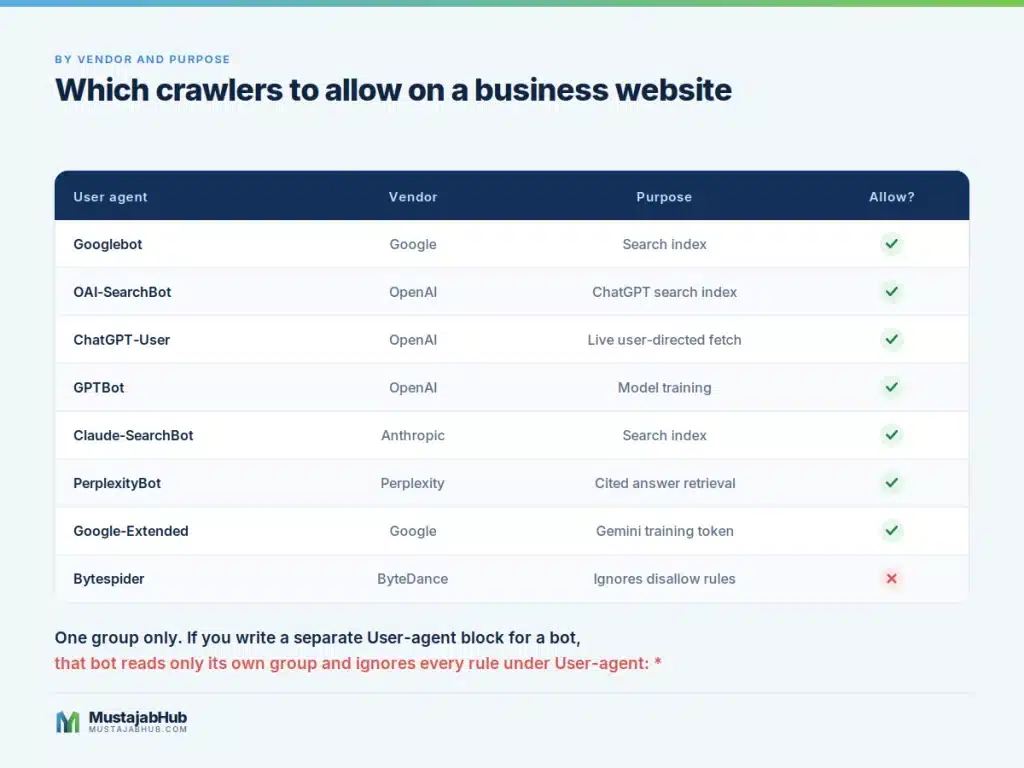
For a normal public-facing business website, I recommend thinking in terms of content purpose, not simply “good bots” and “bad bots”.
| Crawler / token | Main purpose | Typical decision |
|---|---|---|
| Googlebot | Google Search | Allow |
| Bingbot | Bing Search / Microsoft ecosystem | Allow |
| OAI-SearchBot | ChatGPT Search | Usually allow |
| ChatGPT-User | User-directed OpenAI retrieval | Usually allow |
| Claude-SearchBot | Claude search | Usually allow |
| Claude-User | User-directed Claude retrieval | Usually allow |
| PerplexityBot | Perplexity search | Usually allow |
| GPTBot | OpenAI crawling for model development | Business policy |
| ClaudeBot | Anthropic crawling/model development | Business policy |
| Google-Extended | Gemini-related data-use control | Business policy |
| CCBot | Common Crawl | Business policy |
| Bytespider | ByteDance crawler | Review carefully |
| Applebot-Extended | Apple AI data-use control | Business policy |
This is not a permanent list. AI crawler names and purposes change, so review your policy periodically.
My recommended robots.txt strategy for most WordPress business sites
Don’t copy an enormous robots.txt file from another website without understanding it.
For a normal WordPress business website, start with a small, understandable configuration.
User-agent: *
Allow: /Disallow: /wp-admin/
Allow: /wp-admin/admin-ajax.php
Disallow: /wp-login.php
Disallow: /xmlrpc.php
Sitemap: https://example.com/sitemap_index.xml
Replace:
https://example.com/sitemap_index.xml <= {Your current website sitemap file}with your actual sitemap URL.
If Rank Math generates the following:
https://example.com/sitemap_index.xmlUse that.
If another SEO system generates:
https://example.com/sitemap.xmlUse the actual live sitemap.
Do not blindly assume the filename. Need any help with robot or sitemap files? Contact Mustajabhub. Technical Support for a free consultation!
Why I prefer a simple robots.txt
There is a temptation to add 30–50 crawler rules because an article says:
“These are the 27 AI bots you must allow.”
That can make the configuration harder to maintain and easier to break.
Google’s own documentation says that if no applicable restriction exists, crawling is allowed by default.
Therefore, you don’t necessarily need the following:
User-agent: OAI-SearchBot
Allow: /
if your wildcard rules already permit it.
In fact, unnecessarily creating a specific user-agent group can introduce a subtle problem: specific groups don’t simply inherit all restrictions from the wildcard group.
Simple is often safer.
A balanced AI search configuration
If your business specifically wants to make its public content available to AI search services, you can explicitly document your policy.
For example:
# Public website: AI search visibility enabled

User-agent: *
Allow: /Disallow: /wp-admin/
Allow: /wp-admin/admin-ajax.php
 Disallow: /wp-login.php
 Disallow: /xmlrpc.php

 Sitemap: https://example.com/sitemap_index.xml
This already allows the major crawlers unless a specific restriction is added.
You don’t need to create an explicit Allow: / group for every AI crawler.
What if I want AI search visibility but don’t want training crawlers?
That’s a different strategy.
For example, a publisher could decide to allow AI search crawlers while separately restricting certain training-related crawlers.
The important point is that:
GPTBotand:
OAI-SearchBotare not interchangeable.
Likewise:
ClaudeBotand:
Claude-SearchBothave different purposes.
That gives publishers more control than the old “block AI” versus “allow AI” choice.
Should you block GPTBot?
There is no universal SEO answer.
If your priority is:
Maximum openness
You may allow it.
AI-search visibility but reduced training exposure
You may choose to allow the relevant AI search crawlers while restricting selected training crawlers.
Protecting proprietary or restricted content
You may want stronger controls at the CDN/server level as well.
The decision should come from your content strategy rather than from a generic SEO checklist.
What about Claude?
Anthropic currently documents separate crawler purposes.
ClaudeBot is associated with Anthropic’s web crawling/data collection, while:
Claude-SearchBot
is used to improve search-result quality.
Claude-User handles user-directed retrieval.
This means a business that wants Claude search visibility should not automatically block every Anthropic crawler simply because the request contains the word “Claude”.
What about Perplexity?
Perplexity’s current documentation is particularly useful because some older articles still contain outdated claims.
Perplexity states that:
PerplexityBotrespects robots.txt.- A site that disallows it won’t have full or partial page text indexed through that crawler.
- PerplexityBot’s indexed content isn’t used for foundation-model pre-training.
- Perplexity previously had a user-request URL behaviour that has since been changed.
So don’t copy an old 2024/2025 Perplexity robots.txt recommendation into a 2026 site.
The WordPress mistake I see most often
One of the most dangerous configurations is:
User-agent: *
Disallow: /
That tells compliant crawlers not to crawl your site.
If you accidentally deploy that to a production website, your SEO work becomes irrelevant because you’ve created a fundamental crawling restriction.
Google’s documentation explains that robots.txt is primarily a crawling control mechanism and should not be used as a substitute for noindex.
robots.txt does NOT mean “don’t index this page”
This is one of the most important technical SEO distinctions.
Suppose you want this URL removed from Google Search:
/example-page/Do not assume this is the correct solution:
User-agent: *
Disallow: /example-page/
Google may still discover the URL from links elsewhere.
If you need the page excluded from Google Search, use an appropriate indexing control such as:
<metaname="robots"content="noindex">The important catch is that Google must be able to crawl the page to see the noindex directive. If robots.txt blocks the page, Google may never see the noindex instruction.
Don’t block CSS and JavaScript just because they look technical
Another old robots.txt habit is blocking:
/wp-includes//wp-content/without understanding what resources the website actually needs.
Google specifically warns that blocking resources can interfere with rendering and understanding pages.
If Google needs a CSS or JavaScript resource to understand the rendered page, don’t block it just because it isn’t a normal article URL.
How to check your actual robots.txt
Don’t start by editing WordPress.
First open:
https://yourdomain.com/robots.txtUse a private/incognito browser window.
Google recommends checking that the file is publicly accessible and correctly formatted.
Check:
- Does it return the robots.txt file?
- Is it plain text?
- Is there
Disallow: /? - Is
/wp-admin/restricted? - Is your sitemap listed?
- Are important content directories accidentally blocked?
- Are AI crawlers explicitly blocked?
- Is Cloudflare serving a different file?
- Is a physical file overriding your WordPress-generated file?
The Cloudflare check many WordPress owners miss
Your robots.txt is only one layer.
If your website uses Cloudflare, traffic can also be controlled at the edge.
Cloudflare’s current AI Crawl Control allows site owners to monitor AI crawler activity and allow or block individual crawlers. It can also identify robots.txt violations.
That means you can have:
robots.txt → Allowwhile Cloudflare has:
AI crawler → BlockIn that situation, editing robots.txt won’t solve the problem.
Cloudflare documents AI Crawl Control as a separate control layer from robots.txt.
MustajabHub practical implementation note
At MustajabHub, we approach crawler configuration as a two-layer diagnostic rather than a copy-paste SEO setting.
First we inspect what the public robots.txt actually returns. Then we check whether the hosting/CDN layer is imposing another restriction.
For a WordPress business website, that means checking the relationship between:
WordPress → SEO plugin → robots.txt → XML sitemap → Cloudflare/CDN → server → crawler response.
This matters because changing one layer doesn’t necessarily change another.
A website can have perfectly written robots.txt rules and still return:
403 Forbiddenor:
429 Too Many Requeststo a crawler because of a security or rate-limiting layer.
That is why we don’t treat a robots.txt validator as the final diagnostic.
How to test a crawler response
If you have terminal access, you can test how your server responds to a crawler user agent.
For example:
curl-I-A"OAI-SearchBot/1.0" https://example.com/Then test:
curl-I-A"PerplexityBot" https://example.com/and:
curl-I-A"Claude-SearchBot" https://example.com/You’re looking at the HTTP response.
For example:
HTTP/2 200means the request reached the server and received a successful response.
A:
403may indicate blocking.
A:
429may indicate rate limiting.
But remember: a successful HTTP response does not prove that a crawler will index or cite your page.
It only proves that the request wasn’t rejected at that point.
Check your server logs
This is where a robots.txt article becomes genuinely useful instead of another generic SEO post.
Look at your server access logs and search for:
GPTBot
OAI-SearchBot
ChatGPT-User
ClaudeBot
Claude-SearchBot
Claude-User
PerplexityBot
Perplexity-User
Googlebot
bingbot
If you’re using Cloudflare, its AI Crawl Control provides crawler activity information, including requests, crawler categories and robots.txt violations.
Don’t invent crawler statistics for a case study.
If your logs show:
OAI-SearchBot: 7 requests
PerplexityBot: 3 requests
GPTBot: 11 requests
publish those exact numbers.
If they show nothing, say that.
Real zero is more trustworthy than invented success.
How we would document a real MustajabHub test
A useful case study should contain:
Test date
August 2026
Website platform
WordPress

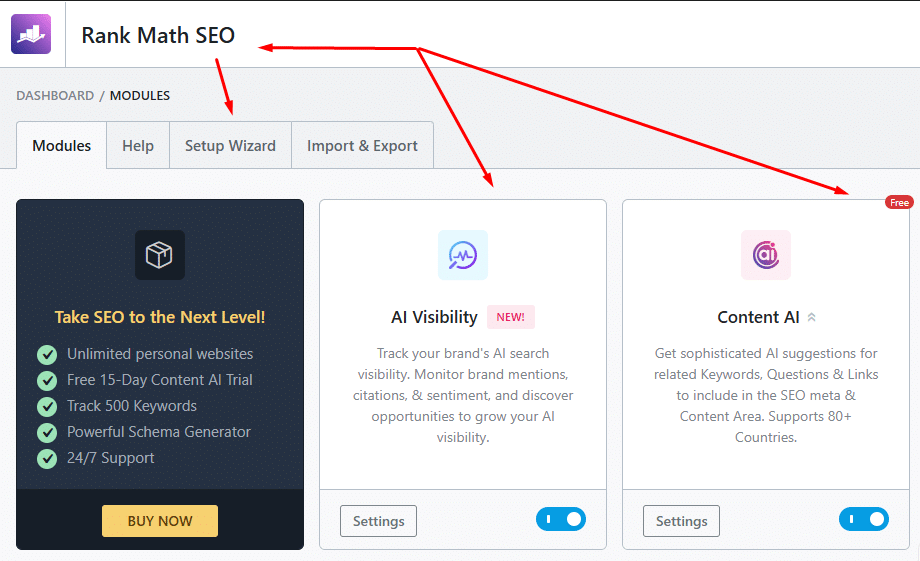
SEO plugin
Rank Math
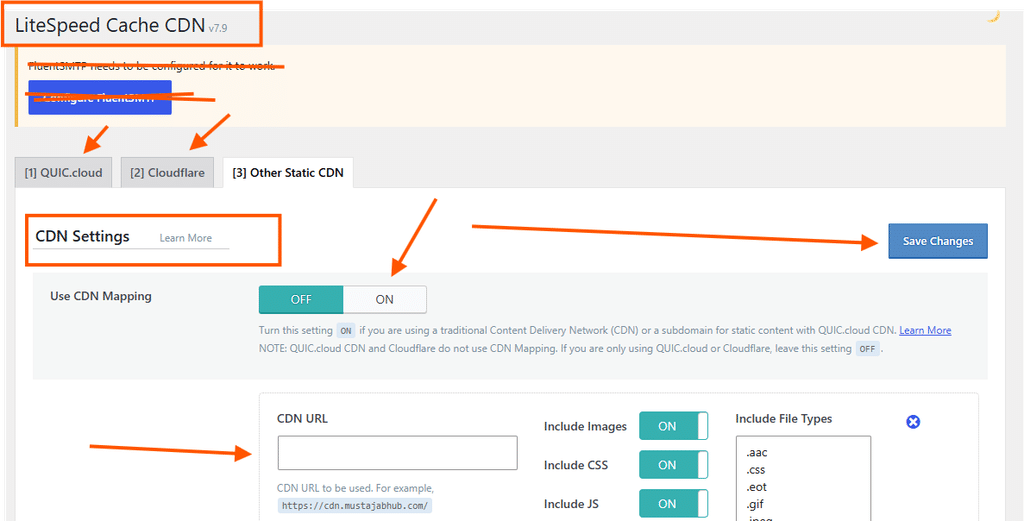
CDN/security layer
Cloudflare
Robots.txt before
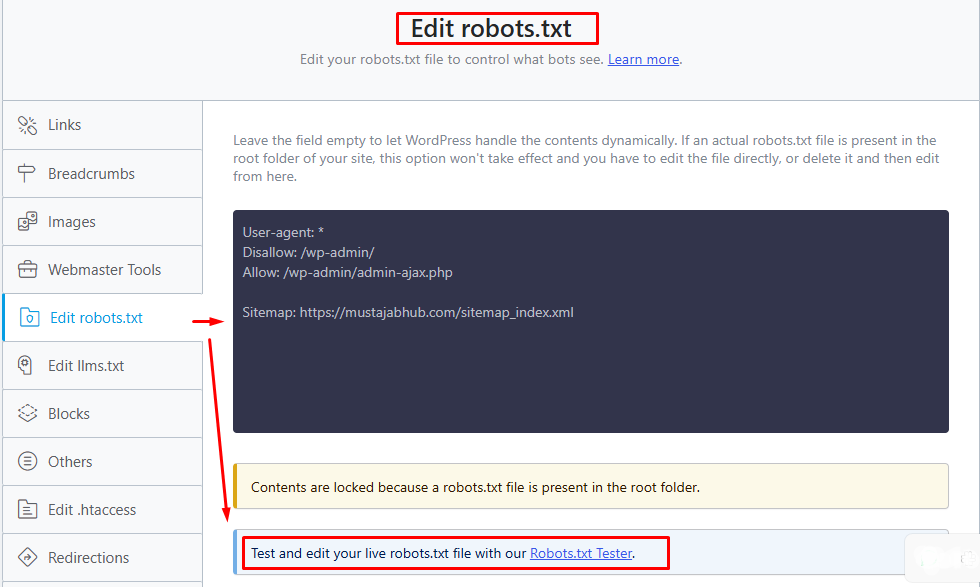
Rank Math’s robots.txt configuration is used to control crawler access on the WordPress website.
Robots.txt after

HTTP response
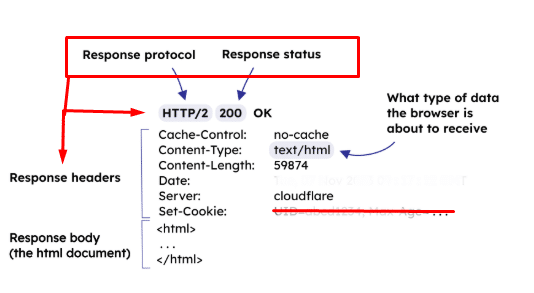
Server logs
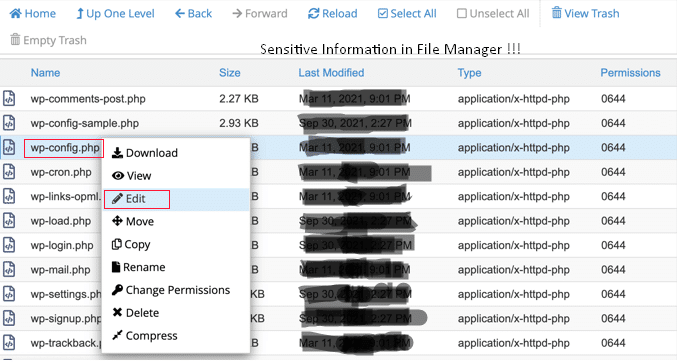
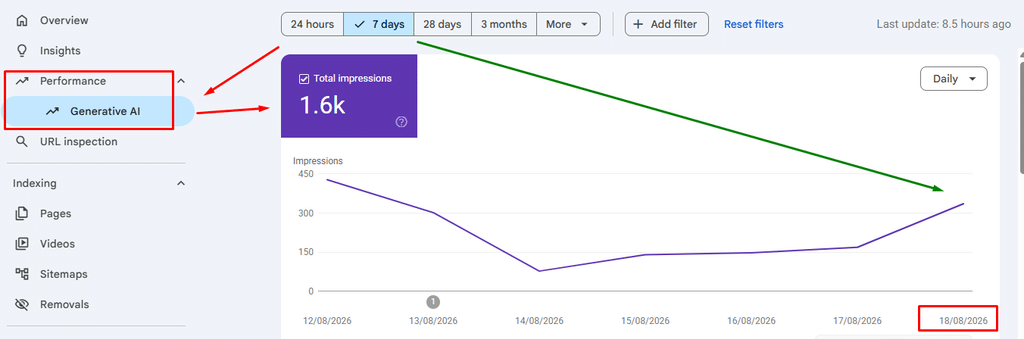
Search Console
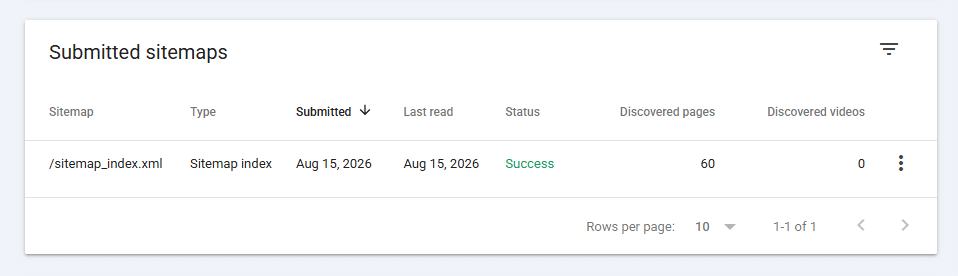
AI crawler activity
Actual numbers from logs/Cloudflare.
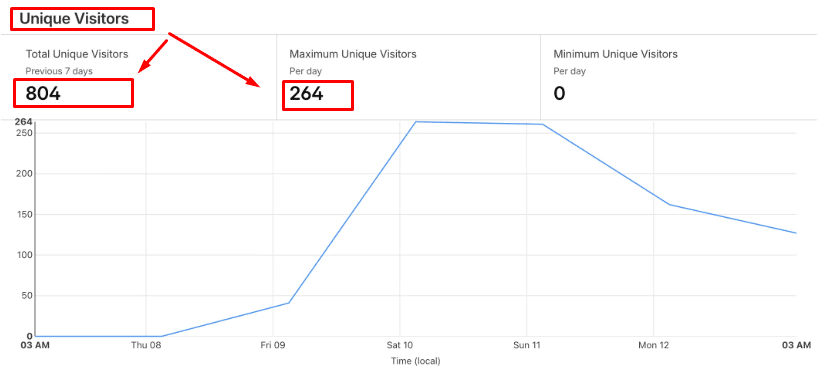
What about llms.txt?
You’ve probably seen recommendations to create the following:
/llms.txtIt can be useful for some emerging AI-agent workflows, but don’t present it as a Google ranking requirement.
Google’s current documentation explicitly says that Google Search does not need llms.txt or other special AI markup for Search or its generative AI features. Google says maintaining such files for other systems is fine, but they don’t provide a ranking benefit or penalty in Google Search.
So the correct SEO position is:
llms.txtis optional experimentation, not a replacement for SEO, robots.txt, sitemap, crawlability or useful content.
That’s much more credible than saying:
“You must have llms.txt to rank in ChatGPT.”
Does robots.txt Make you rank in ChatGPT?
No.
Robots.txt can determine whether a crawler is permitted to access content.
It cannot manufacture:
- authority
- relevance
- expertise
- citations
- backlinks
- brand recognition
- topical authority
- useful information
Google’s own generative-AI guidance says unique, valuable, non-commodity content is more important than supposed GEO hacks.
Think of robots.txt as the door.
Good content is what gives the crawler a reason to walk through that door.
What AI systems actually need from your website
A technically crawlable site is only the beginning.
Your pages should make the important information easy to understand.
For example, instead of writing:
“We offer advanced solutions for businesses looking to improve their online presence.”
write:
“MustajabHub provides WordPress development, technical SEO, Core Web Vitals optimization and indexing troubleshooting for businesses in Pakistan and international clients.”
The second statement contains identifiable entities and concrete relationships.
It answers:
Who?
MustajabHub.
What?
WordPress development and technical SEO.
Where?
Pakistan and international clients.
What problems?
Performance and indexing.
That is much more useful to humans and retrieval systems.
The difference between crawling, indexing and ranking
These three are often mixed together.
Crawling
A crawler requests your URL (a domain URL like https://mustajabhub.com/)
Indexing
A search engine processes the page and may add it to its index.
Ranking
The search engine decides where the page should appear for a particular query.
Therefore:
robots.txt
   ↓
Crawl access
    ↓
Page processing
     ↓
Indexing
    ↓
Search eligibility
    ↓
Ranking
Allowing Googlebot through robots.txt does not guarantee indexing.
And indexing does not guarantee traffic.
The same principle applies to AI search
You can think about AI visibility as:
Crawler access
    ↓
Content discovery
    ↓
Retrieval/indexing
   ↓
Relevance
   ↓
Source selection
    ↓
Citation / mention
    ↓
Referral
Therefore:
Allowing an AI crawler is an eligibility condition, not a ranking guarantee.
That distinction will keep you away from a lot of misleading GEO marketing.
Common robots.txt mistakes
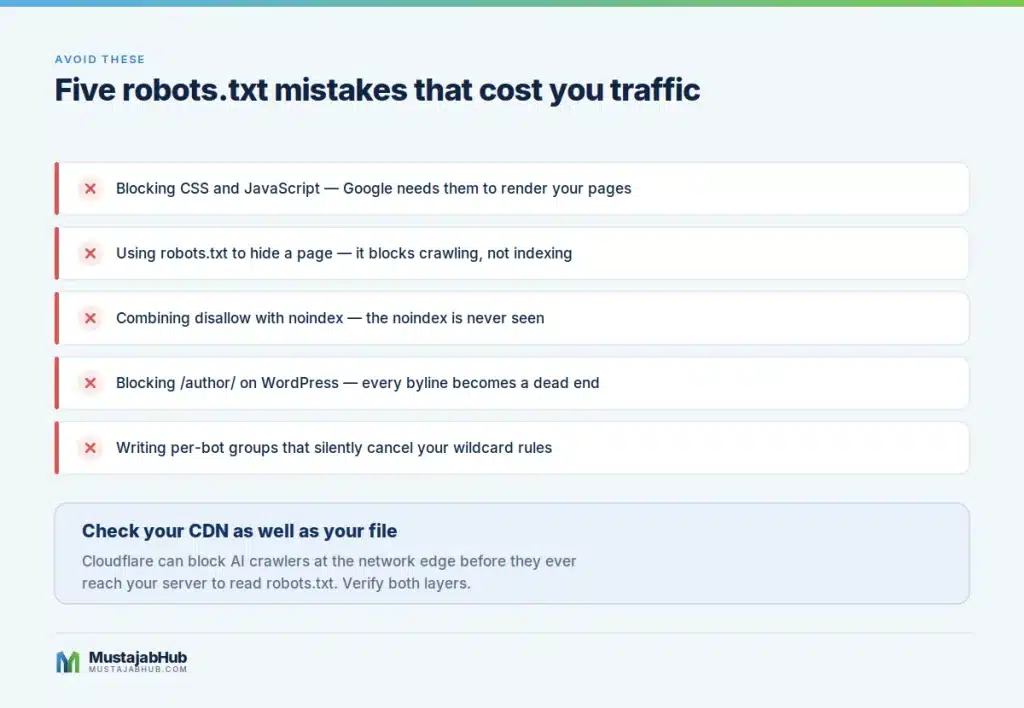
Mistake 1: Blocking everything
User-agent: *
Disallow: /
Don’t deploy this on a public site unless you deliberately want to restrict crawling.
Mistake 2: Using robots.txt for privacy
Don’t put confidential URLs in robots.txt thinking they are hidden.
The file itself is publicly accessible.
RFC 9309 specifically warns that robots.txt isn’t an access-control mechanism.
Mistake 3: Using robots.txt instead of noindex
If you need a page removed from Search, understand noindex.
Mistake 4: Blocking JavaScript and CSS
Don’t block resources without understanding their role in rendering.
Mistake 5: Copying a competitor’s robots.txt
Your website architecture is different.
A rule that makes sense on a large WooCommerce store may be completely unnecessary on a five-page business website.
Mistake 6: Adding dozens of AI bot rules without understanding groups
More rules do not automatically mean better SEO.
A smaller configuration that you understand is often safer.
Mistake 7: Forgetting Cloudflare
The crawler may be stopped before it reaches WordPress.
Mistake 8: Never checking logs
Robots.txt tells you what you intended.
Logs tell you what actually happened.
A practical 10-minute robots.txt audit
Run this checklist.
1. Open the live file
https://yourdomain.com/robots.txt2. Confirm HTTP response
It should normally return successfully and serve plain text.
3. Search for:
Disallow: /4. Check Googlebot
Make sure Google isn’t accidentally blocked.
5. Check Bingbot
Make sure Bing isn’t accidentally blocked.
6. Check AI search crawlers
Look for restrictions affecting:
OAI-SearchBot
Claude-SearchBot
PerplexityBot
7. Check training crawlers separately
Review:
GPTBot
ClaudeBot
Google-Extended
according to your content policy.
8. Check your sitemap
Example:
Sitemap: https://example.com/sitemap_index.xml9. Check Cloudflare
Make sure an AI crawler rule isn’t overriding your intended policy.
10. Check server logs
Look for actual crawler requests.
Should small Pakistani businesses care about this?
Yes, but not because every Pakistani business needs a complicated AI-crawler configuration.
A local business website normally needs to get the fundamentals right first:
- crawlable pages
- Google Search Console
- XML sitemap
- correct canonical URLs
- useful content
- internal links
- fast mobile experience
- structured data where appropriate
- Google Business Profile where relevant
- clear business information
- consistent branding
- real authorship
- useful service/location information
Then AI crawler access becomes another layer.
For a business serving customers in Gujranwala, Lahore, Islamabad, Karachi or elsewhere in Pakistan, the same technical principles apply. What changes is the information you provide about the actual business, location, services and audience.
How to make your WordPress site more AI-readable without gimmicks
Don’t create an artificial “AI version” of every page.
Instead:
Put the answer near the top
Answer the primary question quickly.
Use descriptive headings
For example:
What is robots.txt?
is better than:
Understanding the hidden layer
Define technical terms
Don’t assume everyone knows what noindex, canonical, WAF or CDN means.
Show relationships
Explain:
Googlebot     → Google Search
OAI-SearchBot → ChatGPT Search
PerplexityBot→ Perplexity search
Include original evidence
Screenshots, tests, logs and before/after observations are powerful.
Keep the content factual
Don’t manufacture experiments.
Test your site & “Crawler Audit” table
This is the example table to checking your site crawling audit.
| Check | Result Check | Evidence Record |
|---|---|---|
| robots.txt accessible | Pass/Fail | Live URL |
| Googlebot allowed | Pass/Fail | robots.txt |
| Bingbot allowed | Pass/Fail | robots.txt |
| OAI-SearchBot allowed | Pass/Fail | robots.txt |
| Claude-SearchBot allowed | Pass/Fail | robots.txt |
| PerplexityBot allowed | Pass/Fail | robots.txt |
| XML sitemap accessible | Pass/Fail | Sitemap test |
| Cloudflare AI rule | Allow/Block | Cloudflare |
| Google Search Console | Healthy/Issue | GSC |
| Server response | 200/403/429 | curl |
| AI crawler activity | Actual count | Logs |
This is the main proprietary MustajabHub methodology rather than generic check.
Frequently Asked Questions
Does robots.txt affect Google rankings?
Indirectly, crawling restrictions can prevent Google from accessing content you want it to process. But robots.txt itself isn’t a magic ranking factor. Google must be able to access and understand content before it can consider it for Search.
Does blocking GPTBot block ChatGPT Search?
Not necessarily. OpenAI operates separate crawler user agents for different purposes. GPTBot and OAI-SearchBot should not be treated as the same crawler.
Does Google Extended affect Google rankings?
Google says Google-Extended has no effect on Google Search. It is a separate control token for certain Gemini-related uses of content.
Should I block all AI crawlers?
Not if your goal is AI-search visibility.
Decide individually based on the crawler’s purpose and your content policy.
Is llms.txt required for AI SEO?
No.
Google says Google Search does not use llms.txt as a special ranking or visibility mechanism. It may still be useful for other systems that choose to support it.
Can robots.txt protect private information?
No.
Use authentication, authorization or server-side access control for private information. robots.txt is publicly accessible and is not a security mechanism.
Should I add every AI crawler to robots.txt?
No.
Only add explicit rules when you have a reason to control that crawler.
A simple policy is easier to maintain and less likely to create conflicting rules.
How often should I review robots.txt?
For a normal business site, review it when you change:
hosting
CDN
security configuration
SEO plugins
website architecture
AI crawler policy
Because the AI crawler ecosystem changes quickly, a quarterly review is reasonable for a site actively pursuing AI-search visibility.
Final takeaway
Your robots.txt file is small, but the decision behind it isn’t.
The modern question isn’t:
“Should I block AI?”
It’s:
“Which crawler is accessing my website, why is it accessing it, and what do I want that crawler to be able to do?”
Googlebot, GPTBot, OAI-SearchBot, ClaudeBot, Claude-SearchBot and PerplexityBot don’t all serve the same purpose.
For most public WordPress business websites, the best approach is:
- Keep important pages crawlable.
- Don’t accidentally block Googlebot or Bingbot.
- Understand AI search crawlers separately from training crawlers.
- Don’t confuse Google-Extended with Google Search.
- Don’t use robots.txt as a security mechanism.
- Use
noindexwhen your actual objective is preventing indexing. - Check Cloudflare and other CDN/security layers.
- Verify the live file instead of trusting the WordPress editor.
- Check server logs to see what actually happens.
- Build useful, original content that deserves to be retrieved and cited.
robots.txt opens or closes the door. It doesn’t decide whether your content is worth recommending.
Note: AI is expanding, and things change with new updates and with the passage of time, so check AI and Google updates frequently and check new updates on MustajabHub.
About the author
Rana Umar is a technical SEO and WordPress specialist at MustajabHub, a Pakistan-based website development and technical SEO platform serving businesses in Pakistan and international clients.
His work focuses on WordPress development, technical SEO, crawlability, indexing, Core Web Vitals, structured data, website performance and practical search visibility.
Author: Rana Umar
Publisher: MustajabHub
Location: Gujranwala, Punjab, Pakistan
Topic: WordPress, Technical SEO & AI Search
Read More Related Topics Here:
Elementor vs Gutenberg Pakistan | WordPress Website Development Cost in Gujranwala | WordPress vs Custom Website Pakistan | Technical-seo-audit-checklist | Why-is-my-wordpress-website-slow | how to get Google AdSense approved in Pakistan | ssl-certificate-pakistan-website | fix-lcp-wordpress-pakistan | cloudflare-setup-wordpress-pakistan | google-pagespeed-score-wordpress-pakistan | Best Free WordPress Theme for Local Agency | crawled-currently-not-indexed-fix-pakistan | Google Business Profile Verification Pakistan



مقال رائع! فيديو عمودي من صورتين: AI Hotel Lobby — /. AI Hotel Lobby