


If your Google Business Profile verification video keeps failing in Pakistan, the problem may not be the video quality itself.
Google’s current verification guidance requires the video to establish three practical things: where the business operates, that the business actually exists, and that you manage or represent it. The evidence Google expects depends on whether the business is a shopfront, service-area business, or hybrid business.
For a home-based web developer, SEO consultant, freelancer, electrician, photographer or other service provider, you do not need to pretend that you have a shopfront.
Instead, your recording should clearly connect your real business location, your actual work setup and your authority to manage the business.
This guide explains exactly what to prepare, what to record, what commonly goes wrong, and what to do if Google rejects your verification video.
Quick answer: Why does Google Business Profile video verification fail?
Google Business Profile video verification can fail when the recording does not provide enough evidence of the business location, business activity or management authority. For a service-area business, Google asks you to show the operating location, professional tools or workspace, and evidence that you manage or represent the business. The video must also be a live, unedited, continuous recording of at least 30 seconds made and uploaded from a mobile device through your Business Profile.
If you have already been rejected, don’t simply record the same video again.
First identify which evidence was missing.
Table of Contents
What is Google Business Profile verification?
Google Business Profile, formerly known as Google My Business, is Google’s system for representing eligible businesses on Google Search and Google Maps.
Verification helps Google establish that the business is legitimate and that the person managing the profile is authorized to represent it.
Depending on the business and circumstances, Google may offer verification through methods such as video recording, phone or SMS, email, live video call or other available options. Google determines which methods are available for a particular profile; businesses cannot simply choose any method they want.
The important point is this:
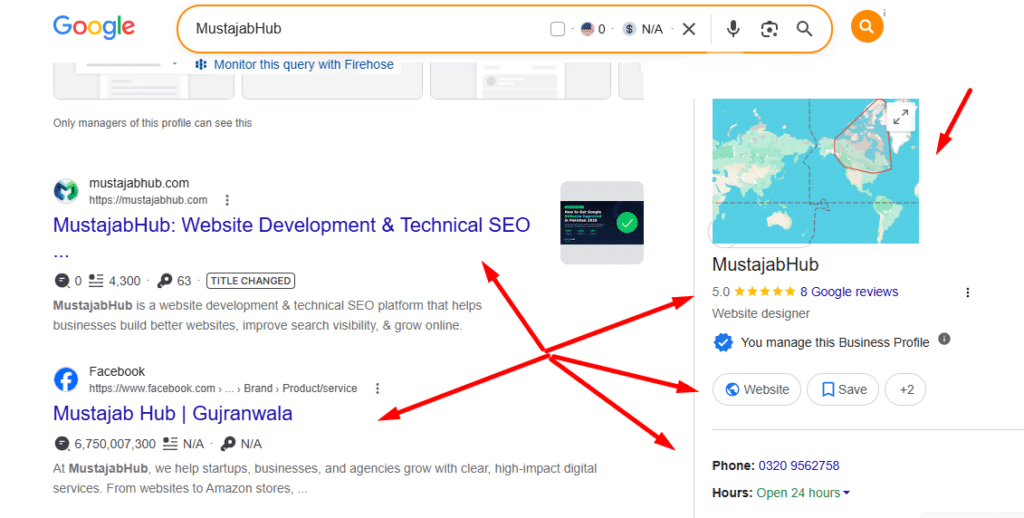
Verification is about establishing the legitimacy and management of the business. It is not a shortcut to ranking #1 in Google Maps.
Verification makes your profile eligible to operate within Google’s system. Local visibility is a separate issue.
Why is Google Business Profile verification difficult for home-based businesses in Pakistan?
This is where the situation becomes confusing for many Pakistani businesses.
A traditional shop is relatively easy to demonstrate:
street → building → signboard → shop → equipment → proof of management
A home-based service business may instead have:
street → house → home office → laptop → business documents
There may be no commercial signboard, showroom or customer entrance.
That doesn’t automatically make the business ineligible.
Google specifically states that a service-area business operating from home can use landmarks and signs in the immediate neighbourhood to help establish its location. It can also show its workspace, professional equipment, business cards, branded materials and business documents.
The key is to make the evidence understandable.
First: determine which type of business you actually have
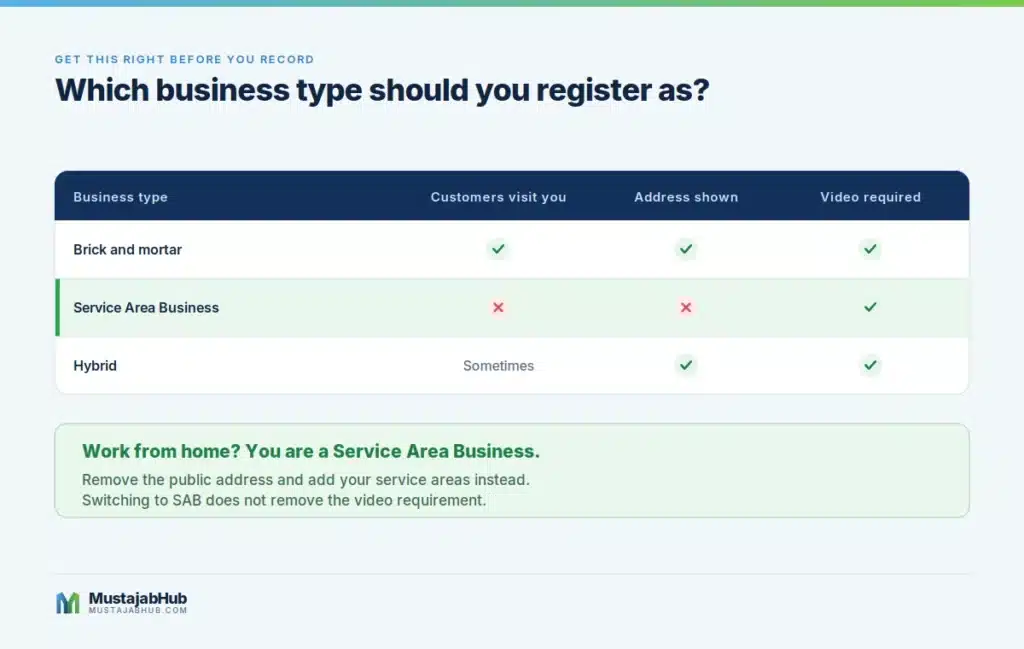
Before recording anything, determine whether your Google Business Profile represents a:
1. Storefront business
Customers visit your physical location during business hours.
Examples:
- restaurant
- salon
- retail shop
- clinic
- repair shop
- physical agency office
A shopfront business generally needs a real customer-facing location and permanent signage representing the business.
2. Service-area business
You travel to customers or deliver services to them, but customers don’t visit your business location.
Examples include:
- plumber
- electrician
- cleaning service
- mobile repair service
- photographer
- home service provider
If customers don’t visit your business address, Google says you should remove the public address and use service areas instead.
3. Hybrid business
You receive customers at your physical location and travel to customers.
For example, a business might have a staffed office where customers can visit and also provide services at customer locations.
Google allows eligible hybrid businesses to display their address and define a service area.
Important: Don’t choose “storefront” just because you want better visibility
This is one of the most important decisions in the entire process.
If your business is genuinely home-based and customers don’t visit your home, don’t create a fake shopfront setup simply because you think a visible address will help rankings.
Google’s guidelines require businesses to represent their real-world operation accurately.
Virtual offices and mailing addresses that don’t represent where the business actually operates aren’t acceptable. Google also restricts coworking locations unless the business maintains a genuine staffed presence and meets the other eligibility requirements.
A fake address may create a much bigger problem than an unsuccessful verification video.
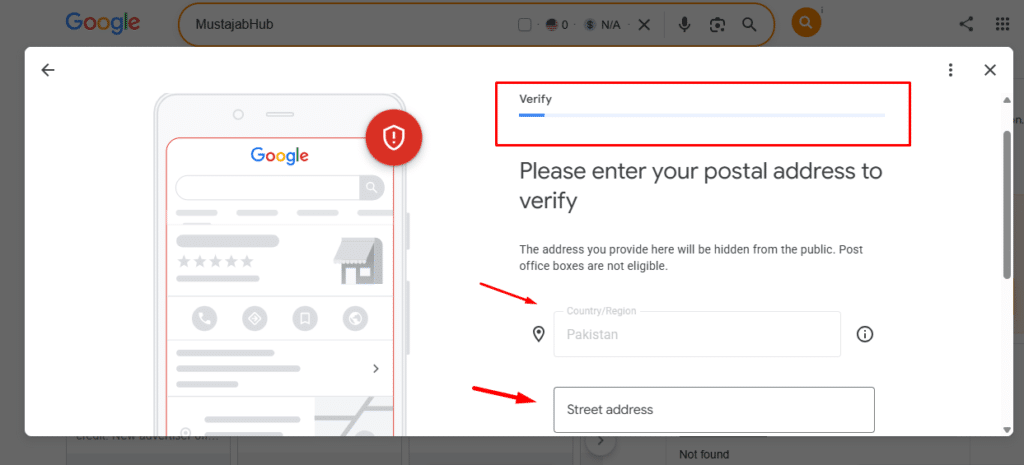
What does Google require in a verification video?
For a service-area business, Google’s current guidance focuses on three categories of evidence.
1. Show where the business operates
You need to establish the location associated with the business.
Possible evidence includes:
- street name
- building number
- nearby business
- recognizable landmark
- other location identifiers
Google specifically says a home-based service-area business can use landmarks and signs in its immediate neighbourhood.
Example
Suppose your real business operates from an office/home base in Gujranwala.
You could begin outside and show the following:
street/area → recognizable nearby location → building/home entrance
The purpose isn’t to make the video cinematic.
The purpose is to establish continuity between the location and the business.
2. Show evidence that the business actually exists
This is where many weak verification videos fall short.
Showing a laptop alone doesn’t necessarily communicate what business you operate.
Google gives examples such as:
- professional tools
- equipment
- products
- workspace
- business cards
- branded apparel
- branded equipment
- service vehicles
- marketing materials
For a digital agency or SEO business, your evidence might look very different from an electrician or restaurant.
Example: web development / SEO business
You might show:
- your actual workstation
- monitors
- computer used for client work
- printed business cards
- branded material
- website/business documentation
- client project workspace where appropriate
- other genuine business equipment
Don’t manufacture evidence simply for the video.
Use things that genuinely belong to the business.
3. Show that you manage or represent the business
Google also wants evidence that the person completing verification is authorised to represent the business.
Depending on the business, Google gives examples such as the following:
- unlocking a business location
- accessing employee-only areas
- opening business equipment
- showing a branded vehicle
- performing a service
- showing business documents
- showing an invoice
- showing a utility bill matching the Business Profile name
For a service business, the strongest evidence is usually something that connects you + the business + the operation.
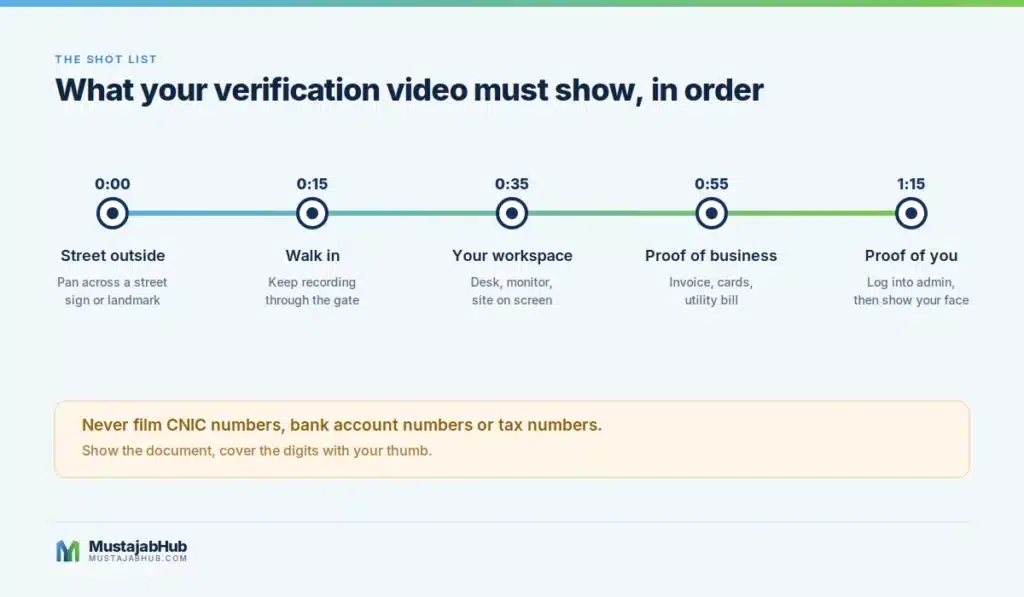
The correct video structure for a Pakistani home-based service business
Here is the practical sequence I recommend.
Shot 1 — Establish the surrounding location
Start outside.
Show:
- street sign
- building number if available
- recognizable nearby location
- surrounding area
Don’t spend the entire recording filming random streets.
You want the reviewer to understand:
“This is the location associated with this business.”
Shot 2 — Connect the outside location to the business premises
Continue recording and move toward the actual operating location.
If appropriate, show:
- entrance
- building
- gate
- office entrance
- workspace
The important thing is continuity.
Shot 3 — Show the actual business workspace
Show the environment where the work genuinely happens.
For a digital business, that could include:
- computer
- monitors
- printer
- networking equipment
- branded materials
- work documents
For another type of business, use the equipment relevant to that service.
Shot 4 — Show business evidence
Use legitimate documents or business materials.
Google specifically lists examples such as the following:
- business permit
- invoice
- utility bill
The document should help connect the business to the profile.
Do not expose sensitive information.
Google specifically warns against including sensitive information such as bank account, tax or identification numbers, as well as private information or other people’s faces.
Shot 5 — Demonstrate management
Show something that establishes your connection to the business.
For example:
- access to a business-only area
- unlocking business equipment
- accessing genuine business systems
- performing the service
- showing a business asset that only the operator can access
Don’t rely on a generic laptop screen as your only evidence.
How long should the verification video be?
Google’s current official requirement is that the recording be at least 30 seconds long.
Google also requires it to be:
- live
- unique
- complete
- unedited
- continuous
- recorded and uploaded through the Business Profile on a mobile device
Google does not currently publish a universal “60–90 second” requirement in its official instructions.
So don’t make video length your obsession.
Make the evidence complete.
Do not edit the video
Your verification video isn’t a promotional video.
Don’t add:
- music
- transitions
- logos
- cuts
- animated text
- filters
- voice-over added afterward
- previously recorded footage
Google says the verification recording must be an unedited, unique and complete recording with no breaks.
What documents can you show?
Google’s current examples for service-area verification include:
- business permit
- invoice
- utility bill
Depending on your circumstances, you may have other genuine business documentation.
For a Pakistani business, examples might include legitimate business records such as:
- invoice
- utility bill
- business registration documentation
- business permit where applicable
- genuine business stationery
But don’t assume that a specific Pakistani document automatically guarantees approval.
For example, having an NTN/FBR document does not mean Google must accept your verification.
The goal is to demonstrate the business, not to collect as many documents as possible.
What should you hide from the video?
This is extremely important.
Never deliberately expose:
- CNIC numbers
- bank account numbers
- card numbers
- tax identification numbers
- passwords
- private client information
- private customer information
- other people’s faces
Google specifically warns against sensitive financial, tax and identification information in verification videos.
If a document is useful but contains sensitive information, position the camera so that the relevant business information is visible without exposing confidential details.
A simple verification-video checklist
Before recording, check this:
Location
- Real business location
- Street/area identifier
- Building number if available
- Nearby landmark/business if useful
- Location matches your actual business setup
Business
- Actual workspace
- Genuine business equipment
- Business materials
- Products/tools if applicable
- Signage if applicable
Management
- Genuine business documents
- Business asset you control
- Business-only access where appropriate
- Evidence connecting you to the business
Video
- Recorded live
- Mobile device
- At least 30 seconds
- One continuous recording
- No editing
- No cuts
- No sensitive information
- No unnecessary people in the footage
What if you have no signboard?
This is a common concern for Pakistani home-based businesses.
If you are genuinely a Service Area Business, lack of a storefront signboard does not mean you should create a fake sign.
Google specifically distinguishes service-area businesses from storefront businesses and allows home-based SABs to use neighbourhood landmarks and signs to establish location.
So don’t manufacture a commercial storefront simply to make the video look more convincing.
Instead, demonstrate:
real location + real business operation + real management
What if your house has no visible street number?
Use the location evidence that actually exists.
For example:
- street sign
- nearby landmark
- recognizable neighbouring business
- building identifier
- other location marker
Google specifically mentions nearby landmarks and signs for home-based service-area businesses.
If the address is difficult to identify on Google Maps, make sure the Business Profile location itself is accurate before recording.
What if your business name isn’t on the building?
That depends on your business type.
A storefront business has stronger signage requirements because customers are expected to visit that location. Google says shopfront businesses should have permanent on-site signage.
A genuine service-area business is different.
Don’t put an artificial business sign on a residential property simply to imitate a shopfront.
What if Google rejected my video?
Don’t immediately assume that the entire Business Profile is invalid.
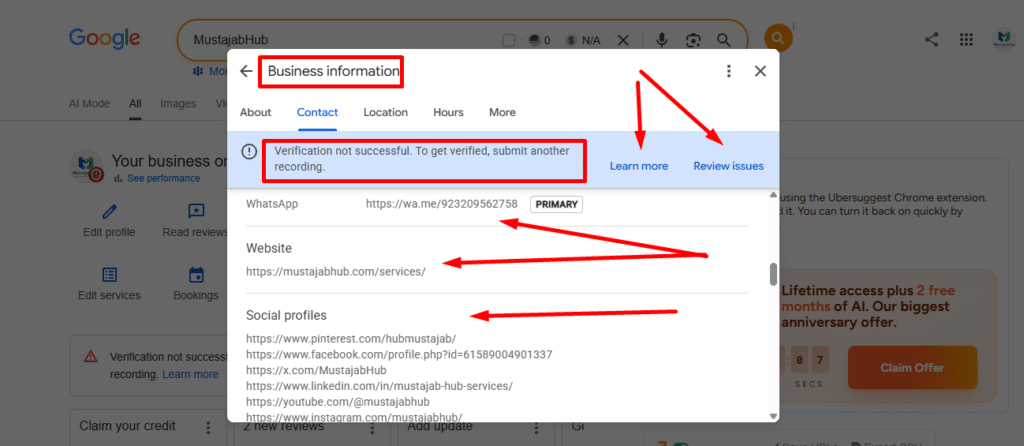
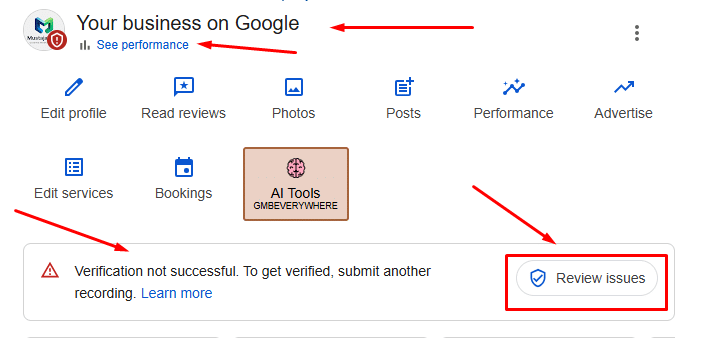
Google says that after an unsuccessful verification, you can select Review issues to see what was missing and then record another video containing both the information from the first attempt and the missing evidence.
Use this process:
Step 1
Open the Business Profile.
Step 2
Look for the verification status.
Step 3
Open Review issues if Google provides it.
Step 4
Write down exactly what Google says is missing.
Step 5
Compare the rejection with the three evidence categories:
Location
Business existence
Management
Step 6
Record a new continuous video that fixes the missing evidence.
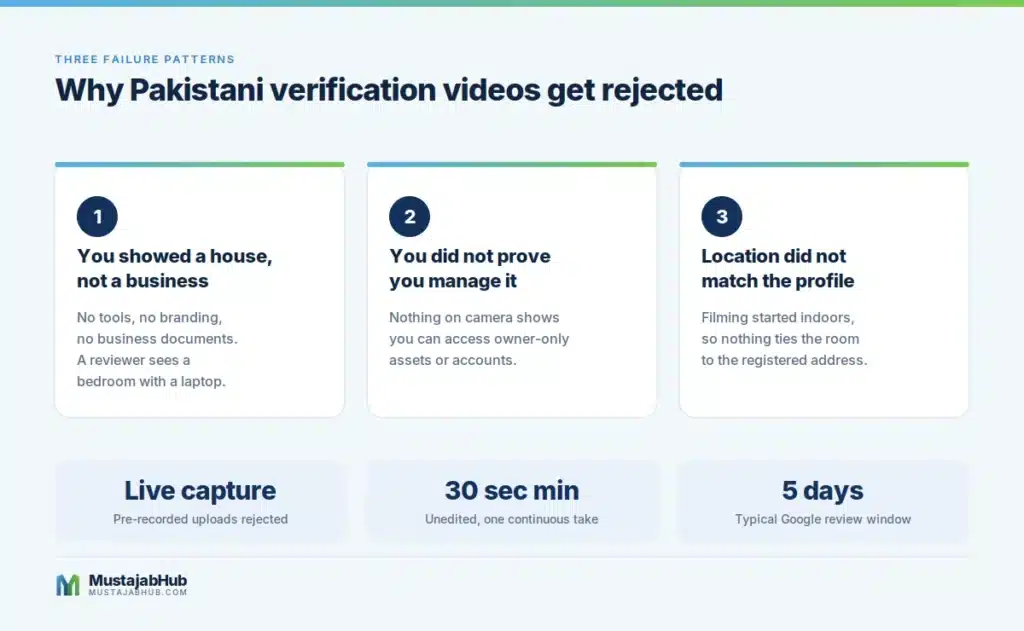
Verification rejected because “no nearby area was shown”
This usually means your video did not provide enough visual evidence connecting the business to its location.
For a service-area business, start outside and capture useful location identifiers.
Don’t simply film:
- sky
- road
- empty wall
- random houses
- generic traffic
The footage should help identify the actual area.
Google specifically recommends street signs, nearby landmarks and other identifiers.
Verification rejected because “business name not visible”
This rejection is particularly important for storefront businesses.
If your profile represents a storefront, Google expects permanent business signage that matches the Business Profile name.
For a service-area business, don’t automatically assume you need a storefront sign.
First confirm that you’ve selected the correct business type.
Verification rejected because proof of management is missing
This means the recording may have demonstrated a location and perhaps a business, but not enough evidence that you actually manage or represent it.
Strengthen the management portion using genuine evidence such as:
- business documents
- keys/access
- business-only areas
- branded business assets
- actual service activity
These are aligned with Google’s published examples.
What if Google keeps rejecting every video?
At that point, stop blindly repeating the same recording.
Check the profile itself.
Review these areas:
Business name
Does the name represent the business’s real-world name?
Google says the Business Profile name should match how the business is represented in the real world, including signage, stationery and branding.
Business type
Are you actually a:
- storefront
- service-area business
- hybrid business?
Address
If customers don’t visit your address, Google says to remove the public address and use service areas.
Service area
Your service area should represent where you genuinely provide services.
Google currently allows up to 20 service areas, and says the overall area generally shouldn’t extend more than about two hours’ driving time from the business base.
Category
Use the category that best describes the core business.
Don’t stuff keywords into the business name or category fields.
Google’s guidelines specifically warn against unnecessary information in the business name.
Don’t create multiple Google Business Profiles
If your business serves Lahore, Islamabad, Karachi and other cities, don’t automatically create a separate profile for every city.
Google says service-area businesses should generally have one profile for the whole area they serve.
This is especially important for Pakistani service businesses trying to create pages such as:
- SEO Agency Lahore
- SEO Agency Islamabad
- SEO Agency Karachi
- SEO Agency Faisalabad
A website can have legitimate location/service content where appropriate, but that doesn’t mean you should manufacture multiple Google Business Profiles.
Don’t use a virtual office as a shortcut
A virtual office or mailing address isn’t automatically an eligible Google Business Profile location.
Google says a virtual office isn’t eligible simply because the business can receive mail there. Coworking locations also have specific requirements.
This matters because buying an address merely to obtain a Google Maps listing can create a much larger compliance problem.
What about an online-only business?
This distinction is important.
If your company operates completely online and doesn’t provide in-person services, it may not be eligible for a Google Business Profile.
Google explicitly says online-only businesses without in-person services aren’t eligible for a Business Profile.
So a website alone does not automatically qualify a company for Google Maps.
Does verification make your business rank higher?
No. Verification itself does not guarantee higher rankings.
Google says local results are primarily based on:
Relevance
How well the Business Profile matches the search.
Distance
How close the business is to the person searching.
Prominence
How well-known the business is.
Google also says prominence can be influenced by information such as links from other websites and reviews.
This distinction is important:
Verification = eligibility/trust in the profile system
Ranking = relevance + distance + prominence and other signals
So if your profile becomes verified but still doesn’t appear for competitive searches, that doesn’t necessarily mean verification failed.
What should you optimize after verification?
Once the profile is legitimately verified, complete the profile accurately.
Focus on:
- correct business name
- correct primary category
- appropriate additional categories
- accurate service area
- business hours
- website
- phone
- services
- business description
- genuine photos
- genuine business updates
- customer reviews
- responses to reviews
Google recommends keeping business information complete and current and says reviews, photos and other business information can contribute to local visibility.
Your website also matters
Google Business Profile and your website should not exist as disconnected identities.
Your website should clearly establish the following:
Who you are → what you do → where you operate → how customers contact you
For a Pakistani service business, this can include:
- About page
- Contact page
- Services
- Service-area information
- genuine business details
- author information
- company information
- privacy policy
- terms
- relevant case studies
- original photographs
- useful guides
You can also use appropriate LocalBusiness structured data on eligible pages. Google says LocalBusiness structured data can help Google understand business information such as hours and other business details.
Structured data does not guarantee rankings or a rich result.
A better way to think about Google Business Profile verification
Instead of asking:
“What can I show Google to get approved?”
Ask:
“If someone who has never heard of my business watched this video, could they independently understand where my business operates, what it actually does, and why I am authorized to manage it?”
That is a much better test.
Your video should tell one coherent story:
Location → business → management
not:
random street footage → laptop → documents → selfie
A practical example for a home-based Pakistani digital agency
Imagine a legitimate digital marketing agency operating from a home office in Gujranwala.
A sensible verification recording could establish:
Outside
Street/location identifier.
↓
Entrance
The actual property where the business operates.
↓
Workspace
The agency’s genuine working environment.
↓
Business evidence
Legitimate business materials or documents.
↓
Management
Evidence that the person recording is authorized to operate the business.
The exact evidence will depend on the business and what Google requests.
The objective is not to create the most impressive video.
It is to create the clearest evidence.
What I would NOT do
Don’t:
- create a fake office
- rent a virtual address solely for GBP eligibility
- use a friend’s address
- create duplicate profiles
- keyword-stuff your business name
- display confidential documents
- upload an edited promotional video
- use someone else’s business footage
- invent business evidence
- claim that an NTN guarantees verification
- claim that a certain video length guarantees approval
- claim that Pakistan has a special Google rejection algorithm
- promise clients guaranteed verification
Google’s Business Profile guidelines specifically require accurate real-world representation and prohibit misleading location practices.
Verification troubleshooting decision tree
Is your business eligible?
No → Don’t create a business profile.
Yes → Continue.
Do customers visit your location?
Yes → Consider shopfront/hybrid classification.
No → Consider Service Area Business.
Is your address real?
No → Fix it before verification.
Yes → Continue.
Does your video establish the location?
No → Add genuine location evidence.
Yes → Continue.
Does it show the business actually operates?
No → Show genuine tools, workspace, products or business materials.
Yes → Continue.
Does it establish your management/authorisation?
No → Add legitimate management evidence.
Yes → Continue.
Did Google reject it?
Open Review issues and address the specific missing evidence before submitting another recording.
GBP Video Verification Evidence Map
GOOGLE BUSINESS PROFILE
                   │
      ┌────────────┼────────────┐
      ↓            ↓            ↓
  LOCATION      BUSINESS     MANAGEMENT
      │            │            │
 Street sign    Workspace     Invoice
 Landmark       Equipment     Utility bill
 Building       Tools         Business asset
      │            │            │
      └────────────┼────────────┘
                   ↓
           COMPLETE EVIDENCE
                   ↓
          GOOGLE REVIEW
Frequently Asked Questions
Can a home-based business in Pakistan get a Google Business Profile?
Yes, an eligible service-area business can operate from a home base. If customers don’t visit the address, Google says the address should not be publicly displayed & the business should use a service area.
Do I need a shop to verify Google Business Profile?
No. A genuine service-area business doesn’t necessarily need a storefront. Google provides separate video-verification requirements for service-area businesses.
Do I need a signboard?
A storefront business has signage requirements. A service-area business is different and can use other evidence such as location identifiers, professional equipment, workspace, business cards and business documents.
Can I use my home address?
If your business genuinely operates from there, the setup depends on whether customers visit the location. If customers don’t visit, Google says to hide the address and use a service area.
Can I use a virtual office?
Not simply because you receive mail there. Google says a virtual office that doesn’t represent where the business actually operates isn’t eligible.
Can I show an invoice?
Yes. Google lists invoices among examples of business documents that can help demonstrate management for service-area businesses.
Can I show an NTN or FBR document?
You can use genuine business documentation where appropriate, but don’t assume that an NTN/FBR document guarantees approval. Google evaluates the evidence as a whole.
Can I record the video beforehand?
No. Google says the verification recording must be captured live and cannot be recorded offline and uploaded later.
How long does Google take to review the video?
Google currently says video review can take up to five business days.
What if Google rejects my video?
Use Review issues and address the missing evidence. Google specifically says the new video should contain the information from the first attempt plus the missing information.
Does Google Business Profile verification guarantee Google Maps ranking?
No. Local ranking is primarily influenced by relevance, distance and prominence.
Does adding lots of cities to my service area improve rankings?
Not necessarily. Your service areas should represent where you genuinely provide services. Google currently recommends accurate, specific service areas and allows up to 20.
Is Google Business Profile the same as Google My Business?
Google Business Profile is the current name for Google’s business listing product that was formerly commonly called Google My Business.
Final checklist before you submit your video
Business setup
☐ Correct business type
☐ Real operating location
☐ Accurate business name
☐ Correct service area
☐ Appropriate category
Video
☐ Live recording
☐ Mobile device
☐ At least 30 seconds
☐ Continuous recording
☐ No editing
☐ Location shown
☐ Business operation shown
☐ Management shown
Privacy
☐ No CNIC number
☐ No bank information
☐ No tax numbers
☐ No passwords
☐ No private customer information
☐ No unnecessary faces
After rejection
☐ Read Review issues
☐ Identify missing evidence
☐ Fix the specific weakness
☐ Record a new complete video
☐ Don’t fabricate evidence
The bigger local SEO lesson
Getting your Google Business Profile verified is only the beginning.
Google says local search depends primarily on relevance, distance and prominence. That means a verified profile still needs a genuine business identity, accurate information, useful services, reviews, website signals and broader prominence to compete effectively.
For Pakistani businesses, the goal shouldn’t be to create a profile that merely passes verification.
The goal should be to create a business presence that is consistent across:
Google Business Profile → Google Maps → website → real-world business → customer experience → reviews → relevant third-party mentions
That is a much stronger foundation for long-term local search visibility.
What to do if you’re still stuck
If your verification keeps failing, don’t start by recording a fifth version of the same video.
Start by answering three questions:
1. Can Google clearly identify where this business operates?
2. Can Google clearly see evidence that the business actually exists?
3. Can Google clearly establish that the person managing the profile is authorized to represent it?
If one answer is “no”, that’s where your next verification attempt should concentrate.
For official instructions, use Google’s current Business Profile video verification guide and Business Profile guidelines rather than relying on an old third-party checklist.
About the Author
Written by Rana Umar — Content Writer and SEO Specialist at MustajabHub.
Rana Umar works on SEO, websites, technical search optimization and digital growth for businesses.
Experience: 5+ years of experience now
Based in: Pakistan.
Areas of expertise: Technical SEO, Google Search Console, WordPress, local SEO and website performance.
Read More Related Topics Here:
Elementor vs Gutenberg Pakistan | WordPress Website Development Cost in Gujranwala | WordPress vs Custom Website Pakistan | Technical-seo-audit-checklist | Why-is-my-wordpress-website-slow | how to get Google AdSense approved in Pakistan | ssl-certificate-pakistan-website | fix-lcp-wordpress-pakistan | cloudflare-setup-wordpress-pakistan | google-pagespeed-score-wordpress-pakistan | Best Free WordPress Theme for Local Agency | crawled-currently-not-indexed-fix-pakistan


This answered my questions. Also recommend WanVideoGen: for 480P–1080P Wan 3.0 generation.. WanVideoGen
Bonne lecture. MiniMax H3 Video Generator (/) pour clips 4–15s. MiniMax H3 Video Generator