
You spent three to six months writing blog posts & optimizing your website with seo factors. Now one simple question keeps you up at night: Am I actually ranking on Google for anything? or you might think for how to check google rankings free 2026/2027 ?
Most Pakistani / Asian bloggers and website owners have no idea about where their pages appear in Google search results. They only either guess (dangerous), pay for expensive SEO tools (unnecessary at the start), or simply do not check at all (the worst option). but the real question people usually ask that: How do I check my Google ranking for free? and they also searches regularly like How to rank higher on Google for free?
The truth is you can check your Google rankings completely free now in this guide, in your real time, with tools that are more powerful than most paid softwares — if you know where to look & how to read the data you can update your website from day 1.
This guide covers every free method to check your Google ranking in 2026 and 2027, from Google’s own tools to the best free third-party rank checkers, with step-by-step instructions for each.
Table of Contents
Why Checking Your Google Ranking Matters So Much
How to rank #1 on Google in 2026?: There is a simple rule in business you cannot improve what you do not measure.
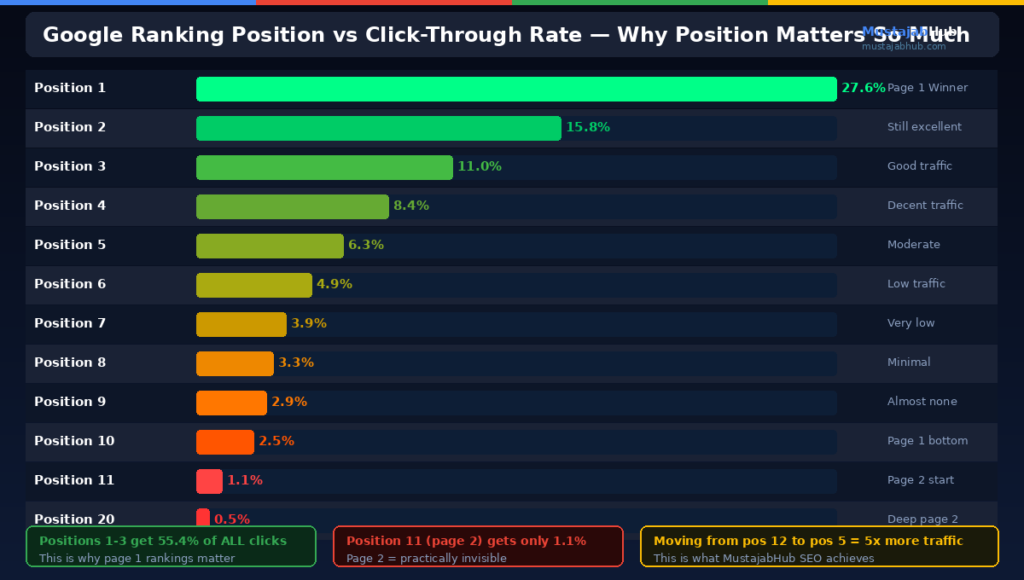
Your Google ranking is your website’s visibility score. A page ranking on position 1 gets approximately 27.6% of all clicks for that search term. Position 3 gets around 11%. Position 10 gets about 2.5%. By page 2 — position 11 — you are getting under 1% of the clicks.
Over 90% of searchers only click on results from the first page of Google. This highlights the critical importance of ranking high — a website on page 2 is practically invisible regardless of how good the content is.
Checking your rankings regularly tells you which blog posts are working, which ones need improvement, and whether your SEO efforts are producing results or not. Without this data, you are investing time and money based on gut feeling rather than real signals.
How often should you check? Monthly is sufficient for most small Pakistani websites. Checking daily causes unnecessary anxiety — rankings fluctuate naturally by 1 to 3 positions every day without it meaning anything significant. Is there a free website ranking checker? Yes ! There is 4 steps below for free to check your ranking on google and this method even works in Bing also.
Method 1: Google Search Console — The Most Accurate Free Ranking Tool
Google Search Console is the Best Website ranking Checker free tool for checking your Google rankings (A-Z). Unlike all other tools, it shows you data directly from Google’s servers — not estimates or approximations. It is the source of truth.
What it shows you: Every keyword your website gets impressions and clicks for. Your average SERP position for each keyword. Which specific pages rank for which keywords. Your Core Web Vitals on real visitor data. Indexing status of every page. Mobile usability errors.
Do Google ranking check free in Search Console:
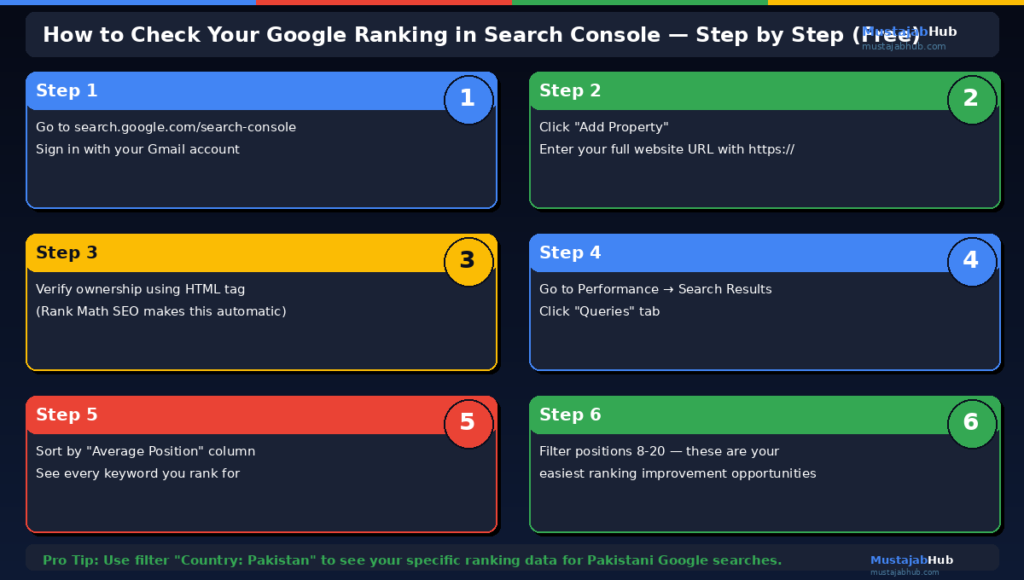
Step 1: Go to search.google.com/search-console and sign in with your Gmail.
Step 2: Select your website property from the dropdown at the top.
Step 3: Click Performance on the left sidebar. This opens the Performance Report.
Step 4: You will see four metrics at the top: Total Clicks, Total Impressions, Average CTR, and Average Position. Average Position is your average Google ranking across all keywords.
Step 5: Below the graph, click the Queries tab. This shows every keyword your site ranks for, sorted by total clicks by default.
Step 6: Change the date range to Last 3 Months for more useful data. Click the Average Position column header to sort by ranking position.
Step 7: Look for keywords where your Average Position is 8 to 20 (positions 8–20 mean page 1–2). These are your easiest ranking wins — improving those specific pages can push them to the top 5 positions where most of the clicks happen.
Google rank checker for a specific page:
Click the Pages tab instead of Queries. Click on your specific page URL. Then switch back to the Queries tab — now you see only the keywords that specific page ranks for, plus its average position for each.
Pro tip for Pakistani websites: Filter by country to see your Pakistan-specific rankings. Click Add Filter → Country → Pakistan. This shows your ranking performance specifically for Pakistani searchers, which matters if your target audience is primarily local.
Method 2: Google SEO Ranking Checker — Quick and Free Manual Google Search
Sometimes you just want to know: “Does my page appear when I search this exact phrase on Google?”
Manual searching is the quickest way to check a specific keyword ranking. But it has one major problem: Google personalizes search results based on your location, search history, and device. Searching from your own laptop shows you different results than what a stranger in Karachi would see.
How to do a neutral Google ranking & Keyword Rank checker free:
Step 1: Open Google Chrome in an Incognito window (Ctrl+Shift+N). Incognito removes your personal search history from the results.
Step 2: Go to google.com and search your target keyword exactly as you want to check it.
Step 3: Look through the results for your website URL. Note which position it appears in.
Limitation: Even incognito searches are location-based. Your Rawalpindi results differ from Karachi results and US results. Manual checking is useful for quick one-off checks, not for systematic tracking.
For checking rankings in a different country: Add &gl=us (for US), &gl=pk (for Pakistan), or &gl=gb (for UK) at the end of the Google search URL to see country-specific results.
Method 3: Google Analytics 4 — Traffic Source Data
Google Analytics 4 does not directly show your keyword rankings anymore (Google stopped passing keyword data to GA4 in 2013). However, it shows something equally valuable: which pages are getting organic search traffic and how much.
How to use GA4 for ranking insights:
Step 1: Go to analytics.google.com and open your website property.
Step 2: Go to Reports → Acquisition → Traffic Acquisition.
Step 3: Set the primary dimension to Session Default Channel Group. Look at the Organic Search row — this shows all traffic from Google.
Step 4: Click on the Organic Search row to drill down. Then go to Reports → Engagement → Pages and Screens and filter by Organic Search to see which specific pages receive the most Google traffic.
Pages getting high organic traffic are ranking well. Pages with zero organic traffic despite being published for 3+ months need SEO improvement.
Connect GA4 with Search Console: In Google Analytics, go to Admin → Product Links → Search Console Links. Connecting the two gives you a combined report showing both the keywords (from Search Console) and the user behavior after clicking (from GA4) — the most powerful free SEO analysis available without any paid tools.
Method 4: Free Third-Party Rank Tracker Tools
Several free tools provide keyword ranking checks without needing Search Console access. These are useful for:
- Checking your ranking on a specific keyword without setting up Search Console
- Checking competitor rankings
- Checking rankings from a different location
Best SEO ranking Checker free tools in 2026:
Google’s own PageSpeed Insights (pagespeed.web.dev): Not a rank checker but shows performance scores that affect ranking — useful context alongside ranking data.
Semrush Free Account: Semrush’s free plan allows up to 10 keyword searches per day. Shows your ranking position, traffic estimate, and competitor rankings. The most accurate third-party tool available.
Ahrefs Webmaster Tools (free): Connect your website and Ahrefs shows all keywords you rank for, backlinks, and technical SEO issues — completely free for your own website.
Google Keyword Planner (free): Shows keyword search volume and competition data. Not a rank checker but essential for finding which keywords are worth ranking for before investing content effort.
Search Engine Reports Rank Checker (free): No account needed. Enter your URL and keyword and it shows your position in Google. Limited to 1 check per keyword per day on the free tier.
SERPWatcher by Mangools (free trial): 10-day free trial with full rank tracking features. Use the trial period strategically for a comprehensive ranking audit.
Free Google Ranking Checker Tools Comparison Table
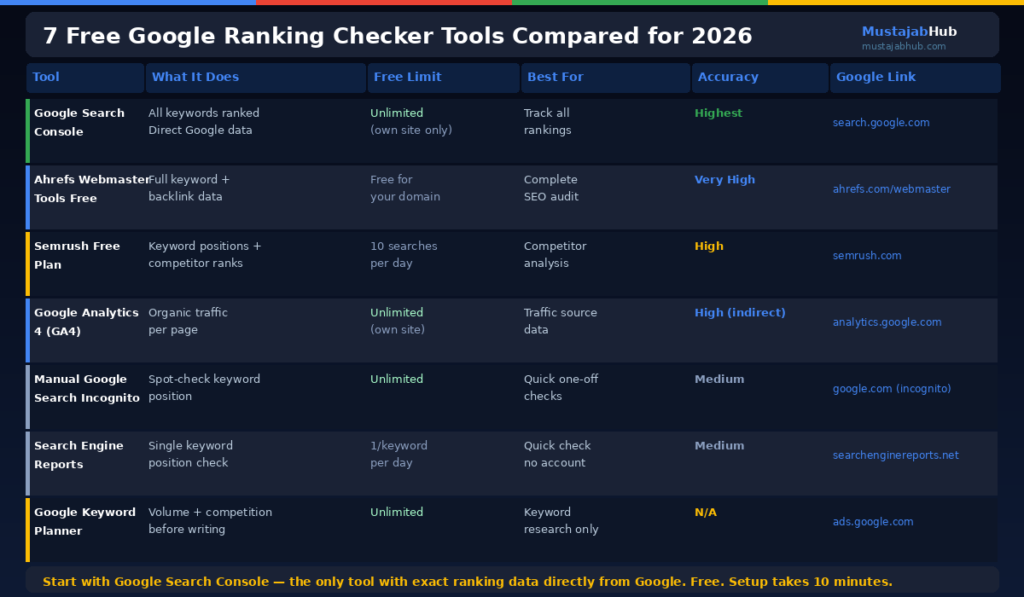
| Tool | What It Does | Free Limit | Best For | Accuracy |
|---|---|---|---|---|
| Google Search Console | Shows ALL keywords you rank for with exact data | Unlimited (your site only) | Tracking all rankings over time | Highest (direct from Google) |
| Ahrefs Webmaster Tools | Full keyword + backlink data | Free for your own site | Comprehensive site audit | Very High |
| Semrush Free | Keyword positions + competitor data | 10 searches/day | Quick competitor checks | High |
| Google Analytics 4 | Organic traffic per page | Unlimited | Understanding traffic from rankings | High (indirect) |
| Google Manual Search | Spot-check specific keyword | Unlimited | Quick one-off checks | Medium (personalized) |
| Search Engine Reports | Single keyword position check | 1/keyword/day | Quick no-account checks | Medium |
| Google Keyword Planner | Search volume + competition | Unlimited | Keyword research before writing | N/A (not rank tracking) |
How to Track Google Rankings Over Time
Check website ranking Google once tells you where you stand today. Tracking over time tells you whether your SEO is working.
Here is the simplest free ranking tracking system using only Google Search Console:
Set up your tracking spreadsheet:
Create a Google Sheet with these columns: Date, Keyword, Page URL, Average Position, Total Clicks, Total Impressions, CTR.
Monthly tracking routine:
On the first day of each month, open Search Console Performance Report. Set the date range to the previous month. Sort by Average Position. Export the data (there is a download button at the top of the query table). Paste into your spreadsheet.
After 3 months, you will have a clear trend line showing whether your rankings are improving, declining, or staying flat for each keyword. This data tells you exactly where to focus your next month’s SEO efforts.
What good ranking progress looks like:
Month 1: Average position 45–60 for target keywords (deep in results, barely visible)
Month 3: Average position 20–35 (page 2 to 3, building authority)
Month 6: Average position 8–15 (page 1–2, getting meaningful clicks)
Month 9–12: Average position 1–7 (top of page 1, high click-through rate)
Most new Pakistani websites that publish consistently and fix technical SEO follow this progression. Slower progress usually means there are still unfixed technical issues, the keywords are too competitive, or content quality needs improvement.
What Your Google Ranking Data Actually Tells You
Raw ranking data by itself is just numbers. Here is how to interpret what Search Console data actually means for your website so here you can check website ranking and traffic:
High impressions, low clicks (high position but low CTR): Your page is appearing in results but people are not clicking. The problem is your title tag or meta description — they are not compelling enough compared to competitors on the same page. Fix: rewrite your title and meta description to be more specific and benefit-focused.
Low impressions despite published content: Google is not indexing your page or your content is not relevant enough to the search terms you want to rank for. Fix: check indexing status in URL Inspection, strengthen on-page SEO, and add more relevant content.
Ranking position 8–15 (bottom of page 1 or page 2): These are your best opportunities. You are close. Add more depth to the content, strengthen internal links pointing to these pages, and build 2 to 3 new backlinks specifically to these URLs.
Ranking declining over 3 months: A competitor improved their content, Google had an algorithm update, or your content has become outdated. Fix: update the post with fresh statistics, expand the content, and check if competitors added features (videos, comparison tables, new data) that you lack.
Why Your Rankings Fluctuate and What to Do
You check your ranking on Monday and you are at position 5. You check on Thursday and you are at position 9. Did something break?
Probably not. Ranking fluctuations are normal — Google continuously tests different page orderings and updates its index. Day-to-day movement of 1 to 5 positions is standard. Larger drops of 10+ positions over a week are worth investigating.
Normal fluctuations (do nothing): 1–5 position changes day to day. Temporary drops before recovering within 1–2 weeks. Slight movement after a competitor updates their page.
Fluctuations worth investigating: Consistent decline over 30 days. Sudden drop of 10+ positions that does not recover. Multiple pages dropping simultaneously (this suggests a technical issue or algorithm penalty).
Use Search Console’s Performance Report with a 90-day date range and a smoothed trend line view for the most useful picture of your true ranking trajectory.
How to Use Ranking Data to Improve Your SEO
Ranking data is only useful if you act on it. Here is the action protocol:
For keywords ranking position 8–20: These are your priority pages. Increase content depth, add relevant statistics and comparisons, strengthen H2 structure, add internal links from higher-authority pages on your site, and build 1 to 2 backlinks specifically to this page.
For keywords ranking position 1–7: Protect these by updating content regularly. Add new FAQ questions. Improve page speed. Check that no competitors have recently added substantially better content.
For keywords with no ranking yet: Verify the page is indexed. Check search intent alignment. Assess if your domain has enough authority to compete for this term yet — if competitors are all high-authority sites, this keyword needs more time.
Monthly SEO review routine:
- Export Search Console data for the previous month
- Identify your top 5 keywords by impressions that rank position 8–20
- Improve those 5 pages
- Identify your top 5 pages by clicks and update them with fresh information
- Check Google Search Console Coverage for new indexing errors
- Verify Core Web Vitals pass in Search Console
This 2-hour monthly process compounds over time. Six months of consistent implementation produces ranking improvements that take competitors years to replicate.
Need help analyzing your Google ranking data and building a custom SEO improvement plan for your Pakistani website? MustajabHub offers a complete technical SEO service including ranking analysis, on-page optimization, and monthly reporting. Contact us here for a free initial consultation.
Frequently Asked Questions
Q: How do I check my Google ranking for free?
The best free method is Google Search Console — go to search.google.com/search-console, connect your website, and open the Performance Report. You will see every keyword you rank for, your position for each, and your clicks and impressions data directly from Google. For your own website, Search Console is more accurate and comprehensive than any paid tool.
Q: Why does my Google ranking look different when I search myself vs what Search Console shows?
When you search on Google while logged into your Google account, the results are personalized based on your location, search history, and preferences. Search Console shows your average position across all searchers globally or by country — not your personal results. Always use Search Console data rather than your own manual searches for accurate ranking information.
Q: How do I check my website’s keyword ranking in Google Analytics?
Google Analytics 4 does not directly show keyword rankings. However, by linking your GA4 account with Google Search Console (Admin → Product Links → Search Console Links), you get a combined report that shows both the keywords driving traffic and user behavior after clicking. This is more valuable than keyword position alone because it connects your rankings to actual business outcomes.
Q: What is a good Google ranking position?
Position 1 receives approximately 27.6% of clicks for a keyword. Positions 1–3 together capture over 60% of all clicks. Position 1–10 (first page) gets 91% of all clicks. Position 11 and below (page 2 and beyond) receives less than 9% of total clicks combined. For practical purposes, position 1–5 generates significant traffic, 6–10 generates moderate traffic, and 11+ generates almost none.
Q: How often does Google update keyword rankings?
Google continuously updates rankings in near-real-time as it recrawls pages and recalculates signals. Major algorithm updates that shift rankings broadly happen several times per year. Your ranking for any given keyword can change daily by 1 to 5 positions as a normal part of Google’s continuous re-evaluation process.
Q: Can I check my competitor’s Google ranking for free?
Yes. Semrush’s free plan (limited to 10 searches per day) shows competitor keyword rankings when you enter their domain. Ahrefs free plan shows competitor data at a basic level. Google’s manual search also works for spot-checking where competitors rank on specific keywords. For systematic competitor ranking tracking, the Semrush free account is the most capable free option.
Q: How do I track my Google ranking over time for free?
Use Google Search Console with a date comparison feature. Set your Performance Report date range to the last 3 months and compare to the previous 3 months. The query table shows your average position for each keyword in both periods — you can see exactly which keywords improved and which declined. Export this data monthly to a Google Sheet to build your own free ranking tracking history.
For detailed instructions on using Google Search Console to track rankings, visit Google Search Central’s Search Console guide.
About the author
Rana Umar is a technical SEO and WordPress specialist at MustajabHub, a Pakistan-based website development and technical SEO platform serving businesses in Pakistan and international clients.
His work focuses on WordPress development, technical SEO, crawlability, indexing, Core Web Vitals, structured data, website performance and practical search visibility.
Read more about: Web Development Agency in Gujranwala | robots.txt for WordPress | THE 8 REAL REASONS YOUR SITE HAS NO TRAFFIC AFTER 1 YEAR