
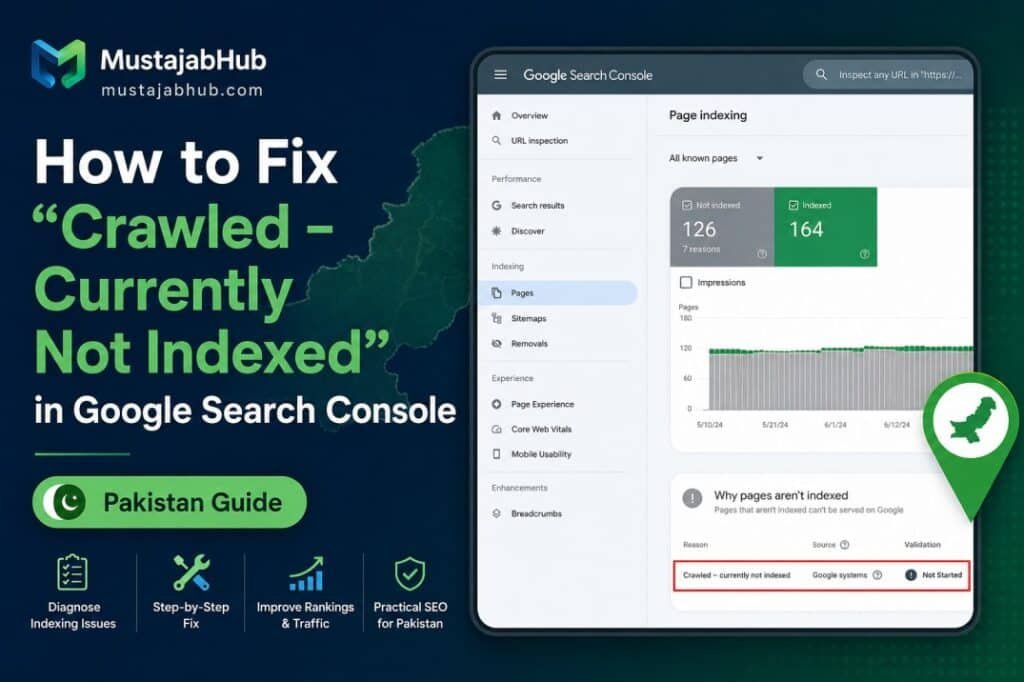

“Crawled – currently not indexed” means Google successfully crawled a URL but has not currently added that URL to its search index. It is not, by itself, a Google penalty or proof that your website has a technical error. Google says the URL may be indexed later and that there is no need to repeatedly resubmit it for crawling. The correct response is to diagnose the specific URL: confirm its index status, check noindex and robots.txt rules, review canonicalization, test Google’s rendered version, look for duplicate or thinly differentiated content, strengthen relevant internal links, and then request indexing after making meaningful improvements.
If you are seeing dozens or hundreds of URLs under Crawled – currently not indexed, don’t automatically try to make the number reach zero.
Some URLs are not supposed to have their own search result at all.
The better question is the following:
Which URLs are important to my website, deserve to appear in Google Search, and are currently being left out?
That change in approach can save a lot of unnecessary SEO work.
If your Search Console report contains dozens or hundreds of URLs under this status, don’t automatically try to fix every URL. Some URLs should never be indexed separately, such as certain duplicate, parameter, feed, archive or utility URLs. The goal isn’t to make the number in the report reach zero; the goal is to make sure the important URLs on your website are technically accessible, genuinely useful and deserving of their own search result.
Table of Contents
What Does “Crawled – Currently Not Indexed” Mean?
Crawled – currently not indexed is a status shown in the Page indexing report inside Google Search Console.
In simple terms:
- Google discovered the URL.
- Googlebot crawled the URL.
- Google did not currently add that URL to its search index.
Google’s documentation says the page may or may not be indexed in the future, and there is no need to repeatedly resubmit the URL just to get it crawled again.
This distinction is important because the status does not tell you:
“Your content has exactly this one problem.”
It tells you the outcome.
You still need to diagnose the URL.
Crawling, Rendering, Indexing and Ranking Are Different
One of the most common SEO mistakes is treating these four processes as if they are the same thing.
They aren’t.
Crawling
Googlebot requests and fetches a URL.
Rendering
Google processes the page and, where necessary, renders JavaScript to understand what users can see.
Indexing
Google decides whether the page should be included in its search index and how it should be represented.
Ranking
If the page is eligible to appear, Google’s systems determine when and where it may appear for particular searches.
So:
Crawled does not mean indexed.
And:
Indexed does not mean ranking well.
A page can be indexed and still receive very few impressions because it doesn’t rank prominently for relevant searches.
Google’s URL Inspection documentation also makes clear that a URL being available on Google does not guarantee that it will appear in search results.
Is “Crawled – Currently Not Indexed” a Google Penalty?
No.
The status itself is an indexing status, not a manual-action notification.
Don’t panic when you see it.
Instead, determine which type of URL you’re dealing with.
For example:
- an important service page
- a product page
- an original article
- a location page
- a tag archive
- a feed
- a duplicate URL
- a parameter URL
- an old page
- a thin page
- a page competing with another URL on your website.
The correct action can be completely different for each one.
The First Question: Should This URL Be Indexed?
This is the step many SEO guides skip.
Before trying to “fix” an unindexed URL, ask:
Does this URL deserve its own place in Google Search?
For example, you may have URLs that are useful to your website but don’t need to rank independently.
| URL type | Should it usually have its own search result? |
|---|---|
| Main service page | Usually yes |
| Original, useful blog post | Usually yes |
| Product page | Usually yes |
| Important category page | Depends |
| Tag archive | Depends |
| Internal search results | Usually no |
| RSS/feed URL | Usually no |
| Tracking-parameter URL | Usually no |
| Duplicate URL | Usually no |
| Very similar location page | Depends |
| Thin utility page | Usually no |
Google’s indexing documentation emphasizes that not every URL discovered or crawled by Google needs to be indexed.
The goal isn’t to index everything.
The goal is to make sure the right pages are indexable and useful.
The MustajabHub 7-Check Diagnosis
When investigating a URL marked “Crawled – currently not indexed”, don’t start by repeatedly clicking Request Indexing.
Use these seven checks.
Check 1: Is the URL Actually Not Indexed?
First, open:
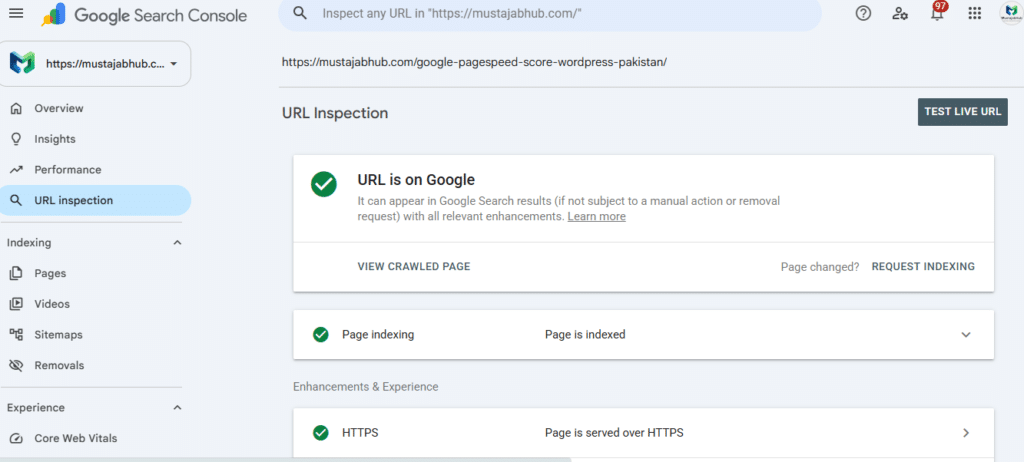
Google Search Console → URL Inspection
Enter the exact URL.
The Page indexing report is useful for identifying patterns across a website, but URL Inspection is the tool you should use when diagnosing a specific URL.
Check:
- whether Google has an indexed version
- whether indexing is allowed
- the user-declared canonical
- Google’s selected canonical
- last crawl information
- live-test availability.
Google’s URL Inspection tool provides information about the indexed version and allows you to test the current live URL.
Important
If your Page indexing report says:
Crawled – currently not indexed
but URL Inspection says the URL is already indexed, don’t immediately rewrite the page.
The reports can represent different points in time.
Check 2: Does the Page Have an Indexing Block?
If the URL genuinely isn’t indexed, inspect its technical signals.
Check:
Meta robots
Look for:
<meta name="robots" content="noindex">If the page should be indexed, an unintended noindex directive needs to be removed.
HTTP headers
A noindex directive can also be delivered through an HTTP response header.
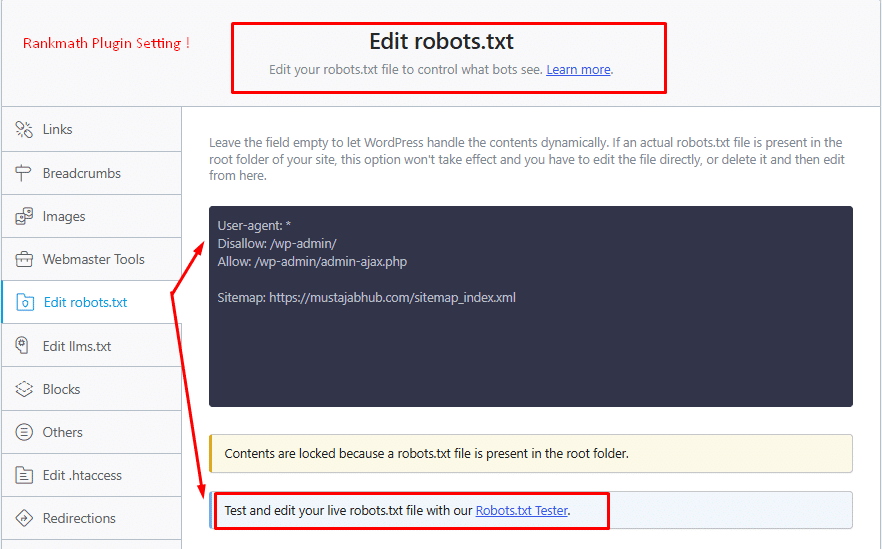
Robots.txt
Check whether important resources or URLs are unnecessarily blocked.
HTTP status
Make sure the page returns the expected status.
For a normal indexable page, you generally want a successful response rather than an accidental one:
- redirect
- 404
- 410
- server error
- authentication wall.
Robots.txt and Noindex Are Not the Same Thing
This distinction causes a lot of confusion.
robots.txt
Controls crawling access.
noindex
Tells search engines not to include a page in their index.
If you block a URL in robots.txt, Google may not be able to crawl the page and see a noindex directive on that page.
So don’t use robots.txt as a substitute for a noindex directive.
And don’t use robots.txt as your canonicalization system.
Google explicitly recommends against using robots.txt for canonicalization.
Check 3: Is Google Choosing a Different Canonical URL?
This is one of the most important checks.
Suppose you have:
https://example.com/seo-guide/but Google considers:
https://example.com/seo-guide-2026/to be the better representative.
The problem may not be:
“Google doesn’t like my page.”
It may be:
“Google considers another URL a better representative of substantially similar content.”
Google’s canonicalization system evaluates duplicate and very similar URLs and chooses the version it considers most representative.
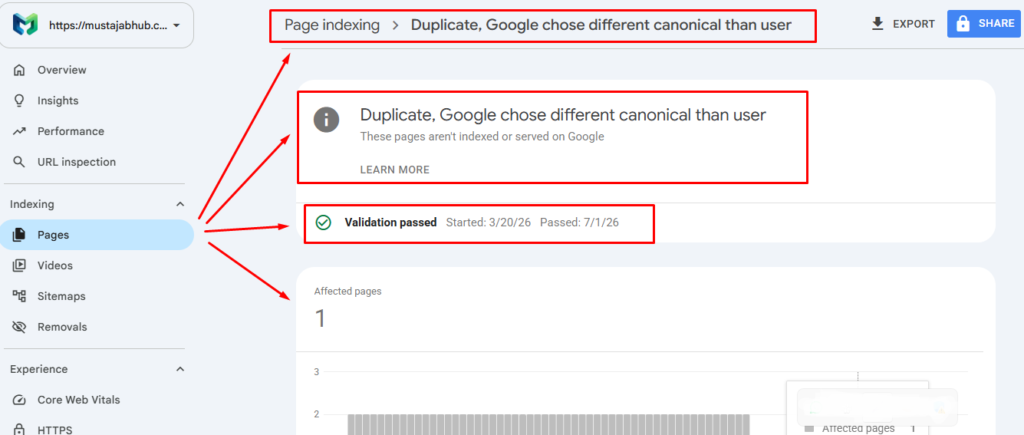
In URL Inspection, compare:
User-declared canonical
with:
Google-selected canonical
If they are different, investigate why.
How to Fix a Canonical Problem
Make your preferred URL clear and consistent.
Possible signals include:
rel="canonical"- redirects
- sitemap inclusion
- internal links.
Google says redirects and rel="canonical" are strong canonical signals, while sitemap inclusion is a weaker signal.
Avoid conflicting signals.
For example, don’t:
- declare URL A canonical
- put URL B in your sitemap
- internally link heavily to URL C
- redirect some versions to URL D.
Your website should communicate a consistent preferred URL.
Check 4: Can Google Actually Render the Important Content?
This is an important technical edge case.
A page can be successfully fetched but still have problems during rendering.
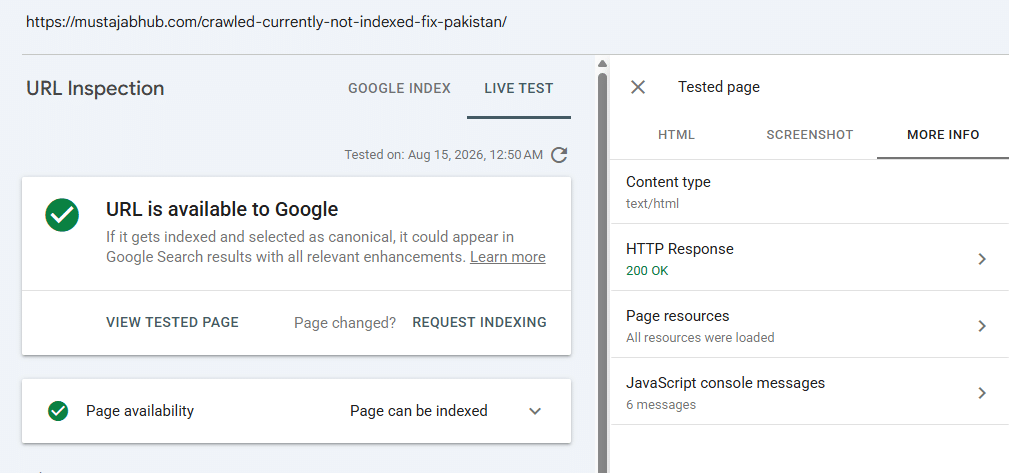
Google Search Central’s community guidance specifically notes that a page can be fetchable but potentially unrenderable, and recommends using the Search Console Live Test and checking the rendered screenshot.
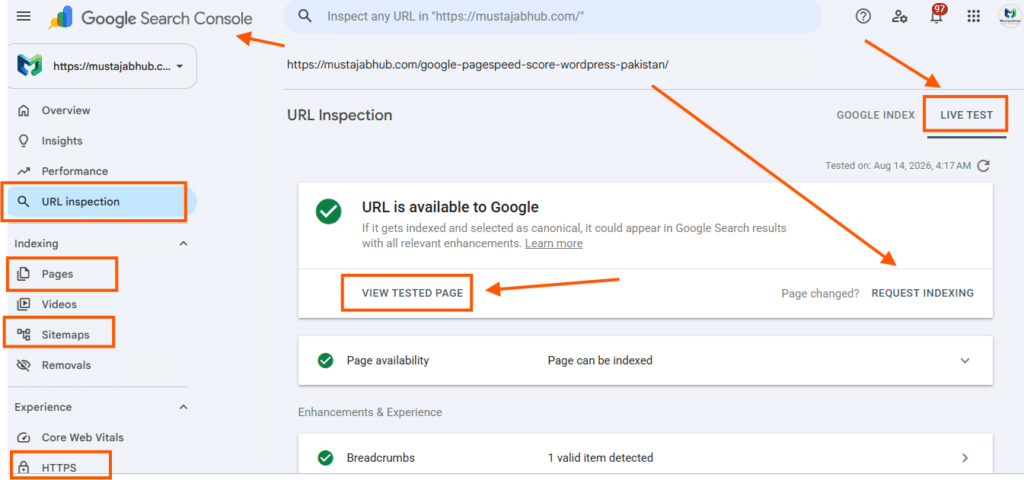
Go to:
Search Console → URL Inspection → Test Live URL → View Tested Page
Then look at Google’s rendered version.
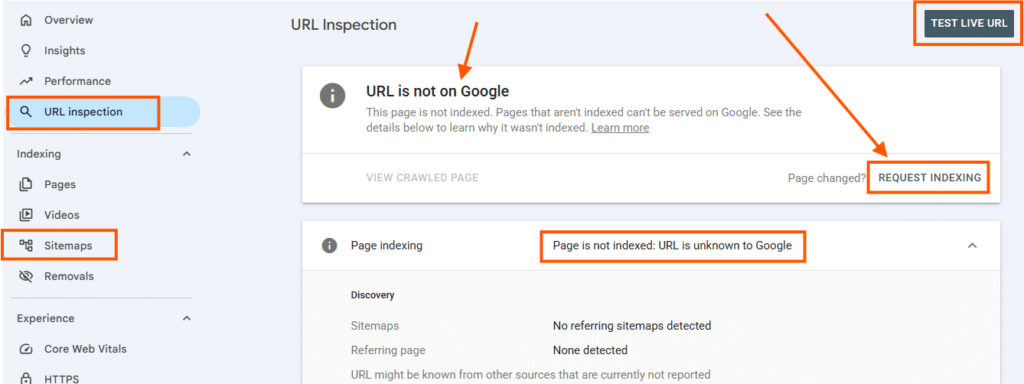
Ask:
- Is the main article visible?
- Is the heading visible?
- Is the important text visible?
- Are images loading?
- Is JavaScript working?
- Is the page empty before JavaScript runs?
- Is a cookie banner covering the content?
- Is a popup covering the page?
- Are important resources blocked?
- Does the mobile rendering look correct?
This is especially important for JavaScript-heavy websites.
Check 5: Is the Page a Duplicate or Near-Duplicate?
This is one of the most common content-side problems.
A page doesn’t have to be copied word-for-word to be substantially similar.
For example, imagine a website publishes:
- SEO Services Lahore
- SEO Services Karachi
- SEO Services Islamabad
- SEO Services Gujranwala
- SEO Services Faisalabad
If every page contains the same:
- introduction
- service list
- benefits
- process
- FAQs
- testimonials
- CTA
and only the city name changes, the pages may provide very little unique value.
The solution isn’t simply changing:
Lahore → Karachi
The page needs a genuine reason to exist.
How to Make Location Pages Actually Different
A useful location page could include genuinely local information such as:
- actual service coverage
- local business examples
- relevant industries
- locally observed customer problems
- unique FAQs
- local project experience
- real photographs
- service availability
- delivery/service-area information
- locally relevant terminology
- original data or observations.
Don’t create location pages simply because you found a keyword with a city name.
Create them when users actually benefit from the location-specific page.
Check 6: Does the Page Add Something Original?
This is where many SEO articles fail.
Google’s current people-first guidance encourages content containing original information, research, reporting or analysis and asks whether the content demonstrates first-hand expertise and gives readers a satisfying answer. Google also explicitly says there is no preferred word count.
So don’t ask:
“Does this page have 300 words?”
Ask:
“What useful information does this page provide that the user couldn’t easily get from another generic page?”
That difference matters.
What Counts as Information Gain?
Information gain can come from:
Original screenshots
Show exactly what the user should click.
First-hand observations
Explain what you actually encountered during website audits.
Original examples
Show a realistic before/after situation.
Data
Use real project measurements where you have permission.
Templates
Give users a tracker they can actually use.
Decision frameworks
Help users decide whether to:
- improve
- merge
- redirect
- noindex
- remove
- keep
- request indexing.
Technical explanations
Explain not just what to do, but why.
Mistake prevention
Tell users which common SEO recommendations are misleading.
This is much more valuable than adding another 1,000 generic words.
There Is No Magic Word Count
Don’t believe that a page must have:
- 300 words
- 1,000 words
- 2,000 words
- 3,000 words
to get indexed.
Google explicitly says it does not have a preferred word count.
A 500-word article can be excellent.
A 5,000-word article can be useless.
The right length is:
Long enough to completely satisfy the user’s intent without adding filler.
Check 7: Does the Page Have Meaningful Internal Links?
Internal linking helps users and search engines discover relationships between pages.
A strong structure might look like:
Homepage
   ↓
Technical SEO
   ↓
Google Search Console Guide
   ↓
Crawled – Currently Not Indexed
   ↓
Canonical Guide
   ↓
JavaScript SEO Guide
You can also link from relevant articles back to the main service page.
For example:
Technical SEO guide
→ Google Search Console indexing guide
→ WordPress technical SEO
→ JavaScript SEO
→ Core Web Vitals
→ Technical SEO service
The important thing is relevance.
Don’t add internal links just to hit a number.
What Is an Orphan Page?
An orphan page is a page that has little or no meaningful internal linking from other pages on the website.
A sitemap can help Google discover a URL, but a contextual internal link can also communicate how that page fits into your site’s information architecture.
If an important article has no internal links pointing toward it, ask:
Why would a user naturally discover this page from the rest of my website?
Fix the architecture rather than simply adding random links.
What About the XML Sitemap?
An XML sitemap is useful.
But:
Submitting a URL in a sitemap does not guarantee that Google will index it.
Google describes sitemap inclusion as a useful discovery mechanism and a relatively weak canonical signal compared with stronger signals such as redirects and rel="canonical".
Your sitemap should generally contain the URLs you actually want search engines to discover and consider as preferred pages.
Don’t treat your sitemap as:
“An indexing button.”
Does Page Speed Cause “Crawled – Currently Not Indexed”?
This needs a careful answer.
Not necessarily.
A slow page can create a poor user experience and, in some situations, crawling or rendering problems can complicate technical processing.
But there is no rule saying:
“LCP above 2.5 seconds = Google will not index the page.”
Core Web Vitals and indexing are related areas of technical SEO, but they should not be confused with one another.
Check performance because you want:
- fast loading
- stable layouts
- responsive interactions
- good mobile UX
- efficient resource delivery.
Don’t try to “fix indexing” by chasing a single PageSpeed number.
What About WordPress?
WordPress websites can develop indexing problems for many reasons, but WordPress itself does not mean that pages won’t be indexed.
Check:
WordPress Reading Settings
Make sure you haven’t accidentally enabled:
Discourage search engines from indexing this site
SEO plugin settings
If you’re using:
- Rank Math
- Yoast SEO
- another SEO plugin
check the page’s robots and canonical settings.
Categories and tags
Decide which archives actually deserve search visibility.
Duplicate URLs
Check attachment pages, feeds, parameters and unnecessary archives.
Internal linking
Important pages should be connected to the rest of the website.
JavaScript
Make sure important content isn’t unnecessarily dependent on client-side rendering.
What About Rank Math?
If your WordPress website uses Rank Math, don’t assume Rank Math is responsible for every indexing decision.
SEO plugins can output signals such as:
- canonical URLs
- robots directives
- XML sitemaps
- structured data.
But Google still makes the final crawling, indexing and ranking decisions.
For an important page, inspect the actual rendered HTML and Search Console data, not just what the WordPress plugin interface says.
Thin Content: What It Really Means
Thin content isn’t simply:
“A page with fewer than X words.”
A page can be short and still completely satisfy its purpose.
A page becomes more concerning when it provides little standalone value.
Examples:
- generic paragraphs copied across many pages
- rewritten competitor information without new insight
- city pages with only the city name changed
- product pages with no useful product information
- pages created solely to target slight keyword variations
- articles that repeat information users can find everywhere
- automatically generated pages with little editorial value.
Google’s people-first guidance emphasizes original, useful and satisfying content rather than a particular word count.
When Should You Improve, Merge, Noindex or Remove a Page?
Don’t automatically improve every URL.
Use this framework.
Keep and improve
If the page:
- serves a real user need
- has a valuable search intent
- supports your business/site purpose
- has potential to rank
- can be made substantially better.
Merge
If two pages:
- target the same intent
- contain overlapping information
- compete with each other
- would be stronger as one comprehensive resource.
Redirect
If an old URL has a clear replacement and you want users and search engines to reach the replacement.
Noindex
If the page is useful for users or your site but isn’t intended to appear independently in search.
Remove
If the URL has no useful purpose and shouldn’t exist.
The objective isn’t:
“Make every URL indexed.”
It’s:
“Build a clean website where the URLs that deserve search visibility are genuinely useful.”
What If Google Crawled the Page but Still Won’t Index It?
If you’ve checked:
- indexability
- canonical
- rendering
- duplication
- content value
- internal links
And the page still isn’t indexed? Don’t panic.
Google says crawling can take days to weeks, and requesting a crawl does not guarantee inclusion in Search.
Indexing isn’t an instant publishing system.
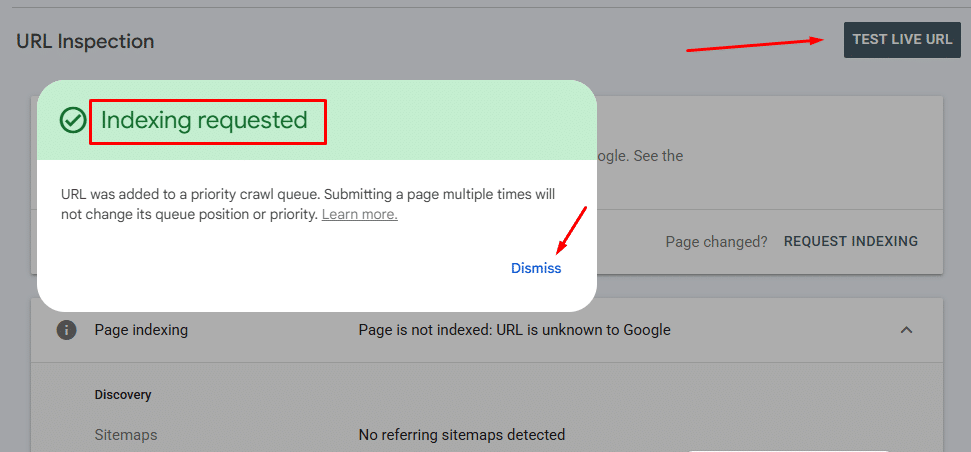
Should You Click “Request Indexing” Again?
You can use Request Indexing after making meaningful changes.
But don’t repeatedly submit the same unchanged URL expecting it to force Google to index the page.
Google explicitly says repeated requests for the same URL won’t make it crawl faster, and individual URL submissions are subject to quotas.
A better workflow is:
Diagnose → improve → request → monitor
not:
Request → request → request → request
How Long Does Google Take to Index a Page?
There isn’t a guaranteed timeframe.
Google says crawling can take a few days to a few weeks, and requesting a crawl does not guarantee that a URL will be included in Search.
So don’t promise a client:
“Your page will be indexed in seven days.”
Instead say:
“We’ve removed the known technical and content barriers and submitted the page for recrawling. Google controls the final indexing decision and timing.”
That’s a much more professional SEO statement.
The Difference Between a Good Fix and a Fake Fix
Fake fix:
Add 1,000 more words.
Better fix:
Add the information users actually need.
Fake fix:
Repeat the keyword 20 times.
Better fix:
Cover the complete topic naturally.
Fake fix:
Request indexing every day.
Better fix:
Make meaningful improvements and request a crawl once.
Fake fix:
Put every URL in the sitemap.
Better fix:
Keep your sitemap focused on preferred, useful URLs.
Fake fix:
Create 20 city pages by changing the city name.
Better fix:
Create location pages only when each provides genuine local value.
Fake fix:
Make every article 3,000 words.
Better fix:
Make every article complete enough to satisfy its search intent.
Google’s current guidance specifically warns against search-engine-first content and content created primarily to attract search traffic.
A Practical 10-Minute Diagnosis
When you have a URL marked Crawled – currently not indexed, work through this checklist.
1. URL Inspection
Is the URL actually indexed?
2. Indexability
Is indexing allowed?
3. Robots
Is Google able to crawl the URL and required resources?
4. Canonical
What canonical did you declare?
What canonical did Google choose?
5. Rendering
Can Google see the main content?
6. Duplication
Is another URL doing the same job?
7. Content
Does this page provide unique value?
8. Internal links
Can users reach this page naturally from relevant content?
9. Sitemap
Is the preferred URL included appropriately?
10. Request and monitor
After meaningful changes, request indexing and monitor the URL.
Crawled – Currently Not Indexed Decision Tree
"Crawled – currently not indexed"
              |
              v
     Is the URL actually indexed?
          /           \
        YES            NO
        |               |
     Monitor       Should it be indexed?
                    /          \
                  NO            YES
                  |              |
          Noindex/merge/     Inspect URL
             remove              |
                                 v
                         Technical conflict?
                           /           \
                         YES            NO
                          |              |
                        Fix        Test rendering
                                        |
                                  Content visible?
                                   /          \
                                 NO            YES
                                 |              |
                         Fix rendering    Check canonical
                                             |
                                       Duplicate/overlap?
                                         /          \
                                       YES            NO
                                        |              |
                                      Merge       Improve value
                                                     |
                                                     v
                                             Strengthen internal links
                                                     |
                                                     v
                                             Request indexing
                                                     |
                                                     v
                                                   Monitor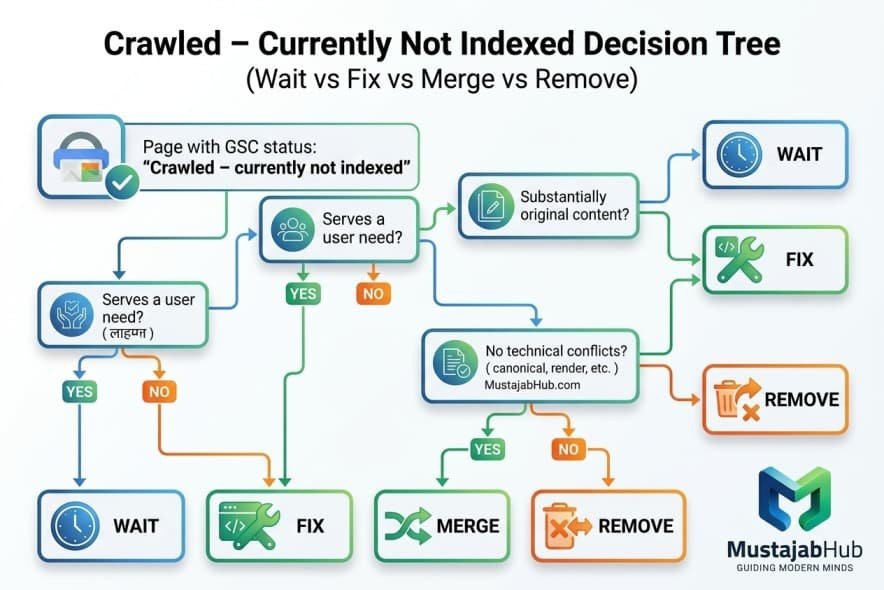
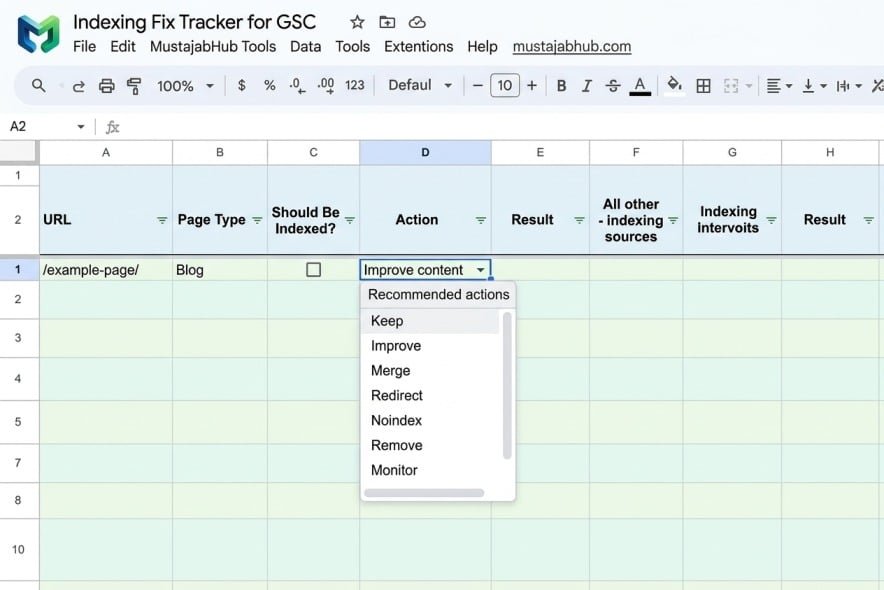
Indexing Fix Tracker
Use this spreadsheet to investigate affected URLs rather than randomly changing pages.
| URL | Page Type | GSC Status | Should Be Indexed? | Noindex? | Robots OK? | Canonical OK? | Google Canonical | Render OK? | Duplicate? | Internal Links | Action | Date Changed | Request Date | Result |
|---|---|---|---|---|---|---|---|---|---|---|---|---|---|---|
/example-page/ | Blog | Crawled – currently not indexed | Yes | No | Yes | Yes | Same URL | Yes | No | 4 | Improve content | — | — | — |
Recommended actions:
- Keep
- Improve
- Merge
- Redirect
- Noindex
- Remove
- Monitor
This makes the process measurable instead of relying on guesswork.
What We Look For on Small WordPress Websites
From a practical technical SEO perspective, some recurring problems are worth checking on small-business WordPress websites:
- duplicated service pages
- poorly differentiated location pages
- weak internal linking
- unnecessary archive URLs
- accidental noindex directives
- inconsistent canonical URLs
- JavaScript-dependent content
- slow or unstable pages
- outdated XML sitemaps
- pages that don’t clearly satisfy a search intent
- content that was produced mainly by rewriting information already available elsewhere.
These aren’t problems unique to Pakistan. They can occur on websites anywhere.
For Pakistani small businesses, however, they can be particularly frustrating because many businesses operate with small teams and limited technical resources.
The solution is the same:
Diagnose the individual URL instead of assuming that the country, CMS or hosting provider is the cause.
A MustajabHub Field Note
Don’t confuse a large “Crawled – currently not indexed” number with a large SEO problem.
A website can have URLs in this report that don’t deserve indexing.
For example, if a site generates:
- feeds
- duplicate URLs
- parameter variations
- unnecessary archives
- old utility pages
then reducing the number of excluded URLs isn’t necessarily an SEO victory.
The better measurement is:
Are your important pages indexed?
Are your important pages receiving impressions?
Are they ranking for relevant searches?
Are users finding the information they need?
Are organic visitors taking meaningful actions?
That’s the difference between indexing management and SEO vanity metrics.
Real Case Study: Use Evidence, Not Claims
If you’re publishing a MustajabHub case study, use a project where you have actual Search Console and performance records.
For example, if your WooCommerce indexing project has documented before-and-after data, you can show the following:
- number of affected URLs
- indexing status before
- technical issues identified
- changes made
- indexing status after
- performance measurements
- organic impressions/clicks before and after
- timeframe
- limitations.
Important
Don’t claim:
“We improved Core Web Vitals; therefore, Google indexed the products.”
Unless your data proves that causal relationship.
Instead, document what happened:
“During the remediation project, we addressed several technical and performance issues. Following the changes, the number of indexed products increased over the subsequent weeks.”
That is transparent and much more credible.
The MustajabHub 7-Check Diagnosis
When we investigate a URL marked “Crawled – currently not indexed”, we don’t start by repeatedly clicking Request Indexing. We first ask seven questions.
1. Should this URL actually be indexed?
Not every URL discovered by Google needs to appear in search results. First decide whether the page has a genuine standalone purpose.
2. Is Google seeing the same URL you want indexed?
Inspect the page’s canonical signals and compare the user-declared canonical with Google’s selected canonical.
3. Can Google access the page correctly?
Check the HTTP response, robots.txt, meta robots directives, redirects and other access restrictions.
4. Can Google render the important content?
Run a live test in Search Console and inspect Google’s rendered screenshot. If the main content is missing or substantially different, investigate JavaScript, blocked resources and client-side rendering.
5. Is another page doing the same job?
Compare the URL with similar pages on your own website. Near-duplicates can compete for the same search intent without giving users a meaningful reason to choose between them.
6. Does the page add information that isn’t already obvious?
Don’t measure quality by word count. Look for original examples, first-hand observations, screenshots, data, explanations, processes and useful decisions that improve the page beyond what another generic article already provides.
7. Can users and Google discover the page naturally?
Important pages should have meaningful internal links from relevant parts of your website. A sitemap can help discovery, but it isn’t a guarantee that Google will index the URL.
Only after these checks do we consider requesting indexing.
How We Researched This Guide
This article was prepared using current Google Search documentation and Search Console guidance, supplemented with current practitioner coverage of the ‘Crawled – currently not indexed’ status.
Where Google provides an official definition or technical recommendation, Google documentation is used as the primary source.
Where MustajabHub describes its own project experience, those claims should be supported by actual project records.
This distinction matters:
Google’s documentation tells us what Google says.
Your project records tell us what you personally observed.
Those are not the same thing, and keeping them separate makes the article more trustworthy.
Does AI-Generated Content Cause Indexing Problems?
There isn’t a simple rule saying the following:
AI-generated = not indexed.
The more useful question is whether the content provides genuine value.
Google’s current guidance says its systems prioritize helpful, reliable, people-first content and warns against content created primarily to manipulate search rankings. It also specifically asks whether creators are producing original information, research or analysis and whether the content demonstrates first-hand expertise.
So if you use AI to help research or structure an article, don’t stop there.
Add:
- your own testing
- original screenshots
- original examples
- expert interpretation
- first-hand observations
- accurate citations
- useful templates
- unique analysis.
The objective shouldn’t be to “beat an AI detector”.
The objective should be to create something worth indexing because it is genuinely useful.
Can “Crawled – Currently Not Indexed” Hurt AdSense?
The Search Console status itself is not an AdSense violation.
However, a website filled with low-value, incomplete or unoriginal pages can have broader quality problems.
Google’s AdSense guidance says sites need sufficient text and original, relevant content that provides users with a reason to visit.
Google’s publisher policies also restrict ads on pages with little or no publisher content or low-value content.
So don’t create articles simply to:
get indexed → get traffic → place ads.
Build the site around:
Useful information → satisfied visitors → trusted publication → organic visibility → monetization.
Frequently Asked Questions
What does “Crawled – currently not indexed” mean?
It means Google crawled the URL but has not currently added it to its search index. Google says the URL may or may not be indexed later.
Is Crawled – Currently Not Indexed a penalty?
No. The status itself is an indexing status, not a manual-action notification.
Why did Google crawl my page but not index it?
There isn’t one universal reason. Investigate whether the URL should be indexed, then check technical indexability, canonicalization, rendering, duplication, content usefulness, check de-index status and internal linking.
How do I fix Crawled – Currently Not Indexed?
Start with URL inspection first, then check noindex, robots.txt, HTTP status, canonicalization, rendering, duplicate content, page value and internal links. Make meaningful improvements before requesting indexing.
Should I request indexing repeatedly?
No. Repeated requests for the same URL do not make Google crawl it faster.
How long does Google take to index a page?
There is no fixed time and date yet; Google says crawling can take from a few days to a few weeks, & requesting a crawl does not guarantee inclusion.
Does a sitemap guarantee indexing?
No, not directly. A sitemap helps Google discover URLs & provides a canonical signal, but it doesn’t guarantee indexing.
Does thin content cause Crawled – Currently Not Indexed?
Thin or weakly differentiated content can be a problem, but the Search Console status itself doesn’t tell you that thin content is definitely the cause.
Is 300 words enough to get indexed?
There is no minimum 300-word indexing rule. Google explicitly says it doesn’t have a preferred word count.
Does page speed affect indexing?
Performance matters for user experience & can affect technical crawling or rendering in some situations, but there is no single Core Web Vitals score that guarantees indexing.
Can WordPress Pages be Crawled – Currently Not Indexed?
Yes. WordPress pages can receive this status for the same broad reasons as pages on other platforms. Check WordPress’s indexing settings, SEO plugin directives, canonical URLs, duplicate pages, internal links & content quality.
Should I delete every URL with this status?
No. First decide whether the URL deserves to be indexed. Some URLs are legitimately not useful as independent search results.
Can Google index a page later without me doing anything?
Yes. Google says a page marked ‘Crawled – currently not indexed’ may be indexed in the future.
Can a page be indexed but still not rank?
Yes. Indexing and ranking are different stages. A page can be indexed while receiving little or no meaningful organic traffic.
Can this issue hurt AdSense approval (“Low value content”)?
Yes, indirectly. If many pages are thin, duplicate, or unhelpful, AdSense reviewers may see “insufficient content” patterns. Google’s AdSense guidance stresses having enough unique, high-quality text for review and for crawlers to understand pages.
The Final Checklist
Before requesting indexing for an important URL, ask:
Indexing
- Did I verify the exact URL in URL Inspection?
- Is the page actually supposed to be indexed?
- Is indexing allowed?
- Is there an accidental
noindex? - Is the HTTP status correct?
Canonical
- Is the canonical URL correct?
- Does Google select the URL I expect?
- Are sitemap and canonical signals consistent?
Rendering
- Can Google render the important content?
- Did I check the Live Test?
- Is the main content visible in Google’s rendered view?
- Are important JavaScript/CSS resources available?
Content
- Does the page satisfy a real search intent?
- Is the content original?
- Does it provide meaningful information gain?
- Is it substantially different from competing pages?
- Is it substantially different from similar pages on my own site?
- Have I avoided filler and keyword stuffing?
Architecture
- Does the page have relevant internal links?
- Is it an orphan page?
- Is the page logically connected to related content?
- Is the preferred URL included appropriately in the sitemap?
Trust
- Is the author identified?
- Does the article demonstrate first-hand expertise where appropriate?
- Are important claims supported by evidence?
- Are screenshots genuine?
- Are sources cited?
Final action
- Did I make meaningful improvements?
- Did I request indexing only after the changes?
- Am I prepared to wait days or weeks rather than expecting an instant result?
The Bottom Line
“Crawled – currently not indexed” is not a button problem. It’s a diagnosis problem.
Don’t begin by asking the following:
“How do I force Google to index this page?”
Start by asking:
“Should this URL be indexed, and if so, what is preventing Google from selecting it?”
Then work through:
URL Inspection → Indexability → Canonical → Rendering → Duplication → Content Value → Internal Links → Sitemap → Request Indexing → Monitor
The objective isn’t to make every URL on your website appear in Google’s index.
The objective is to build a website where the important pages are technically accessible, genuinely useful, clearly differentiated, internally connected and worthy of appearing in search.
That is a much more sustainable approach to Google Search, organic traffic and long-term website growth.
About the Author
Rana Umar — Technical SEO & WordPress Specialist at MustajabHub
Rana Umar writes practical guides about technical SEO, WordPress, website performance, Google Search Console, indexing and digital growth. His work focuses on turning technical website problems into practical steps that business owners and website teams can understand and implement.
For technical SEO projects, MustajabHub works on areas including crawlability, indexation, canonicalization, WordPress SEO, JavaScript SEO, website performance, Core Web Vitals and Google Search Console diagnostics.
Read More Related Topics Here:
Elementor vs Gutenberg Pakistan | WordPress Website Development Cost in Gujranwala | WordPress vs Custom Website Pakistan | Technical-seo-audit-checklist | Why-is-my-wordpress-website-slow | how to get Google AdSense approved in Pakistan | ssl-certificate-pakistan-website | fix-lcp-wordpress-pakistan | cloudflare-setup-wordpress-pakistan | google-pagespeed-score-wordpress-pakistan