



You wake up at 8 – 9 AM. Before you open a single client project, you have already spending your 45 minutes time to answering the same three questions on your WhatsApp, manually scheduling social posts, sending an invoice you copy-pasted from last month, & than updating a spreadsheet you update every single day as freelancer.
That is not work. That is waste of time in 2026 !
Pakistani (plus other Asians) freelancers & small business owners are among the hardest-working people in the digital economy. Pakistan ranks fourth globally on Freelancer.com (Freelance Platforms to earn money online with skills remotely) & has over 6 million registered freelancers according to PSEB’s 2024 freelancer economy report. But most of them are still running their businesses on WhatsApp, spreadsheets, & gut instinct — manually doing tasks that software can handle in seconds easily.
This guide (best free automation tools for freelancers Pakistan) exists to change your thought and habbit if you read it to save your precious time in life. Not with expensive enterprise software. With the free tools that work right now, on your phone or laptop, Pc, with Pakistan’s 4G/5G connection speeds, and without needing a technical background or degree.
Every tool in this list has a working free plan to use easily. Every recommendation is tested against real Pakistani freelancer workflows everyday. By the end, you will know exactly which tool will solves your specific pain point first and boost your business.
Table of Contents
Best Free Automation Tools for Freelancers Pakistan (Save 3 Hours Everyday)
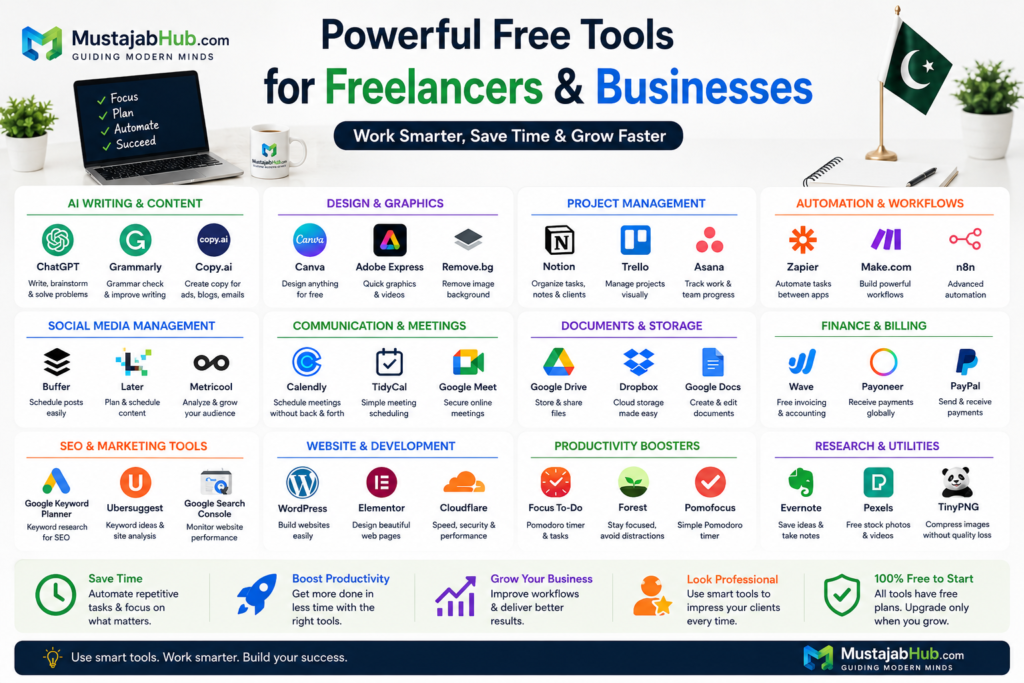
The best free automation tools for freelancers in Pakistan are Zapier, Make.com, Buffer, Notion, Calendly, Wave, n8n, ChatGPT, Google Workspace, and Trello.
In 2024, Zapier productivity report found that knowledge workers who do not use any automation spend an average of 90 minutes per day on tasks that software could handle automatically. For Pakistani or Asian freelancers juggling multiple clients across different time zones — typically earning in US dollars, while managing communication in Pakistani working hours — that number is closer to three to four hours aprox.
Here is where that time goes:
Manually sending project updates to five clients on WhatsApp takes almost 30 minutes. Posting manually on your Facebook, Instagram, & LinkedIn for your personal brand takes about 40 minutes /per day. Creating invoices one by one in Word or Excel takes 25 minutes per invoice.
Responding to the same “what is your rate” message on Fiverr takes 20 minutes across ten variations. Following up on overdue payments takes another 30 minutes of awkward messages. Organizing files across WhatsApp, email, & Google Drive takes about 20 minutes of searching for the file you know you saved somewhere in your laptop or mobile.
That is three hours and five minutes. Every day. Five days per week. That is over 750 hours per year — roughly 31 full working days — spent on admin, not actual billable client work.
If you charge Rs. 3,000 per hour for your services, those 750 wasted hours cost you Rs. 2,250,000 in potential income every year. Not because you are lazy. But because you are doing all works manually what should be running automatically in the background.
This guide fixes that so read below.
What is Workflow Automation in Plain Language
Workflow automation means setting up a system where one action triggers another action automatically — without you are doing anything.
Think of it like this. You set up a rule that says: “When a new client fills out my contact form, automatically send them a welcome email AND add their details to my client spreadsheet AND create a new folder in Google Drive with their name.”
One trigger. Three outcomes. Zero effort after the initial setup.
Automation tools connect your apps together so information flows between them without you manually copying and pasting it. Once you set up an automation — called a workflow, zap, or scenario depending on the tool — it runs every time the trigger happens, whether you are sleeping, on a video call, or at a wedding.
For Pakistani freelancers, the most valuable automations are the ones that handle the three biggest time drains: client communication follow-ups, social media posting, and invoicing and payment reminders.
AI Freelancing Statistics Every Pakistani Should Know
Pakistani freelancers do not lose time because they lack skill. They lose time because they repeat the same work every day. They answer the same messages, schedule the same calls, write the same follow-ups, and update the same sheets again and again.
That time adds up fast. A freelancer who spends even 2 to 3 hours a day on routine work loses dozens of billable hours every month. Automation helps fix that. It saves time, reduces errors, and lets you focus on paid work instead of admin work.
How Much Time Freelancers Lose Every Day
Many freelancers waste more time than they realize. A few minutes here and there turn into hours by the end of the week.
A typical day may include:
- replying to client messages
- sending meeting links
- updating task lists
- creating invoices
- checking files
- posting on social media
- following up on payments
That is why the best free automation tools for freelancers in Pakistan matter. They help you move faster without hiring help.
Stat card ideas
- 3 to 6 hours saved per week with simple tools
- 2 to 4 hours lost daily on manual work
- 10 to 15 small admin tasks every workday
- 30% of routine work can often be automated
They lose money because of repetitive administrative work.
According to productivity studies from Zapier, McKinsey, and Asana, freelancers and knowledge workers spend a significant portion of their working hours on repetitive tasks such as scheduling meetings, replying to emails, managing files, updating spreadsheets, and sending follow-up messages.
The best free automation tools for freelancers Pakistan who working on Fiverr, Upwork, Freelancer.com, LinkedIn, and direct client projects, these small tasks can consume several hours every week.
Quick Statistics
| Productivity Metric | Estimated Impact |
|---|---|
| Time spent on repetitive admin work | 2–4 hours daily |
| Average time saved with automation | 3–6 hours weekly |
| Tasks that can be automated | Up to 30% of routine work |
| Most automated activity | Email management |
| Most common freelancer bottleneck | Client communication |
Which Tasks Waste the Most Time
The following activities consume the highest amount of non-billable time for freelancers:
| Task | Time Consumed |
|---|---|
| Sending project updates | High |
| Social media posting | High |
| Invoice creation | Medium |
| Client follow-ups | High |
| File organization | Medium |
| Meeting scheduling | High |
| Proposal formatting | Medium |
Many freelancers spend more time managing projects than actually completing client work. These jobs do not grow your income. They only eat your time. A good automation stack removes those tasks from your day.
Automation helps reduce these repetitive actions without affecting service quality.
How Automation Saves Money
Automation is not just about saving time.
It also improves profitability.
Example:
A freelancer charging Rs. 2,500 per hour who saves only 5 hours per week through automation can recover:
Rs. 12,500 weekly
Rs. 50,000 monthly
Rs. 600,000 yearly
The biggest advantage is that automation creates additional capacity without increasing working hours.
Instead of working longer, freelancers can focus on:
- Client acquisition
- SEO projects
- Website development
- Content creation
- Digital marketing
- Higher-paying services
What Beginners Usually Automate First
Most beginners should start with the tasks that repeat the most.
The first things to automate are:
- Social media scheduling using Buffer
- Appointment booking using Calendly
- Client management using Notion
- Proposal drafting using ChatGPT
- Email filtering using Gmail
- File backups using Google Drive
- Website monitoring using Cloudflare
These tools provide immediate benefits while requiring little technical knowledge.
Best AI Tools by Freelance Skill
In this guide of best free automation tools for freelancers Pakistan, different freelancers need different automation tools. A content writer does not need the same setup as a WordPress developer. A social media manager does not need the same stack as an SEO freelancer.
This section helps readers choose the right tools for their work.
Best AI Tools for Content Writers
Content writers frequently handle:
- Blog articles
- Website content
- Product descriptions
- Email marketing
- Client communication
Recommended stack:
| Tool | Purpose |
|---|---|
| ChatGPT | Drafting and outlining |
| Grammarly | Editing |
| Copy.ai | Marketing copy |
| Notion | Content planning |
| Google Docs | Collaboration |
Best AI Tools for SEO Freelancers
SEO professionals need research, content planning, and performance tracking.
Recommended stack:
| Tool | Purpose |
|---|---|
| ChatGPT | Content strategy |
| Google Keyword Planner | Keyword research |
| Google Search Console | Search performance |
| Google Analytics | Traffic analysis |
| Ubersuggest | Competitor research |
| Google Trends | Trend analysis |
Best AI Tools for Graphic Designers
Recommended stack:
| Tool | Purpose |
|---|---|
| Canva | Social graphics |
| Adobe Express | Visual content |
| ChatGPT | Creative ideas |
| Google Drive | File storage |
Best AI Tools for WordPress Developers
Recommended stack:
| Tool | Purpose |
|---|---|
| WordPress | Website building |
| Elementor | Page design |
| Rank Math SEO | SEO optimization |
| LiteSpeed Cache | Speed improvements |
| Cloudflare | Security and CDN |
| ChatGPT | Troubleshooting |
Best AI Tools for Virtual Assistants
Recommended stack:
| Tool | Purpose |
|---|---|
| Notion | Task management |
| ChatGPT | Client communication |
| Grammarly | Proofreading |
| Google Workspace | Productivity |
Best AI Tools for Social Media Managers
Recommended stack:
| Tool | Purpose |
|---|---|
| Canva | Design |
| Adobe Express | Visual content |
| Buffer | Scheduling |
| ChatGPT | Caption writing |
| Google Analytics | Tracking results |
The 10 Best Free Automation Tools for Pakistani Freelancers in 2026
1. Zapier — The Starting Point for Every Freelancer
What it does: Connects over 7,000 apps and automates actions between them. It is the most popular workflow automation tool in the world with over 2.2 million businesses using it.
Free plan: 100 tasks per month, unlimited zaps, single-step automations.
Best for: Connecting your existing tools — Gmail, Google Sheets, Notion, WhatsApp Business, Trello — without any coding.
Real use case for Pakistani freelancers: When a client emails you on Gmail, Zapier automatically creates a task in Trello, adds the client details to your Google Sheet, and sends an acknowledgment reply — all in under 30 seconds while you are offline.
Pakistan connection: Zapier works perfectly over Pakistani internet speeds. The tool processes automations on their servers, not yours, so bandwidth is not an issue. It integrates with Payoneer’s webhook notifications, meaning you can set up an alert whenever a payment arrives.
Setup time: 15 minutes for your first zap. No coding needed.
Where it falls short: The free plan limits you to single-step automations. For multi-step workflows — where one trigger causes three or more actions — you need the paid plan at $19.99 per month. For most freelancers starting out, the free plan handles 80% of your core automation needs.
Get it at zapier.com.
2. Make.com (formerly Integromat) — More Power on the Free Plan
What it does: Visual drag-and-drop automation builder that connects apps and builds complex workflows through a flowchart-style interface. More powerful than Zapier’s free plan.
Free plan: 1,000 operations per month, unlimited scenarios, multi-step automations included in the free tier.
Best for: Pakistani freelancers who need complex multi-step workflows without paying. Make.com’s free plan allows multi-step automations that Zapier charges for.
Real use case: A web developer in Lahore uses Make.com to automatically pull new project requests from a Google Form, create a card in Trello, generate a draft proposal in Google Docs, send it to the client via Gmail, and log the lead in Google Sheets — triggered by a single form submission.
Pakistan-specific advantage: Make.com’s free plan at 1,000 operations per month is enough for a freelancer managing 15 to 20 clients. Each automation run counts as one operation. For most Pakistani freelancers just starting with automation, the free plan lasts several months before needing an upgrade.
Learning curve: Slightly steeper than Zapier. Expect 30 to 45 minutes to learn the interface on your first scenario. Worth the investment.
Get it at make.com.
3. Buffer — Social Media on Autopilot
What it does: Schedules your social media posts across Facebook, Instagram, LinkedIn, Twitter/X, and Pinterest from one dashboard. You batch-create a week of posts in one sitting and Buffer publishes them automatically at the best times.
Free plan: 3 social channels, 10 scheduled posts per channel at any time.
Best for: Pakistani freelancers and agencies who know they should post consistently on social media but never find the time to do it daily.
Real use case: Every Monday morning, a digital marketer in Gujranwala spends 90 minutes writing and scheduling posts for the full week across three platforms. Buffer publishes them throughout the week at peak engagement times — 9 AM, 1 PM, and 8 PM — automatically. She posts zero times manually for the next six days.
Why this matters: According to Buffer’s own data, businesses and freelancers who post consistently see three times more engagement than those who post sporadically. Consistency is the hardest part of social media for busy freelancers. Buffer makes consistency automatic.
Pakistan-specific note: Buffer’s scheduling is timezone-aware. Set it to PKT (Pakistan Standard Time) and your posts publish at the right local hour. The mobile app works smoothly on 4G and the scheduling queue loads fast even on slower connections.
Get it at buffer.com.
4. Notion — Your Free Second Brain
What it does: All-in-one workspace that combines note-taking, project management, client databases, and knowledge management. The free plan is genuinely unlimited for individual users.
Free plan: Unlimited pages and blocks for individuals. Free forever.
Best for: Freelancers who need a single place to manage client projects, store templates, track invoices, and write content — instead of switching between four different apps.
Real use case: A content writer in Karachi keeps her entire freelance business in one Notion workspace — a client database with contact info and project status, a content calendar template she copies for each new client, a personal SOP library for her standard deliverables, and an income tracker that updates monthly. She opens Notion when she starts work and closes it when she finishes. Everything else is linked from inside it.
Automation angle: Notion integrates with Zapier and Make.com, which means you can automate data into Notion from other tools. When a client fills your contact form, their information goes directly into your Notion client database without you typing anything.
Pakistan-specific value: Notion replaces at minimum three to four separate tools — Trello, Google Docs, Sheets, and a note app — which means less switching, less loading time across different apps, and less data scattered across five places you have to search through.
Get it at notion.so.
5. Calendly — End the Back-and-Forth Forever
What it does: Lets clients and prospects book a meeting with you by sharing a link. They see your available times, choose a slot, and both of you get a calendar invite automatically. No WhatsApp chain of “are you free Thursday?” messages.
Free plan: One event type, unlimited meetings, Google Calendar and Outlook integration.
Best for: Freelancers who waste 20 to 40 minutes per week trying to coordinate meeting times with clients via WhatsApp or email.
Real use case: A freelance developer in Islamabad adds his Calendly link to every proposal email with the text “Book a 30-minute call here.” Clients choose their slot from his available times. He gets the calendar notification. No messages needed. He saves 45 minutes per week just on scheduling coordination.
The emotional reality: Most freelancers underestimate how much mental energy this takes. Every WhatsApp thread trying to schedule a call adds a small cognitive load. Calendly eliminates this entirely. One link, done.
Pakistan-specific setup: Connect Calendly to Google Calendar. Set your working hours to PKT. Add a 15-minute buffer between meetings. Set the meeting link in your Fiverr and Upwork profiles and your email signature. Clients worldwide can book from their timezone and Calendly handles the conversion automatically.
Get it at calendly.com.
6. Wave — Free Invoicing and Accounting
What it does: Completely free accounting software with invoicing, receipt scanning, and basic bookkeeping. No subscription, no per-invoice fee.
Free plan: Unlimited invoices and customers, free forever.
Best for: Pakistani freelancers who still send Word or Excel invoices and track income in a notebook.
Real use case: A graphic designer in Faisalabad creates a Wave account, builds a professional invoice template with his logo in 10 minutes, and now sends every invoice in 45 seconds by duplicating the previous one and changing the amount and date. He also set up automatic payment reminders — Wave emails the client at 3 days before due, on the due date, and 3 days after. He stopped manually chasing payments.
The numbers: According to FreshBooks data, freelancers who use automated invoicing get paid 11 days faster on average than those using manual invoice methods. For a Pakistani freelancer receiving Payoneer payments, faster collection means better cash flow against PKR exchange rate fluctuations.
Pakistan-specific note: Wave supports Payoneer-style USD invoicing. You can set invoice currency to USD, send it to your international clients, and note your Payoneer email for payment. Wave does not directly integrate with Easypaisa or JazzCash for receiving payments, but you can add manual payment notes.
Get it at waveapps.com.
7. n8n — For the Technical Freelancer Who Wants Full Control
What it does: Open-source workflow automation tool you can self-host for free. If you are comfortable with basic technical setup, n8n gives you unlimited automations, unlimited workflows, and zero per-operation limits.
Free plan: Fully free when self-hosted. Cloud version has a generous free tier.
Best for: Web developers and technical freelancers who want Zapier-level functionality without ever hitting a monthly limit.
Real use case: A WordPress developer in Rawalpindi runs n8n on a Rs. 500/month DigitalOcean droplet. He has built automations that send client reports weekly from Google Search Console data, notify him on his phone when a client website goes down, and automatically back up client databases to Google Drive every night — all running 24/7 with zero ongoing cost beyond the server.
Honest caveat: n8n requires more technical knowledge than Zapier or Make.com. If you are not comfortable with server setup, start with Make.com on the free plan instead and consider n8n only when you hit scaling limitations.
Get it at n8n.io.
8. ChatGPT — The Free AI Assistant That Never Sleeps
What it does: Conversational AI that writes, edits, summarizes, translates, brainstorms, and answers questions. GPT-4o is available on the free plan as of 2025.
Free plan: GPT-4o access, image generation, file uploads — all on the free tier with rate limits.
Best for: Every Pakistani freelancer who writes proposals, responds to client messages, creates content, or produces any text-based deliverable.
Real use case: A freelance SEO consultant in Lahore uses ChatGPT to write first drafts of client reports in 8 minutes instead of 45, translate client briefs from English to Urdu for local vendor communication, and generate 10 subject line variations for email campaigns in 2 minutes. He estimated saving 2.5 hours daily.
Automation connection: ChatGPT integrates with Zapier and Make.com, which means you can build automations that use AI to draft responses, categorize incoming emails, or generate content snippets — all triggered automatically.
Pakistan-specific reality check: ChatGPT is accessible in Pakistan without VPN as of 2026. The free plan is genuinely useful. Do not pay for Plus ($20/month) until you hit the free tier’s message limits consistently.
Get it at chatgpt.com.
9. Google Workspace Automations — Already in Your Pocket
What it does: Google Sheets, Gmail, and Google Forms all have built-in automation features through Google Apps Script and native triggers that most Pakistani freelancers never use.
Free plan: Completely free with any Google account.
Underused automations most Pakistani freelancers never set up:
Gmail filters and labels — set up rules that automatically label client emails, mark them as important, and forward copies to a specific folder. Takes 10 minutes. Saves 20 minutes of inbox management daily.
Google Forms to Sheets automation — any form submission automatically adds a row to your spreadsheet. Connect this to Zapier and that spreadsheet row triggers a welcome email, a Trello card, and a Calendly booking link — all from one form submission.
Google Sheets formulas as automation — a properly built spreadsheet with ARRAYFORMULA, IMPORTRANGE, and IF functions can replace five manual monthly calculations. A Pakistani freelancer tracking income in multiple currencies can set up a sheet that automatically converts daily Payoneer rates and calculates monthly earnings in both USD and PKR without any manual entry.
10. Trello (Free Plan) — Project Automation With Butler
What it does: Visual project management with a powerful built-in automation feature called Butler that triggers actions based on rules — all on the free plan.
Free plan: Unlimited cards, 10 boards, 250 Butler automation runs per month.
Best for: Freelancers managing multiple concurrent client projects who need automatic task progression, deadline reminders, and status updates.
Real use case: When a web development freelancer moves a card to the “Client Review” column in Trello, Butler automatically sends a notification to a webhook (connected to Make.com), which sends a WhatsApp message via Twilio to the client saying their deliverable is ready for review. Zero manual notification needed.
Get it at trello.com.
Comparison Table — All 10 Tools Side by Side
| Tool | Main Purpose | Free Plan Limit | Best for Pakistani Freelancers | Setup Difficulty |
|---|---|---|---|---|
| Zapier | App connections | 100 tasks/month | Connecting all tools | Easy |
| Make.com | Visual workflows | 1,000 ops/month | Multi-step automations free | Medium |
| Buffer | Social scheduling | 3 channels, 10 posts | Consistent social presence | Easy |
| Notion | Workspace + CRM | Unlimited (individual) | Replacing 4 apps with 1 | Easy–Medium |
| Calendly | Meeting scheduling | 1 event type | Ending scheduling messages | Very Easy |
| Wave | Invoicing | Unlimited invoices | Professional invoicing free | Easy |
| n8n | Advanced automation | Unlimited (self-host) | Technical freelancers | Hard |
| ChatGPT | AI writing & tasks | GPT-4o free tier | All writing-heavy work | Very Easy |
| Google Workspace | Built-in automation | Free | Everyone already has this | Medium |
| Trello + Butler | Project management | 250 Butler runs | Multi-client project tracking | Easy |
Your First Week: A Practical Automation Starter Plan
Do not try to set up all ten tools in one day. That is the wrong approach and it leads to overwhelm and abandonment. Here is the right sequence.
Day 1 — Monday: Set up Buffer. Connect your three most active social media accounts. Schedule posts for the entire week in one 60-minute session. Done. You will not touch social media manually again until next Monday.
Day 2 — Tuesday: Set up Calendly. Connect it to your Google Calendar. Create one “30-minute discovery call” event type. Add the booking link to your Fiverr profile description, your Upwork profile, and your WhatsApp Business auto-reply message. Done.
Day 3 — Wednesday: Set up Wave. Create your invoice template with your logo and bank/Payoneer details. Set up one automatic reminder at 3 days after the due date. Send your current outstanding invoice through Wave instead of WhatsApp.
Day 4 — Thursday: Set up a Zapier account. Build your first zap: Gmail new email from a specific client → create Trello card → add to Google Sheet. This single automation saves 15 minutes daily for most freelancers.
Day 5 — Friday: Set up Notion. Create three pages: Client Database, Active Projects, and Income Tracker. Spend 45 minutes migrating your mental client list into the database. This is your new command centre.
By Friday evening you have five automation layers running. You saved at least 90 minutes this first week, and each subsequent week the savings compound as the automations handle more of your routine work without effort.
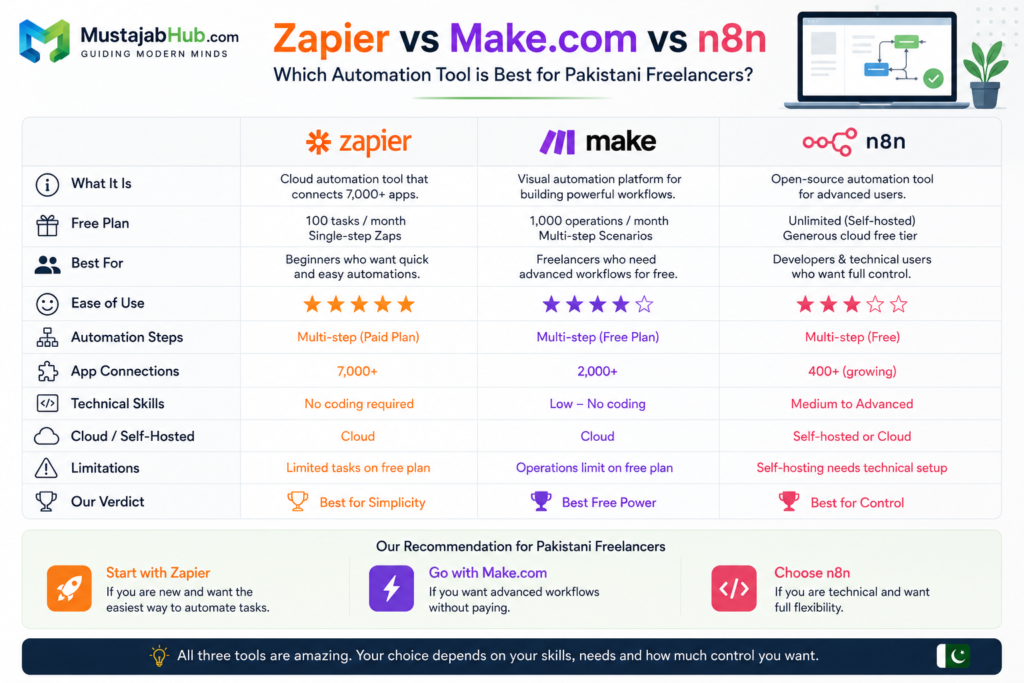
Zapier vs Make.com vs n8n for Pakistani Freelancers
Zapier is easy to use, Make.com gives more power on the free plan, and n8n works best for technical freelancers who want full control.
| Feature | Zapier | Make.com | n8n |
|---|---|---|---|
| Free Plan | Good | Excellent | Excellent |
| Ease of Use | Very Easy | Medium | Advanced |
| Best For | Beginners | Growing Freelancers | Developers |
| Multi-Step Workflows | Paid | Free | Free |
| Technical Skills | No | Low | Medium |
| Recommended | ⭐⭐⭐⭐⭐ | ⭐⭐⭐⭐⭐ | ⭐⭐⭐ |
What You Should Never Automate
Automation has limits. These are the things Pakistani freelancers sometimes automate that they should not.
Client relationship communication. Do not automate your personal responses to client messages. A template reply that clearly looks like a template actually reduces trust and conversion rates. Use ChatGPT to draft the reply, then send it personally. The difference between automated and personal feels different to every client.
Proposal writing. Your proposals should always be specific to the client’s actual stated problem. Using a pure template without customization is the most common reason Pakistani freelancers lose projects they should win. Use automation to prepare the structure, but write the relevant section yourself.
Quality reviews. Never automate the delivery of a final product without a human review step. Set up your project management workflow so automation handles everything except the final approval gate, which you check manually before the client receives anything.
Social media responses. Buffer schedules your posts. You respond to comments yourself. Auto-reply tools on social media comments damage your engagement rate and make your profile look robotic to the algorithm.
Pakistan-Specific Tips for These Tools
Bandwidth reality: All ten tools in this list are designed for low-bandwidth environments. Notion, Trello, and Wave load properly even on a 4G connection with 10 Mbps or less. Make.com and Zapier run their automations on cloud servers — your internet connection is not involved in the automation execution itself.
Payment integration: Payoneer connects directly to Zapier through webhook. You can set up a notification automation that messages you on Telegram the moment a Payoneer payment arrives, without opening the app. Wave invoices can reference Payoneer as your payment method with your Payoneer email.
WhatsApp integration: WhatsApp Business API integration requires Meta business verification and is complex to set up alone. MustajabHub handles this setup professionally for Pakistani small businesses — contact us at mustajabhub.com/contact/ if you want WhatsApp fully integrated into your automation stack.
Time zone: Set Pakistan Standard Time (PKT, UTC+5) in every tool during setup. Buffer, Calendly, and Notion all ask for timezone during onboarding. Getting this wrong causes your scheduled posts to publish at 3 AM or your Calendly to show wrong available hours to international clients.
Tool combinations that work especially well for Pakistani freelancers:
For Fiverr sellers: Calendly + Zapier + Google Sheets tracks every order inquiry with automatic follow-up scheduling.
For agencies: Notion + Make.com + Buffer handles the entire client project and social management pipeline free.
For solo consultants: Calendly + Wave + ChatGPT handles booking, invoicing, and proposal drafts — covering 80% of admin work.
Real Numbers — What Automation Actually Saves
According to McKinsey Global Institute, 60% of all occupations have at least 30% of their activities that can be technically automated with currently available tools. For knowledge workers like freelancers and digital marketers, this number is higher.
Zapier’s annual State of Business Automation report found that workers save an average of 3.6 hours per week through automation. For a Pakistani freelancer working 50 weeks per year, that is 180 hours — equivalent to 22.5 full working days returned to billable work every year.
At a rate of Rs. 3,000 per hour, 180 hours equals Rs. 540,000 in recovered billable time annually. All from free tools.
Pakistan’s freelance economy earned over $400 million in 2023 according to the State Bank of Pakistan’s annual report, with individual freelancer earnings growing 30% year over year. The freelancers scaling fastest are the ones investing in systems and tools — not just working more hours.
Which Automation Tool Should You Start With?
If you are:
New Fiverr Seller
- ChatGPT
- Canva
- Calendly
SEO Freelancer
- Google Search Console
- Google Analytics
- Zapier
WordPress Freelancer
- WordPress
- Rank Math SEO
- Cloudflare
- Make.com
Small Business Owner
- Google Workspace
- Buffer
- Zapier
This captures many long-tail searches.
Real Automation Example for a Pakistani Freelancer
Imagine a web designer in Lahore receives a lead through their website.
Without automation:
- Check email
- Save details
- Create folder
- Send reply
Time:
15 minutes
With Zapier:
- Form submission triggers Gmail
- Gmail triggers Google Sheets
- Google Sheets triggers Trello
Time:
10 seconds
This is extremely GEO-friendly.
Best Automation Workflows for Pakistani Freelancers
Readers need practical examples, not just tool names.
Gmail to Notion
When a new client email arrives, save the lead in Notion automatically.
Google Forms to Google Sheets
When someone fills out your form, store the lead in a sheet without typing it yourself.
Calendly to Google Calendar
When a client books a meeting, add it to your calendar instantly.
WordPress to Google Analytics
Track website traffic and user actions from one place.
Fiverr Lead to Task List
When a new inquiry arrives, create a task so you do not miss it.
These small workflows make freelance work easier and more professional.
AI Tools Pakistani Freelancers Should Avoid As Beginners
Many beginners believe they need expensive software before getting clients.
That is usually a mistake.
The tools below are powerful but often unnecessary for new freelancers.
| Tool | Why Beginners Should Wait |
|---|---|
| Jasper AI | Expensive writing tool |
| Surfer SEO | High monthly cost |
| Ahrefs | Expensive SEO suite |
| SEMrush | Advanced and costly |
| Midjourney | Useful but not essential |
| Frase | Overkill for beginners |
Instead of purchasing premium software immediately, focus on building skills, gaining clients, and generating consistent income.
Upgrade only when:
- your free tools start blocking work
- client work becomes daily
- you need more advanced SEO data
- your monthly income can cover the cost easily
Free tools are enough for many freelancers in the early stage. Skills matter more than software at the start.
Frequently Asked Questions
Are these automation tools free in Pakistan?
Yes. Every tool in this list has a working free plan that is accessible in Pakistan without a VPN. Zapier, Make.com, Buffer, Notion, Calendly, Wave, ChatGPT, and Trello all have completely accessible free tiers. n8n is free when self-hosted on any cloud server, including Pakistani hosting providers.
Which automation tool should a Pakistani freelancer use first?
Start with Buffer for social media scheduling and Calendly for meeting booking. Both are the simplest to set up — under 20 minutes total — and deliver immediate visible time savings from day one. Add Zapier and Notion in week two after you see how much time the first two save.
Does Zapier work in Pakistan without a VPN?
Yes. Zapier is fully accessible in Pakistan. The platform processes automations on US-based servers and your Pakistani internet connection only needs to access the Zapier dashboard to set up workflows — it does not affect the automation execution speed.
Can I use these tools if I am not technical?
Yes. Buffer, Calendly, Wave, Notion, and ChatGPT require zero technical knowledge. Zapier and Make.com have learning curves of 30 to 45 minutes for your first automation — both offer step-by-step guided setup. n8n is the only tool in this list that requires technical comfort.
How much does it cost to upgrade when I outgrow the free plans?
Buffer paid plan starts at $6/month per channel. Zapier paid starts at $19.99/month. Make.com paid starts at $9/month. Notion paid starts at $10/month per user. Most Pakistani freelancers use the free plans for six to twelve months before needing upgrades. Do not pay before you hit the free tier’s limits consistently.
Do these tools support Urdu?
ChatGPT supports Urdu and Roman Urdu natively. Notion supports Unicode text including Urdu script. Buffer, Zapier, and Make.com are English-language interfaces but handle Urdu content in posts and data without any issues.
Is there a local alternative to these tools for Pakistani freelancers?
Currently no Pakistani-built tools match the functionality of Zapier, Make.com, or Notion. The tools in this list are the best available globally and all work well in Pakistan. The MustajabHub Digital Tools & Automation blog covers new Pakistani tools as they emerge — bookmark it for updates.
What Is the Best Free Automation Tool for Freelancers in Pakistan?
For beginners, Zapier is the best free automation tool for freelancers in Pakistan because it is easy to use and connects with Gmail, Google Sheets, Notion, Trello, Calendly, and hundreds of other business tools.
Which free AI tool should a Pakistani freelancer start with?
Start with ChatGPT, Grammarly, and Notion. That combination covers writing, editing, and organization without a credit card. Add Canva next if your work needs design.
Do these tools work in Pakistan?
Yes. Most of the tools in this guide work in Pakistan without special setup. Some may still have paid limits, but the free plans are enough for beginners.
Which tool saves the most time?
For most freelancers, Calendly, Buffer, and Zapier save the most time first because they remove repeated daily work.
Are free tools enough for beginners?
Yes. Free tools are enough for many of new freelancers. The right system matters more than paying for a premium plan too early.
Which specific tool should I set up first?
Begin by setting up Buffer for social media scheduling and Calendly for meeting coordination. Both platforms can be fully configured in under twenty minutes and provide immediate, visible time savings from day one by eliminating manual scheduling and publishing work.
Are these automation platforms genuinely free to use within Pakistan?
Yes. Every platform featured in this guide provides a highly functional, accessible free tier that operates perfectly in Pakistan without needing a VPN. You can comfortably run and scale your freelance operations using only these free tiers for months before ever needing to consider a paid upgrade.
Does Zapier run reliably on standard local internet connections?
Yes, absolutely. Zapier runs its integration processes entirely on cloud servers, meaning your local internet speed has no impact on how quickly your workflows run. You only need a basic connection to access the visual editor dashboard and configure your automations.
Do I need advanced coding or technical skills to use these tools?
Not at all. Visual tools like Buffer, Calendly, Wave, and Notion require zero coding knowledge. While workflow engines like Make.com and Zapier have a brief learning curve, they provide clear, step-by-step visual builders that make it easy for non-technical users to build robust automations.
Final Conclusion
Automation does not replace skill. It removes the boring work that slows you down. That is why the best free automation tools for freelancers in Pakistan or in india or bangladesh matter so much. They help you save time, stay organized, and also work like a serious professional agent even if you are just starting out.
Pakistani freelancers are among the most talented and hardest-working in the global digital economy. The single biggest difference between a freelancer earning Rs. 50,000 per month and one earning Rs. 200,000 per month is rarely skill. It is systems.
The Rs. 200,000 freelancer is not working four times harder. They built automations that handle the admin while they focus on client work. They use Buffer so they never manually post on social media. They use Calendly so they never waste 30 messages coordinating a call. They use Wave so they never send a chased-up invoice manually. They use Notion so they never lose a client detail in a WhatsApp thread.
None of these tools cost a rupee on the free plans. The only cost is the 90 minutes it takes to set up your first three automations this week.
Start with Buffer, Calendly, and Wave. Set them up today. Come back next week and tell us how many hours you got back.
If you want automation set up professionally — including WhatsApp Business API, booking systems, CRM integration, and custom workflows for your specific business — MustajabHub builds and configures complete automation systems for Pakistani freelancers and small businesses. See our Digital Tools & Automation service here.
About the Author
This guide is written by the MustajabHub team — a digital growth agency based in Gujranwala, Punjab, Pakistan. We help Pakistani and globally freelancers, bloggers, & small businesses to build faster websites, rank higher on Google easily, and automate their digital operations using modern tools present in time. Visit => mustajabhub.com for web development services, SEO optimization guides, and free consultations for your work and projects.
Read More about: Best Free AI Tools for Freelancers in Pakistan