

By Rana Umar | Last Updated: July 20, 2026 | SEO & Rankings
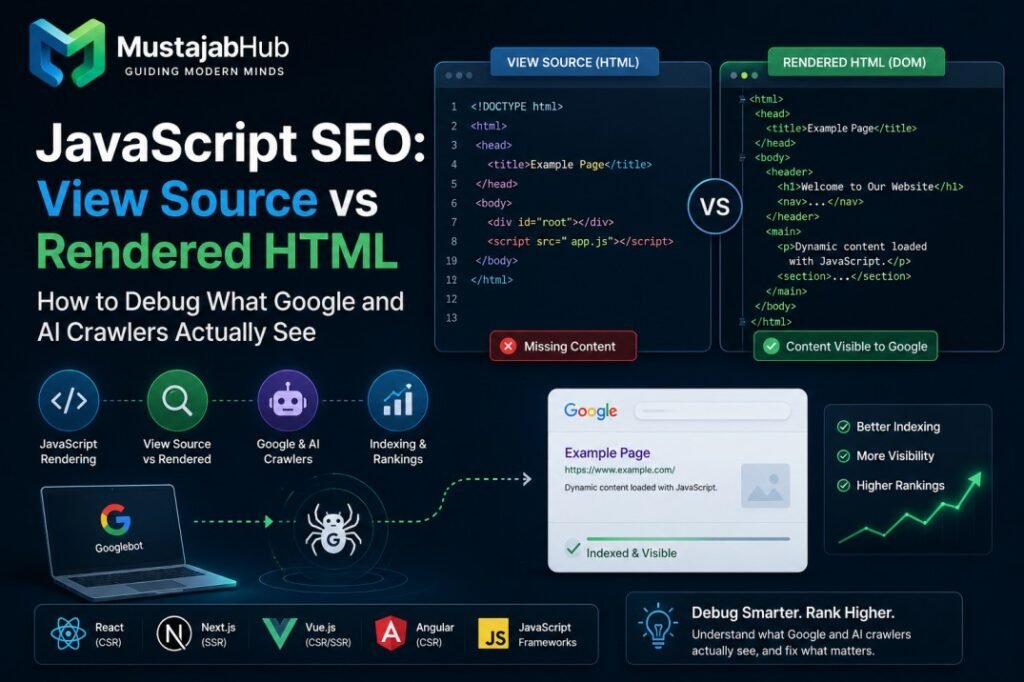
Quick Answer: JavaScript SEO is the practice of making sure search engines and AI crawlers can find, read, and index content that JavaScript builds on your page. The most important thing to know: Google reads your page twice — first the raw HTML your server sends, then the rendered version JavaScript builds. If your main content, headings, links, or schema only appear after JavaScript runs, Google may miss them for days or weeks. Test this with three checks: View Source, Chrome DevTools Elements panel, and the GSC URL Inspection tool.
You built a beautiful website. Your React pages load perfectly in the browser. Your design is clean. But Google only shows your homepage in search. Your product pages and blog posts are stuck in “Crawled — Currently Not Indexed.”
The problem is not your content. The problem is what Google actually sees when it visits your pages — and that is often very different from what you see in your browser. You ship a beautiful React app, GSC shows the URLs as crawled, and three weeks later the impressions are still flat. View source on the page, and you see a near-empty `<div id=”root”></div>` — every heading, paragraph, and product description lives inside JavaScript that Googlebot may or may not have executed.
This guide walks you through exactly what happens, how to test it, and how to fix every rendering problem—step by step, in plain English. No developer jargon required.
What Is JavaScript SEO? (Plain English)
JavaScript SEO is the discipline of making sure search engines and AI crawlers see the same content your human users see, without the rendering delay killing your rankings. It is the technical SEO practice of ensuring that content rendered by JavaScript — typically by SPA frameworks like React, Vue, Angular, or Svelte — is fully discoverable, crawlable, and indexable by search engines.
Here is the simplest way to understand the problem:
A normal HTML website works like a printed book. Google picks it up, reads every page, and knows exactly what is in it. Done.
A JavaScript website is more like a book that only appears on screen after you press a button. If Google does not press that button — or has to wait a long time — it reads an almost empty book. JavaScript SEO is the practice of making sure search engines can crawl, render, and index content that depends on JavaScript to appear. Google can run your JavaScript, but it does so in a slower, resource-limited second pass — so anything important that only loads client-side is at risk of being indexed late, partially, or not at all.
The Half-Truth That Destroys Rankings
Most developers hear this and relax: “Google renders JavaScript now. We are fine.”
That statement is only half true. And the half they miss is where rankings disappear. Googlebot can render JavaScript. That single fact has led more development teams astray than almost any other SEO misconception. The ability to render is not the same as reliable, timely indexing—and the gap between those two things is where your rankings disappear. Google can render JavaScript. But rendering ≠ indexed quickly, reliably, or correctly.
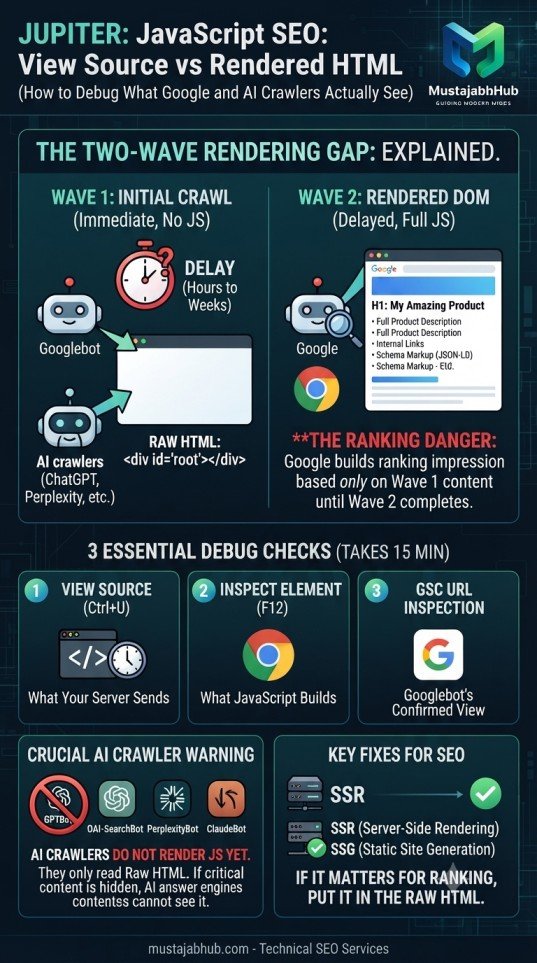
The real danger is timing. Google does not render your JavaScript instantly. It crawls your raw HTML first — often on day one. Then it puts your page into a render queue and processes it later. That gap can last from a few hours to several weeks.
During that gap, Google only knows what your raw HTML says. If your title tag, H1, main content, internal links, and schema only exist in the rendered version, Google builds a ranking impression based on an empty page.
How Google Actually Processes Your JavaScript Page
Understanding this two-wave system changes how you think about JavaScript SEO. To do JavaScript SEO well, you need a clear mental model of what happens after Googlebot requests your page. It runs in two waves, and most indexing problems live in the gap between them. In the first wave, Googlebot fetches your raw HTML — exactly what the server returns before any JavaScript executes. It reads the links, the metadata, and whatever content is already in that response. If your real content is not in this initial HTML, the first wave sees an empty shell. In the second wave, the page goes into a render queue. Google’s Web Rendering Service (WRS), built on an evergreen Chromium engine, executes your JavaScript and produces the final rendered DOM. Only then does Google see the content that was injected client-side.
Here is that process as a simple timeline:
textDay 0,   Hour 0:   Googlebot visits → Gets raw HTML → Reads what is there
Day 0,       Hour 0:   Page enters the Render Queue
Day 0–21:              WRS eventually renders the page with headless Chromium
Day 0–21:              Google updates its index with the rendered content
8 Based on log analysis across sites, the gap between initial crawl and rendering completion ranges from minutes to several days. High-authority sites with frequent crawling tend to see faster rendering. New or low-authority sites may experience delays of 3–7 days. This delay makes CSR unreliable for time-sensitive content like product launches or news.
The Golden Rule: Whatever matters for ranking — your title, H1, main text, internal links, canonical tag, schema — must exist in your raw HTML. Do not make Google wait for JavaScript to build it.
3 Tests to Find Your Rendering Problem (Do These in Order)
These three tests take about 15 minutes total. Together they show you exactly what Google sees at each stage.
Test 1 — View Source (What Your Server Sends)
This is the HTML your server sends before JavaScript does anything. This is what Googlebot sees first — in Wave 1.
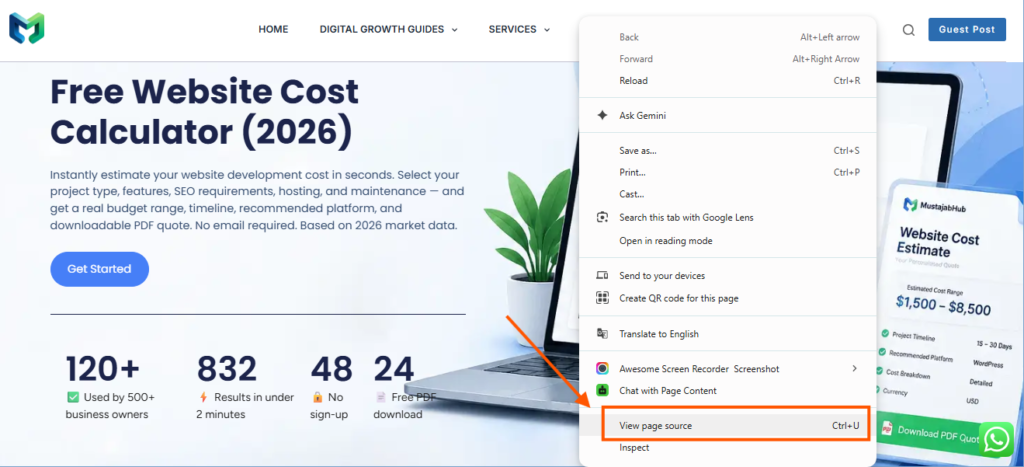
How to do it:
- Open any important page on your site
- Right-click anywhere on the page
- Click “View Page Source” (keyboard shortcut: Ctrl+U on Windows, Cmd+U on Mac)
- Press Ctrl+F and search for your main H1 heading, a key sentence from your page, and your canonical tag
What you are looking for: Is the title, meta description, and main content present in the raw page source?
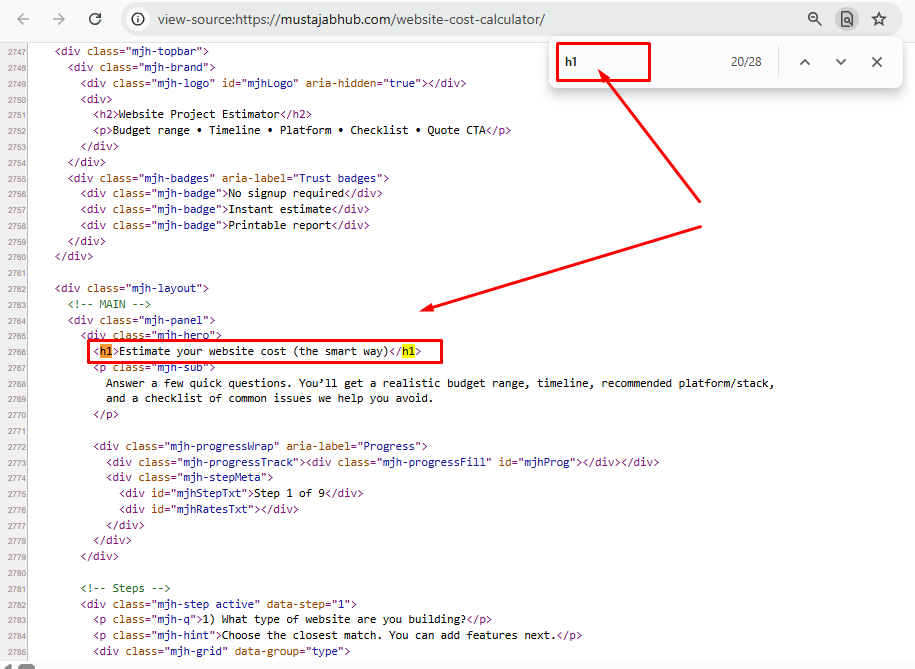
- ✅ If you find them — your server sends the content. Googlebot sees this in Wave 1.
- ❌ If you only see
<div id="root"></div>or<div id="app"></div>with script tags — your page is client-side rendered. Google Wave 1 sees almost nothing.
You cannot rely on “View Source” to check your SEO anymore, because “View Source” only shows the initial raw HTML, not the rendered DOM. But that is exactly the point — you want to see what Wave 1 sees.
Test 2 — Inspect Element (What JavaScript Builds)
This shows the rendered DOM — what JavaScript builds after it runs in the browser.
How to do it:
- Open the same page in Chrome
- Press F12 to open DevTools
- Click the Elements tab
- Press Ctrl+F and search for the same content you looked for in View Source
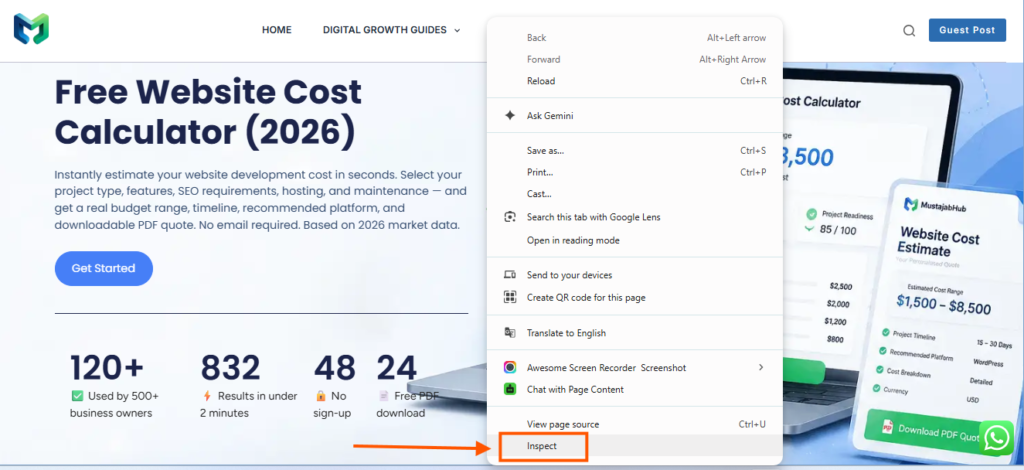
Compare the two results:
| What You Find | What It Means |
|---|---|
| Content exists in View Source | Server sends it — Wave 1 sees it — Safe |
| Content only in Elements, not View Source | JavaScript builds it — Wave 1 misses it — Risk |
| Content in neither | Broken — investigate immediately |
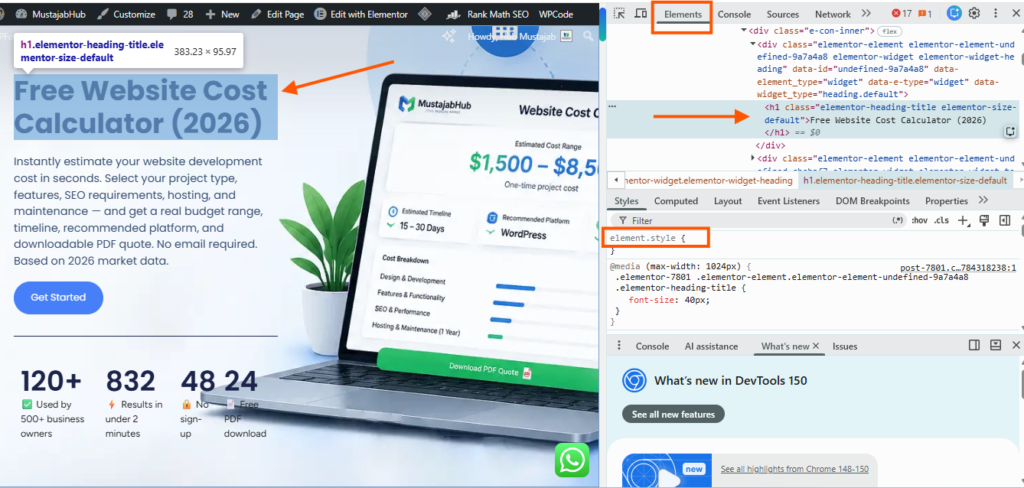
View Source = raw response HTML (pre-JavaScript). Inspect → Elements in Chrome = rendered DOM (post-JavaScript). This extra rendering step means JavaScript can completely change what Google ends up seeing: titles, canonicals, meta tags, links, even the page copy itself.
Test 3 — GSC URL Inspection (What Googlebot Actually Sees)
This is the most important test. It uses Google’s actual Web Rendering Service — the same engine that processes your pages web rendering
How to do it:
- Open Google Search Console
- Paste your URL in the search bar at the top
- Click “Test Live URL” (on the right side)
- Wait about 60 seconds
- Click “View Tested Page.”
- Check three things: the HTML tab, the Screenshot, & More Info (for failed resources)
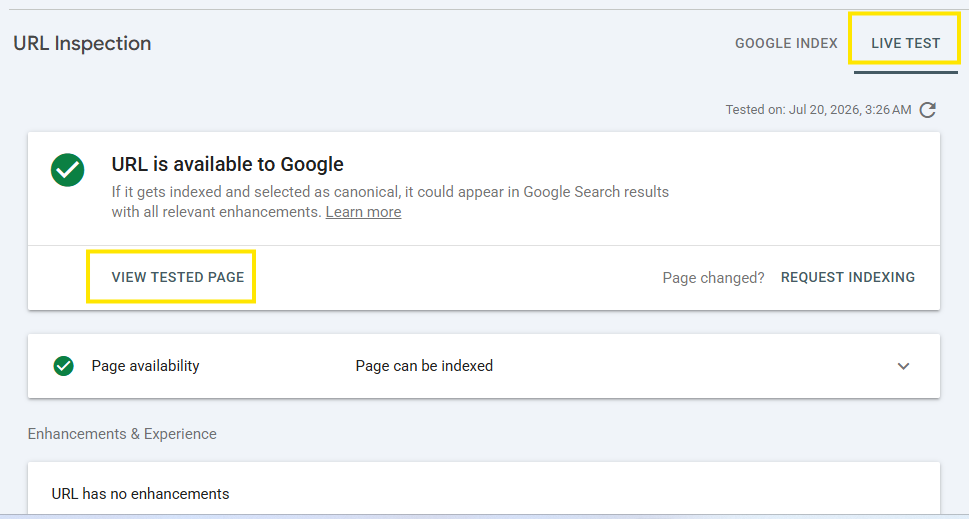
In Google Search Console, inspect a live URL and view the rendered HTML and screenshot. This is the closest thing to seeing the page through Googlebot’s own renderer. Missing content here is a real, confirmed problem, not a hypothesis.
What to check in the screenshot: Look at the screenshot provided by Google Search Console (GSC). If the main content area is blank, white, or missing elements, Google is failing to render your JavaScript.
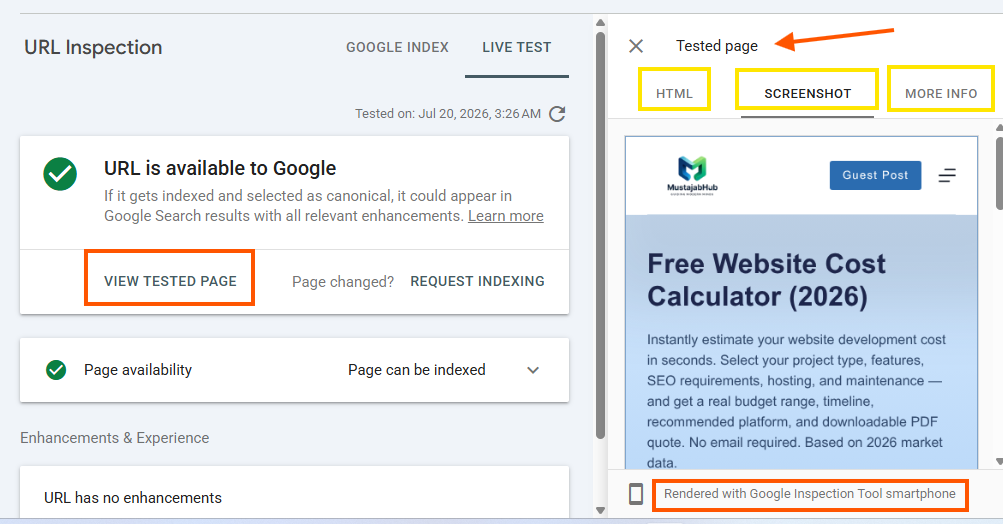
What to check in the HTML tab: Search for your H1, canonical tag, main content sentence, & the key internal links. If they are missing here but exist in your browser — you have a confirmed rendering gap. Always validate with the URL Inspection tool in Search Console, which uses the actual WRS.
What Googlebot Does NOT Do (5 Myths Busted)
Most developers assume Googlebot behaves like a human using Chrome. It does not. These assumptions cost rankings every day.
Myth 1: “If it looks right in Chrome, Google sees it right.” Chrome DevTools & the WRS are not the same environment. DevTools uses your local network, your browser cache, your installed extensions, & your system resources. The WRS has a fixed resource budget, no persistent state, and may time out on resource-heavy pages.
Myth 2: “Googlebot clicks buttons to load more content.” If clicking to a “Show More” button is the only way to reveal a section, Googlebot will not see it. The WRS executes JavaScript but does not click buttons or scroll.
This is a massive trap for e-commerce sites with “Load More” product buttons, and for sites with tab panels that reveal content only on click.
Myth 3: “CSS hidden content is bad for SEO.”
This is actually false. Google’s John Mueller has confirmed multiple times: Content hidden in tabs, accordions, or “read more” buttons for user experience purposes is given full weight. When you use CSS to hide content, the HTML element still exists in the DOM. Googlebot parses the HTML, sees the content, but also sees the CSS rule hiding it. Google indexes this content. It can rank for keywords found within it. In 2026, hidden content is generally treated equally to visible content, provided it is easily accessible to the user.
The key difference:
| Type | How It Works | Google Sees It? |
|---|---|---|
| CSS hidden (display:none) | Content is in the HTML — CSS just hides it visually | ✅ Yes — fully indexed |
| JavaScript hidden (loaded on click) | Content does not exist in HTML until user clicks | ❌ No — Googlebot does not click |
Myth 4: “Service workers can cache content for Googlebot.” Can you use service workers to cache content for Googlebot? No. Googlebot does not support service workers. Any content that depends on a service worker for delivery is invisible to search engines. Use service workers for user experience but not for SEO-critical content delivery.
Myth 5: “JavaScript SEO only matters for single-page applications.” JavaScript SEO only matters for single-page applications — this is a myth. Any website that uses JavaScript to generate, modify, or load content faces rendering considerations. WordPress sites with heavy page builders, lazy-loaded content sections, and JavaScript-injected schema all face these same problems.
The Rendering Gap: A Critical Extra Trap
There is one more pattern that even experienced SEOs miss.
Tabs and accordions on product pages look like a smart design choice. But they hide a dangerous JavaScript SEO trap. Tabs, accordions, “show more” buttons, & modal dialogs are a common SEO trap. Googlebot does not click. It renders what is visible on page load and then may or may not interact with dynamically loaded content depending on the rendering run. If the content matters for SEO, it must be in the DOM on initial render. Hidden via CSS (display: none) is fine. Google reads hidden content. Hidden because the JavaScript has not fetched it yet is not fine.
Real-world example: An e-commerce site puts product specifications, size charts, & reviews inside JavaScript tabs. A user clicks to see them — no problem. But Googlebot never clicks that tab. Google indexes the page without the specs, the size chart, or the review content. Those product pages never rank for the specific product terms customers search for.
The fix: Put the content in the server HTML first. Use CSS to show and hide it for UX. That way both users and Googlebot see it.
CSR vs SSR vs SSG vs ISR — Which One Is Safe for SEO?
This is the most important architectural decision for any JavaScript site.
| Rendering Type | How It Works | SEO Risk | Best Use Case |
|---|---|---|---|
| CSR (Client-Side Rendering) | Browser builds the page from JavaScript | 🔴 Highest | Dashboards, logged-in apps only |
| SSR (Server-Side Rendering) | Server builds full HTML per request | 🟢 Lowest | Product pages, blog posts, landing pages |
| SSG (Static Site Generation) | HTML built at deploy time, served as files | 🟢 Lowest | Blogs, docs, marketing pages |
| ISR (Incremental Static Regeneration) | Static pages that rebuild on a schedule | 🟡 Low | Content updated regularly |
| Dynamic Rendering | Bot gets HTML, users get JavaScript | 🟡 Workaround | Legacy fix, not recommended long-term |
For users on fast devices, CSR feels fine. For SEO, it is the riskiest option. Your content only exists after the second wave, you are fully dependent on Google’s render queue, and every crawler with weaker rendering than Googlebot — including most AI and social crawlers — sees nothing but a blank page. With server-side rendering, the server runs the JavaScript & returns fully-formed HTML on the first request. Googlebot’s first wave sees your complete content immediately, no render queue required. Dynamic rendering is a workaround, not a recommended long-term solution, & recent documentation updates clarified it as a deprecated workaround.
The simple rule:
- If a page needs to rank → use SSR or SSG
- If a page is for logged-in users only → CSR is fine
Use this “diff table” to find the exact issue
Create a small table like this for your page:
| SEO item | View Source | Inspect DOM | GSC rendered HTML | What to do |
|---|---|---|---|---|
| Main H1 | Yes/No | Yes/No | Yes/No | Fix rendering or move to server HTML |
| Main text | Yes/No | Yes/No | Yes/No | Don’t hide behind JS or clicks |
| Internal links | Yes/No | Yes/No | Yes/No | Use real <a href> links |
| Title tag | Yes/No | Yes/No | Yes/No | Set on server or in framework head correctly |
| Canonical | Yes/No | Yes/No | Yes/No | Avoid JS-only canonicals |
| Schema (JSON-LD) | Yes/No | Yes/No | Yes/No | Make sure it appears in rendered HTML |
| Meta robots | Yes/No | Yes/No | Yes/No | Don’t rely on JS to remove noindex |
This table turns “JavaScript SEO fear” into a clean checklist.
Framework-by-Framework Fix Guide
Here is the practical fix for each popular JavaScript framework:
React
Plain Create React App is pure CSR — the highest JavaScript SEO risk. Consider Next.js, Remix, or a prerendering layer.
Plain React builds the page in the browser. Google may eventually render it, but new and lower-authority sites wait 3–7 days. For any page you want to rank, add a server rendering layer.
Fix: Migrate to Next.js. Use the App Router with server components for SEO-critical pages.
Next.js
Next.js is the right tool — but only if you configure it correctly. Next.js solves it when you actually use its SSR or SSG features. If you build a Next.js site that uses client-side useEffect to fetch all data, you have the same problem as plain React. The framework gives you the tools — you still have to configure them correctly. Use generateMetadata (App Router) or getStaticProps/getServerSideProps (Pages Router) so titles, descriptions, & the canonicals are in the initial HTML.
Vue.js
Use Nuxt.js rather than a bare Vue CLI SPA for anything that needs to rank. Vue on its own renders in the browser, like React. Nuxt brings SSR & SSG to Vue with little setup, so reach for it on any Vue site that needs traffic. Nuxt handles universal rendering, static generation, and per-route control, which lets you server-render the pages that matter & keep the app parts client-side.
Angular
Use Angular Universal for SSR. A pure client-side Angular SPA carries CSR-level risk.
WordPress
WordPress uses PHP server-side rendering by default, so most content is in the raw HTML. But many WordPress sites introduce JavaScript SEO problems through:
- Page builders (Elementor, Divi, WPBakery) that inject content through JavaScript
- Lazy-loading plugins that delay content below the fold
- JavaScript-injected schema that depends on rendering
- Popup and chat widgets that block resources
If you use WordPress speed optimization, check that your page builder is not moving critical content into JavaScript-only output. Run the 3-test check above on your key pages to confirm what Googlebot sees.
AI Crawlers Cannot Render JavaScript — Full Stop
This is the section most JavaScript SEO guides do not have. And it is becoming the most important section of all. A React, Angular, or Vue site that hides content behind client-side rendering can rank on Google and still stay invisible in ChatGPT, Claude, & Perplexity.
Googlebot uses a headless Chromium engine & can render most JavaScript. AI crawlers do not yet. As of mid-2026, GPTBot, ClaudeBot, and PerplexityBot read only the raw HTML. Independent crawler analysis has consistently found no JavaScript execution from any of the major AI crawlers. Content that loads with JavaScript stays invisible to them.
Here is a full comparison of how major crawlers handle JavaScript:
| Crawler | Company | Renders JS? | What It Sees |
|---|---|---|---|
| Googlebot | ✅ Yes (Wave 2, with delay) | Rendered HTML (eventually) | |
| Bingbot | Microsoft | ⚠️ Partial | Some JS, not reliably |
| GPTBot | OpenAI | ❌ No | Raw HTML only |
| OAI-SearchBot | OpenAI | ❌ No | Raw HTML only |
| PerplexityBot | Perplexity | ❌ No | Raw HTML only |
| ClaudeBot | Anthropic | ❌ No | Raw HTML only |
The consumers(Visitors) of your HTML now include the crawlers feeding AI answer engines — and their rendering capabilities are, broadly, closer to the raw-HTML era than to Googlebot’s Chromium. Content that exists only post-render is content that largely does not exist for the systems assembling AI answers, citations, & recommendations. For businesses investing in answer-engine visibility, this quietly re-raises the stakes of the initial-HTML rule: the FAQ content, the service descriptions, the expertise signals you want quoted and cited need to be server-delivered, structured, and present without execution.
What this means for your strategy:
If you want Perplexity to cite you, if you want ChatGPT Search to surface your pages, if you want any AI Overview to include your content — your content must exist in the raw HTML format. Not just in the rendered version. The convenient alignment: everything that serves AI crawlers — complete initial HTML, real links, honest metadata, structured data server-side — is identical to what serves Google’s first-pass indexing, other search engines, accessibility, & the raw speed.
JavaScript and Core Web Vitals — The Hidden Connection
JavaScript does not just affect indexing. It also directly damages your Core Web Vitals scores. Heavy JavaScript bundles increase Largest Contentful Paint (LCP) by delaying content rendering. Synchronous scripts block the main thread, increasing Interaction to Next Paint (INP). Layout shifts caused by late-loading JavaScript content inflate Cumulative Layout Shift (CLS). Core Web Vitals are a confirmed ranking signal, so JavaScript that degrades these metrics indirectly hurts your rankings.
Also, a slow-rendering page does not just affect user experience: Page speed & SEO are connected, but not only through Core Web Vitals scores. A page that takes about 8 seconds to render is more likely to time out in Google’s rendering queue — and a partial render means partial indexing.
Quick performance fixes for JavaScript-heavy pages: Add defer or async to non-critical script tags so they do not block the parser. Enable code splitting — ship only the JavaScript needed for the current page, not your entire bundle. Audit third-party scripts (chat widgets, analytics, A/B tools and others). Each one delays render. Load them after the main content. Run Lighthouse and target a Largest Contentful Paint under 2.5 seconds — that is the threshold that matters.
For deeper Core Web Vitals help, the Mustajabhub WordPress Speed Optimization service covers INP, LCP, and CLS fixes for WordPress, Wix, & WooCommerce sites rendering.
Mini case study (real experiment): why rendering delays are real
Onely ran an experiment & found Google needed much longer to crawl JavaScript pages than plain HTML pages. Their headline result: Google needed 9x more time to crawl JS than HTML in that test.
What it means for you:
- If your site depends on client-side rendering, indexing can slow down.
- New pages can take longer to show up, especially when the site is fresh.
- Internal link discovery can lag behind.
So when SEO matters, ship the important content in HTML first.
JavaScript SEO Debugging Checklist
Use this checklist whenever a page is not indexing correctly:
JAVASCRIPT SEO DEBUG CHECKLIST-SSR vs. CSR SEO
================================================
✅ VIEW SOURCE CHECK
[ ] Open View Source on the page
[ ] H1 heading exists in raw HTML
[ ] Meta title and description exist in raw HTML
[ ] Canonical tag exists in raw HTML
[ ] At least 2–3 internal links exist in raw HTML
[ ] Main content (first 3 paragraphs) exists in raw HTML
[ ] Schema / JSON-LD exists in raw HTML (not injected by JS only)
✅ INSPECT ELEMENT CHECK
[ ] Compare Elements panel to View Source
[ ] Note any content that only appears in Elements (JS-injected)
[ ] List all JS-injected items — these are your risk list
✅ GSC URL INSPECTION CHECK
[ ] Run Test Live URL in GSC
[ ] Screenshot shows page content clearly (not blank)
[ ] HTML tab contains all critical elements
[ ] "More Info" tab shows no blocked critical resources
✅ ROBOT RESOURCES CHECK
[ ] robots.txt does NOT block /js/, /scripts/, /static/, /assets/
[ ] robots.txt allows Googlebot to fetch CSS files
[ ] API endpoints used for content are NOT blocked
✅ FRAMEWORK CHECK
[ ] If React — using Next.js with SSR/SSG, not plain CRA
[ ] If Vue — using Nuxt.js with SSR/SSG, not bare Vue CLI
[ ] If Angular — using Angular Universal SSR
[ ] If WordPress — page builder not moving content to JS-only
✅ AI CRAWLER CHECK
[ ] OAI-SearchBot allowed (for ChatGPT Search)
[ ] PerplexityBot allowed (for Perplexity answers)
[ ] Critical content exists in raw HTML (not render-dependent)
✅ PERFORMANCE CHECK
[ ] LCP under 2.5s (PageSpeed Insights field data)
[ ] No render-blocking scripts in <head>
[ ] Third-party scripts use defer or async
[ ] JavaScript bundle split (not one giant file)
7 Most Common JavaScript SEO Mistakes
These are the problems that appear most often on JavaScript-heavy sites:
Mistake 1: Blocking JavaScript files in robots.txt: Google Search will not render JavaScript from blocked files or on blocked pages. If your robots.txt blocks `/static/`, `/assets/`, or `/js/`, Googlebot cannot render your pages at all.
Mistake 2: Title tags set by JavaScript only: In the first pass (HTML crawl), Googlebot sees your source code. If your title tags, meta description, or canonical links are only injected via JavaScript, Googlebot will see the default (or empty) values during this first pass. It is only after the second pass that Google recognises the JavaScript-injected elements.
Mistake 3: Internal links built by JavaScript only: Internal links are an important consideration. In JavaScript applications, navigation links are often generated dynamically & may not appear as standard HTML anchor tags. If Googlebot cannot find these links in Wave 1, it cannot discover the pages they point to until its render in Wave 2.
Mistake 4: Schema markup injected by JavaScript only: Google has said JSON-LD injected by JavaScript is supported. In practice, it works — but it is subject to the same rendering queue delays as everything else. For structured data types that affect your SERP appearance (product rich results, FAQ, breadcrumbs), put the JSON-LD in the server-rendered head.
Mistake 5: Infinite scroll without proper pagination: Paginated content that never appears in the initial HTML will not be indexed. Use standard pagination with crawlable URLs, or ensure the content is server-rendered on load.
Mistake 6: Using hashes in URLs for navigation: Google often ignores hashes, so make sure static URLs are generated for your site’s webpages. Ensure your URLs look like this: yourdomain.com/web-page. Hash-based routing in SPAs (yourdomain.com/#/products) makes proper indexation nearly impossible.
Mistake 7: Over-relying on Google’s rendering ability: A 2024 analysis by Vercel and MERJ, testing how Googlebot handles real JavaScript at scale, confirmed that Google renders client-side content reliably in controlled conditions—but also that the success rate drops sharply once render budget, errors, & timeouts enter the picture on large production sites. The lab and the field are not the same place.
AEO/GEO Tips: Help humans & Help AI answers at the same time
If you want to show up in AI answers, you need the same basics:
- Clear headings (one clear H1)
- Short definitions near the top
- Lists & tables for “how to” steps
- Clean internal linkings
- Important text visible without clicks
That format is easy for people to read and easy for machines to extract.
What to Do If You Cannot Change Your Rendering Setup
Some sites cannot immediately switch to SSR. A full migration takes time. Here is how to reduce the damage while you plan the proper fix.
Short-term fixes:
- Move your title, meta description, canonical, & H1 tag to the server response (even if the rest of the page is CSR).
- Put your main JSON-LD schema in a static server-rendered
<script>tag in the<head>code. - Make sure your primary navigation links are in the raw HTML.
- Use pre-rendering services (like Prerender.io) as a bridge—but plan to move to SSR
Important note on dynamic rendering: Google explicitly supports dynamic rendering as a workaround for sites that cannot implement SSR. The key requirement is that the pre-rendered content must match what users see. Use the dynamic rendering when you have a large existing CSR application & cannot migrate to SSR quickly. But do not use dynamic rendering as a permanent solution. It adds infrastructure complexity & creates a maintenance burden to handle.
If you need help diagnosing and fixing JavaScript rendering issues on your site, the Mustajabhub Technical SEO team runs full JavaScript rendering audits — checking View Source vs Rendered vs Googlebot output on every critical page template. You can also contact us directly to discuss your specific rendering setup.
The One Rule to Remember
After everything in this guide, there is one rule that solves most JavaScript SEO problems:
Content that needs to rank must exist in the HTML your server sends — before JavaScript runs. Content and links that must rank belong in the initial HTML. Everything else — interactivity, personalization, app-like behavior — can be JavaScript’s job. That single sentence is most of JavaScript SEO; the rest of this guide is verifying whether your site honors it and fixing where it does not.
For more detail on how to read Google Search Console correctly and fix indexation errors, visit Google’s official JavaScript SEO documentation. For measuring Core Web Vitals on JavaScript-heavy pages, web.dev’s performance guide is the best starting point.
Frequently Asked Questions – JavaScript SEO
What is the difference between View Source and Inspect Element for SEO?
View Source shows the raw HTML your server sends before JavaScript runs. This is what Googlebot sees in Wave 1 — immediately when it crawls your page. Inspect Element (Chrome DevTools → Elements tab) shows the rendered DOM — what JavaScript builds after running in the browser. For SEO, content in View Source is safest. Content that only appears in Inspect Element depends on Googlebot’s render queue, which can take hours to weeks.
Does Google render JavaScript?
Yes, but not instantly and not always completely. Google uses a Web Rendering Service (WRS) based on headless Chromium to render JavaScript in a second pass, after the initial crawl. This second pass can be delayed from minutes to several weeks, depending on your site’s authority(DA/DR) & server performance. New and smaller sites typically wait 3–7 days.
Why is my React site not showing up in Google Search?
If your React site uses plain Create React App (client-side rendering only), Googlebot sees an empty HTML shell in Wave 1. Your content only exists after JavaScript runs — which happens in Wave 2 with a delay. The fix is to migrate to Next.js with server-side rendering or static site generation so Google sees your full content immediately.
Do AI crawlers like ChatGPT and Perplexity render JavaScript?
No. As of mid-2026, GPTBot, OAI-SearchBot, PerplexityBot, & ClaudeBot all read only the raw HTML. They do not execute JavaScript. If your content only appears after JavaScript runs, it is completely invisible to these AI crawlers — meaning your site will not appear in ChatGPT Search answers, Perplexity citations, or AI Overviews that pull from those sources.
What is the Googlebot render queue and how long does it take?
The render queue is the list of pages Google has crawled & needs to process with its JavaScript renderer. High-authority sites with frequent crawl rates tend to get rendered faster. New sites or lower-authority sites often wait 3–7 days between the initial crawl and rendering. During this time, Google only knows what was in the raw HTML.
Is it bad to hide content with display:none CSS?
No. CSS-hidden content (display:none) is still in the HTML — Googlebot reads it and can index it. Google treats it as normal content when the hiding is for user experience purposes (tabs, accordions, mobile menus). What is bad for SEO is JavaScript-hidden content — content that only loads when a user clicks something. Presently, Googlebot does not click, so it never sees that content.
How do I know if my JavaScript SEO is causing indexing problems?
Run three checks: (1) View Source your page & then look for your main content. (2) Use Chrome DevTools Elements panel to compare. (3) Run the GSC URL Inspection tool and check the rendered HTML and screenshot. If content is missing from View Source but present in Elements — you have a JavaScript rendering dependency. If content is missing in the GSC screenshot — you have a confirmed indexing problem.
What is JavaScript SEO?
JavaScript SEO means making sure search engines can crawl, render, and index content that loads with JavaScript.
Does Google index rendered HTML or source HTML?
Google can index content after rendering, but you should verify what Google renders using Search Console’s rendered HTML view.
Is it bad if my content is not in View Source?
Not always. But it increases risk. If Google fails to render your page, it may miss your content and links. For important pages, SSR/SSG is safer.
How do I check what Googlebot renders?
Use Google Search Console URL Inspection → Test live URL → View tested page → HTML tab.
What is the easiest fix for JavaScript SEO?
Put your main text and internal links in the initial HTML using SSR or SSG, then use JavaScript for extra features.
This post is part of the Mustajabhub Digital Growth Guides series. For related reading, see our Technical SEO Audit Checklist or explore how our Technical SEO Performance Fix service handles JavaScript rendering audits for live sites. Need a full SEO content strategy alongside your technical fixes? The SEO & Content Writing service covers both layers.
Professional Author Profile
Writer Rana Umar
Senior Content Strategist & Search Analyst
Rana Umar is a digital content writer and online education guide with over five + years of experience helping beginners navigate the world of digital skills, online earning, & e-learning. He writes in a simple, direct style because he believes good knowledge should be easy for everyone to understand — not just experts. At MustajabHub, Rana covers practical guides on digital growth, online learning, & building real skills that lead to real results. Rana Umar possessing over 4+ years of professional experience in technical SEO, content optimization, & best search analytics, Rana specializes in aligning editorial strategies with search engine intent. By focusing on data-driven research & practical problem-solving, the writer translates complex technical developments into clear, actionable guides that help businesses & also self-directed learners build topical authority_ Plus, improve organic search visibility, & drive sustainable growth.
Read More about: Technical-seo-audit-checklist | Crawled-currently-not-indexed-fix