

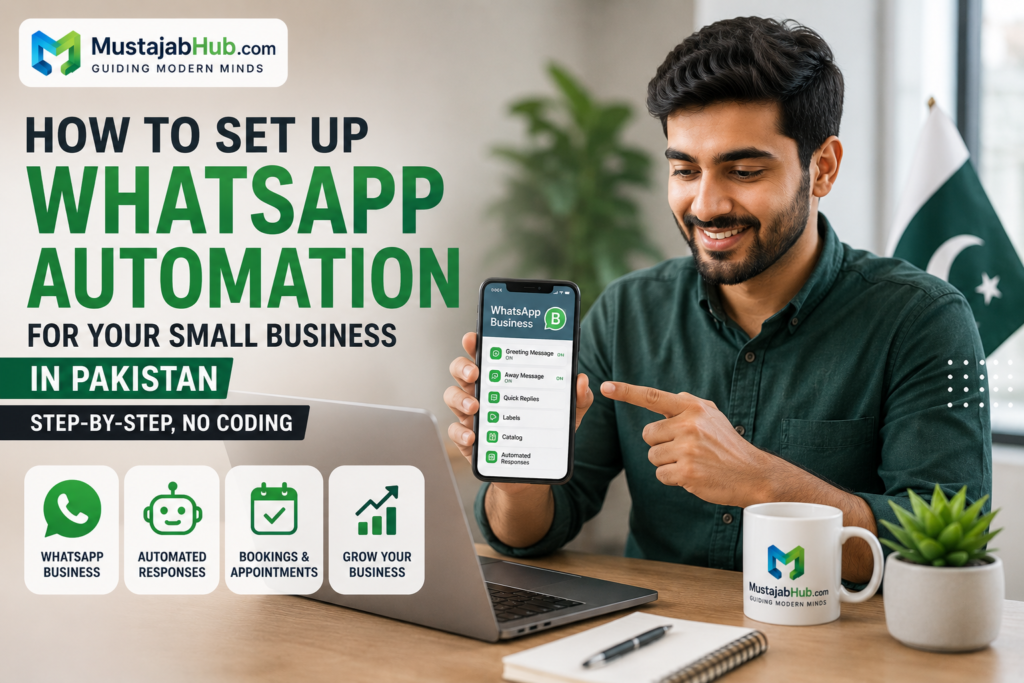

If you run a small business in Pakistan, the easiest way to stay in touch with customers is often already in your pocket: WhatsApp. The right setup can help you answer faster, reduce missed leads, and keep orders moving even when you are busy. If you are a small business that manages chats manually, the WhatsApp Business App is the right starting point. If you need multi-agent automation (likeWhatsApp automation small business Pakistan), message templates, & programmatic access, the WhatsApp Business Platform is the next step.
To set up WhatsApp automation for your small business in Pakistan without coding, you can either use the built-in, free greeting and away messages inside the official WhatsApp Business App for basic setups, or connect a no-code visual chatbot builder like ManyChat or WATI to the official WhatsApp Business API for advanced, multi-step automated workflows.
Table of Contents
Why WhatsApp automation is essential for Pakistani small businesses right now
For many customers in Pakistan, WhatsApp is not just a chat app. It is the place where they ask about prices, confirm orders, book appointments, and follow up on delivery. WhatsApp is also one of the most used instant messaging services in South Asia and Southeast Asia, which makes it a practical channel for local businesses that want direct, low-friction communication.
Pakistan Has 110 Million WhatsApp Users — Your Customers Are Already There
Pakistan’s digital market is massive, with over 110 million active users on the platform. It is the primary way people talk to friends, family, and businesses. If you want your brand to get noticed, you need to be where your customers spend their time.
Traditional email marketing campaigns see average open rates of around 20%. In contrast, automated broadcasts sent over chat networks boast an incredible 98% open rate within five minutes of delivery. This makes it the single most effective channel to promote your brand, confirm orders, and drive repeat sales.
Pakistan has a real WhatsApp-first audience
A 2025 Pakistan study found WhatsApp use among respondents at 62.7%, which is enough to show why a WhatsApp-first workflow is worth building for local businesses. That is why restaurants, clinics, retail stores, service companies, and home-based sellers can all benefit from faster replies and simple automation.
What WhatsApp automation actually does
At the small-business level, automation usually means:
- sending a greeting message automatically
- replying outside business hours
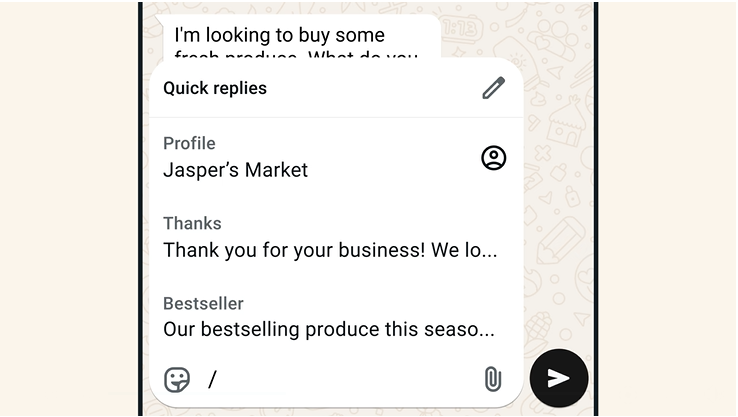
- using quick replies for repeated questions
- organizing customer chats with labels
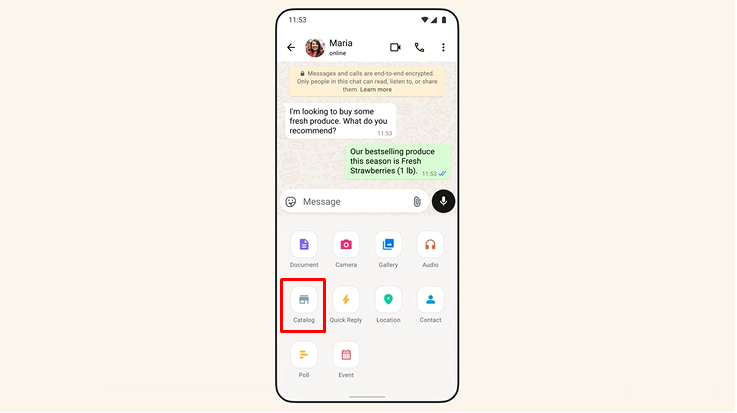
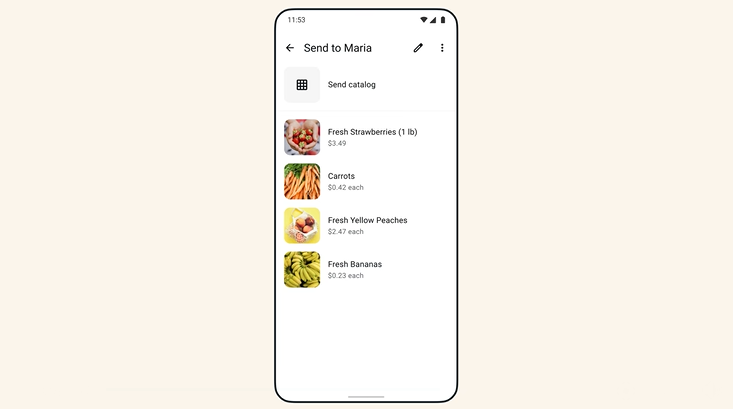
- showing products in a catalog
- sending broadcast updates
- adding a click-to-WhatsApp button on your website
- routing leads more smoothly when you use the Business Platform
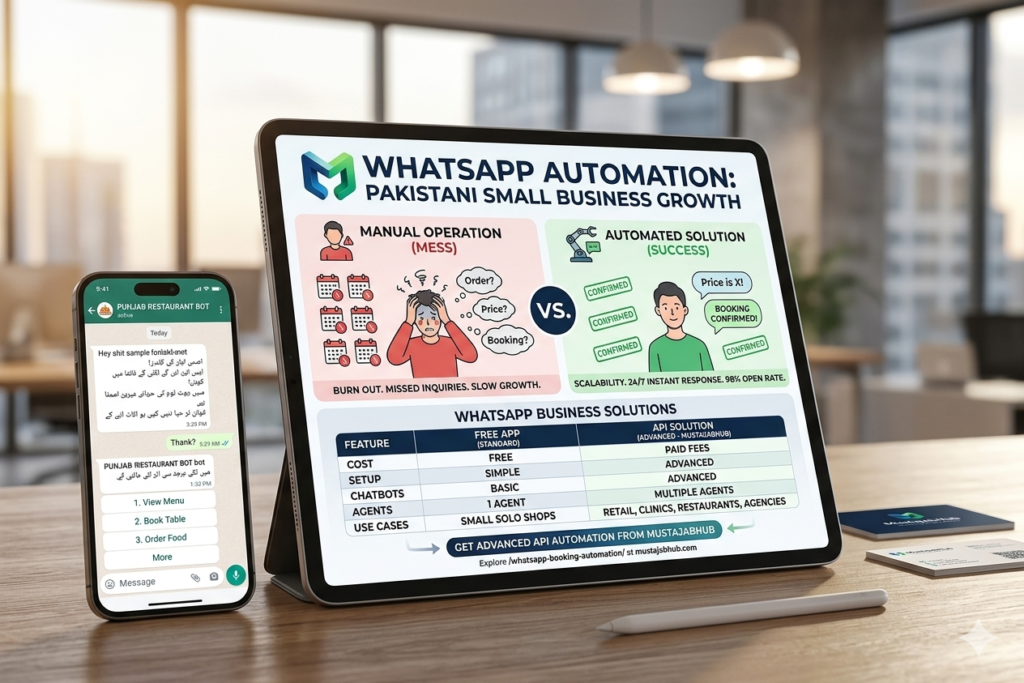
WhatsApp Business App vs WhatsApp Business Platform — which one do you need?
Imagine waking up at 8 AM to find 150 customer messages sitting in your inbox. Customers are asking the exact same questions over and over: “Is this item in stock?”, “What is your price?”, “Where is my order tracking number?”, or “Can I book an appointment for today?”
If you spend your entire morning manually typing the same replies, you are losing valuable time that should be spent growing your business.
The secret to scaling your operations is simple: you need to automate your customer communication. This complete guide will show you exactly how to configure WhatsApp automation small business Pakistan workflows to instantly reply to customers, book orders, and grow your sales on autopilot—with zero coding required.
WhatsApp Business App
Use this if:
- you are a small business
- you personally manage chats
- you want simple automation
- you do not want coding
- you mainly need greeting messages, away messages, and quick replies
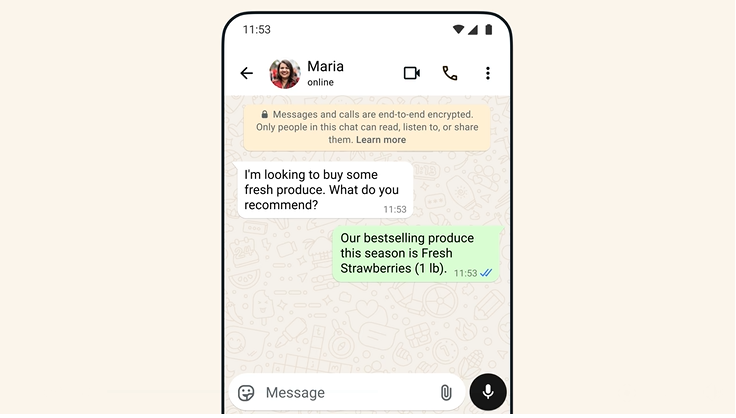
WhatsApp’s official business page says the Business App is for small businesses who personally manage conversations with customers. The app features include a custom business profile, greeting messages, away messages, quick replies, labels, broadcasts, product catalogs, catalog links, and cart support. It also lets eligible Meta Verified businesses link up to 10 devices and agents.
WhatsApp Business Platform
Use this if:
- you need automation at scale
- multiple people will answer customers
- you want message templates
- you need customer-initiated and business-initiated messaging
- you want website buttons, QR codes, read receipts, and interactive messages
Meta’s official business pages say the Business Platform is for medium to large businesses communicating with customers at scale through programmatic access. It supports customer-initiated and business-initiated messages, customizable templates, media messages, interactive reply buttons, QR codes, website buttons, product messages, and read receipts.
The Benefits: It is 100% free, requires no technical setup, and lets you set basic automatic replies.
The Limitations: It only works on a few linked devices, cannot run advanced conditional chatbots, and requires a human to manually click and send broadcast messages to large groups.
Quick decision
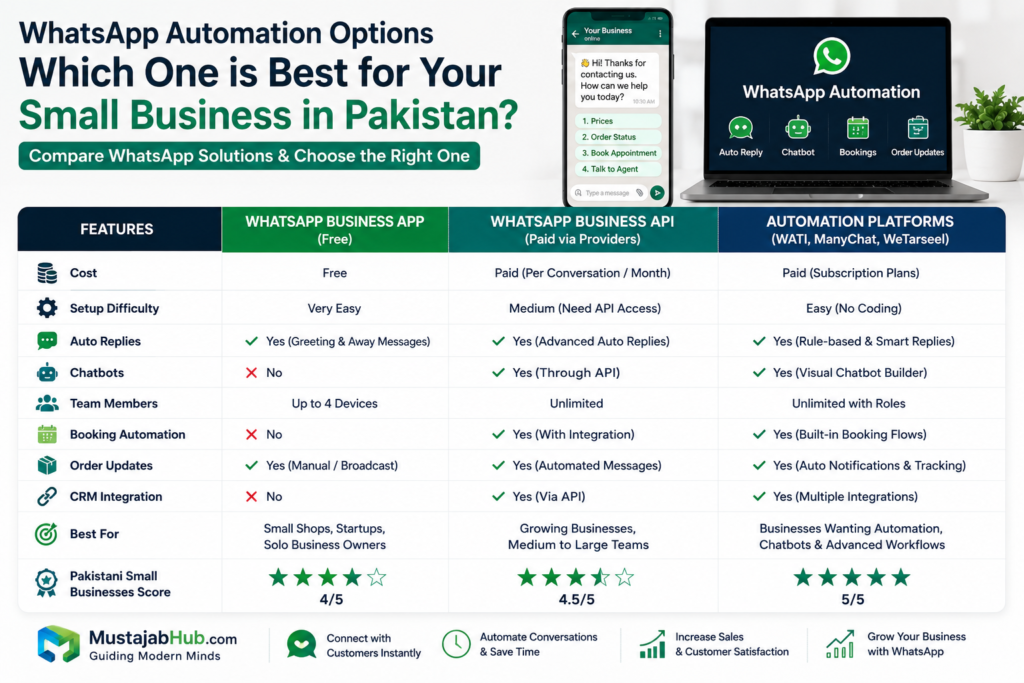
If you are just starting, use the WhatsApp Business App first. If you already have steady orders, a team, or a lead flow that needs automation, move toward the WhatsApp Business Platform through an approved provider. Meta says businesses usually access the API through approved Business Solution Providers.
Comparison Table: Which option fits your business best?
| Option | Best for | Setup style | Automation depth | Good for Pakistan small businesses |
|---|---|---|---|---|
| WhatsApp Business App | Solo owners, small shops, clinics | Very easy | Basic | Yes |
| WhatsApp Business Platform | Growing teams, high message volume | Medium | Strong | Yes, when scale is needed |
| WATI | Sales, support, marketing teams | Easy to medium | Strong | Good for later growth |
| ManyChat | Creators, brands, eCommerce | Easy | Strong | Good if you need multi-channel automation |
| respond.io | Lead capture, routing, analytics | Medium | Strong | Good for teams and conversion tracking |
| Gupshup | Advanced support, commerce, AI agents | Medium to advanced | Very strong | Good for larger operations |
This is the simplest way to choose. The official WhatsApp pages show the app is built for personal small-business chat handling, while the platform is built for scaled programmatic access and richer automation. The vendor pages show how the market splits further into marketing automation, omnichannel messaging, and AI-driven support.
How to set up WhatsApp Business auto-reply in Pakistan
This is the no-coding path most small businesses should start with.
Step 1 — Install WhatsApp Business App
Download the WhatsApp Business app and create your business profile. Meta says the Business App is designed for small companies that personally manage conversations. Use your own business name, logo, business hours, website, & a short description so customers know who they are talking to.
Step 2 — Write your greeting message
Turn on the greeting feature so new customers get a welcome message when they start a conversation. WhatsApp’s Business App features page says greeting messages are sent automatically to new customers when they contact your business.
A simple example:
“Thanks for contacting MustajabHub. We reply during working hours and will guide you to the right service.”
Step 3 — Set your away message
If customers message you after hours, send an automatic reply. WhatsApp says away messages respond automatically outside business hours and help set expectations about when you will be back.
Example:
“Thanks for your message. We are currently offline and will reply tomorrow morning.”
Step 4 — Create quick replies
Quick replies save time when you answer the same question often. WhatsApp says quick replies let you create shortcuts for messages you send often so you can respond to common questions in a few taps.
Use the Quick Replies feature to save pre-written answers. Create a quick shortcut like /bank or /price. When a customer asks for payment options, simply type /bank to instantly populate your complete account details into the chat window.
Use them for:
- Price questions
- Delivery time
- Booking questions
- Location details
- Service packages
Step 5 — Organize chats with labels
Labels help you filter customers by status. WhatsApp says labels help you organize and filter important conversations so you can respond faster.
A simple label set:
- New lead
- Hot lead
- Paid order
- Follow-up
- Completed
Step 6 — Add a catalog if you sell products
If you sell items, build a catalog. WhatsApp says the Business App lets you showcase products and services in a mobile storefront and group similar items into collections. You can also share catalog links across WhatsApp, Facebook, and Instagram.
Step 7 — Add a click-to-WhatsApp button to your website
If you have a website, add a click-to-WhatsApp button so visitors can talk to you instantly. Generate a free click-to-chat link (e.g., [https://wa.me/yournumber](https://wa.me/yournumber)) or use a simple website plugin to place a floating chat widget on your site. This allows users to jump directly from your web page into a live chat session with a single click. Meta says the Business Platform supports native entry points like a custom button on your website and QR codes, and it also supports ads that click to WhatsApp.
That step alone can turn website visitors into chat leads much faster.
Best free or low-friction WhatsApp automation tools
These tools are the ones most likely to show up when businesses move beyond the basic app.
ManyChat
ManyChat positions itself as a chat marketing platform for Instagram, WhatsApp, Messenger, and TikTok. Its homepage says it helps businesses use automations for Instagram, WhatsApp, TikTok, and Messenger, and it offers business-type paths for creators, eCommerce, SM marketers, agencies, and brands.
Why It Works: The free plan lets you build automated workflows for up to 1,000 unique customer contacts. It is perfect for capturing customer phone numbers, qualifying new leads, and running simple interactive question-and-answer funnels.
The Drawback: To connect it to your number, you must go through the official Meta API activation process, which requires an active Facebook Business Portfolio.
WATI
WATI describes itself as an AI-powered customer engagement platform. Its homepage shows WhatsApp Business API, no-code chatbots, Instagram automation, click-to-WhatsApp ads, campaigns, team inbox, and WhatsApp Business calling. WATI also says it is trusted by 16,000+ customers worldwide.
Why It Works: It provides a unified team inbox, meaning five different customer support agents can log in and reply to messages from the exact same business phone number at the same time. It also integrates seamlessly with e-commerce platforms like WooCommerce and Shopify to send automated abandoned cart reminders.
The Drawback: It does not feature a permanent free plan, meaning you will need to transition to a paid monthly subscription as your team scales.
respond.io
respond.io is built around customer conversation management. Its homepage and product pages emphasize WhatsApp pricing tools, link generation, QR generation, lead automation, booking automation, analytics, and customer stories showing conversion gains. It also says it supports over 10,000 businesses across 80+ countries.
Gupshup
Gupshup focuses on AI agents and customer interaction. Its site highlights assisted shopping on WhatsApp, virtual enquiry assistants, automated invoicing, assisted sales, and customer support workflows. It positions itself around sales, marketing, and customer support automation.
WeTarseel — Pakistan-Based WhatsApp Automation Platform
WeTarseel is a localized automation engine designed specifically to meet the unique operational needs and workflows of the Pakistani digital marketplace.
- Why It Works: Unlike international platforms that charge exclusively in US Dollars, WeTarseel offers affordable local payment options and specializes in workflows tailored for Cash on Delivery (COD) retail models.
- The Drawback: The platform has a smaller library of direct, third-party software integrations compared to global tools like ManyChat.
What this means for your blog
These vendors are strong, but they are still product-led global platforms. Your article can win by doing what they do not: teaching a Pakistani small business owner how to start from zero, set up auto-replies, build a booking flow, and decide when to upgrade. That is the content gap.
Best Free WhatsApp Automation Tools for Pakistani Businesses
When your business outgrows the basic free mobile app and you need an advanced, fully automated customer support system, you will want to look at dedicated no-code software solutions.
Here is an architectural comparison of the most popular automation tools used by local businesses:
| Automation Platform | Free Tier Availability | Primary Benefit | Drawback / Limitation | Best Suited For |
| ManyChat | Fully functional free plan for up to 1,000 contacts. | Very intuitive, drag-and-drop visual chatbot builder. | Requires an official Meta Business API connection. | E-commerce brands, digital agencies, and content creators. |
| WATI | Only offers a paid trial; no permanent free plan. | Native Shopify and WooCommerce plugins built-in. | Can be expensive for early-stage startups. | Established retail shops and growing e-commerce platforms. |
| WeTarseel | Affordable local trial tiers; customized setups. | Localized customer support with rupee-based pricing. | Smaller global integrations compared to massive tools. | Pakistani retail shops and local service providers. |
WhatsApp automation for specific Pakistani business types
Restaurants and food delivery
A popular restaurant chain in Karachi integrated a smart WhatsApp chatbot for Pakistani restaurants into their system. Instead of hiring three dedicated phone operators to manually take orders during busy dinner hours, their automated chatbot handles the process flawlessly:
[Customer Opts to Order] ➔ [Chatbot Displays Menu Options] ➔ [Customer Selects Meal] ➔ [Automated Order Confirmation & Receipt Sent]
This simple system cut down order processing times by over 40%, allowing the kitchen team to prepare meals faster and keep customers happy.
Use:
- Auto greeting
- Menu catalog
- Quick replies
- Order confirmation
- Delivery update messages
WhatsApp’s Business Platform supports utility and service messages, plus structured messaging and product-style flows that help customers move from asking to ordering.
Clinics and doctors
Medical clinics use smart scheduling automations to simplify their booking process. When a patient texts the clinic, the automated system presents an interactive calendar showing available check-up times. Once the patient selects a slot, the system automatically logs the appointment and sends a confirmation message with the clinic’s location link.
Use:
- Booking confirmations
- Appointment reminders
- Follow-up replies
- Doctor timing messages
Meta’s pricing page says service messages and utility responses are central to customer help, and the platform supports a 24-hour customer service window for replies after the user messages you.
Retail shops and COD sellers
Local clothing and e-commerce brands use automated messaging workflows to reduce delivery failures on Cash on Delivery orders. The moment an order is placed on their website, the system automatically sends a confirmation message asking the customer to reply with a simple “1” to confirm their shipping address. This simple step helps cut down package return rates significantly, protecting the business’s bottom line.
Use:
- Product catalog
- cart message
- Delivery confirmation
- Payment update
- Order follow-up
The Business App catalog and cart tools are a good fit here, and the Business Platform adds richer templates and entry points for scaled sales.
Side Effects & Things To Keep In Mind
WhatsApp automation is useful, but it is not magic.
1) Messaging costs can rise on the Business Platform
Meta says businesses using the platform are charged on a per-message basis when messages are delivered, with pricing based on who the message is sent to and the category of the message. Meta also says service messages and utility messages sent in response to users are not charged, and there are 72 hours of free messaging after a customer messages from a click-to-WhatsApp ad or a Facebook Page CTA button.
2) Not every automation needs the API
Many small businesses only need greeting, away messages, labels, quick replies, catalog, and broadcasts. The Business App already covers that well.
3) Policy changes matter
Meta has also tightened its WhatsApp Business API rules around general-purpose AI chatbots, so if you plan to use chatbot-first workflows, check the current policy before building on top of WhatsApp.
FAQ – For Digital Growth For WhatsApp automation small business Pakistan
Is WhatsApp Business API free in Pakistan?
No, the official WhatsApp Business API is not entirely free. While Meta allows you to have 1,000 free customer-initiated conversations every month, you will still need a paid third-party platform (like WATI or ManyChat) to access the API interface, manage your team inbox, and build advanced automated workflows.
Can I automate WhatsApp without coding in Pakistan?
Yes, absolutely. By using modern no-code builders like ManyChat, you can visually map out entire conversational workflows, customer support menus, and automated response sequences using a simple drag-and-drop interface—no technical or software engineering experience required.
What is the best WhatsApp automation tool for small business?
For early-stage startups and solo freelancers on a budget, the official free WhatsApp Business App is the best place to start. For growing businesses that need multi-user support and advanced chatbot sequences, ManyChat offers the most intuitive and cost-effective visual builder on the market.
How much does WhatsApp Business API cost in Pakistan?
The total cost depends on the software provider you choose and your monthly messaging volume. On average, standard subscriptions for API access platforms range from $15 to $49 per month. In addition, Meta charges micro-fees per conversation thread, which vary depending on whether the chat was started by the customer or the business.
Can I add WhatsApp automation to my website?
Yes. Meta’s Business Platform supports native entry points like a custom website button and QR codes, and it also supports ads that click to WhatsApp.
Final Thouhts For WhatsApp Automation
Implementing an automated messaging strategy is a highly effective way for local businesses to save time, increase team efficiency, and turn incoming messages into loyal customers on autopilot.
Instead of getting overwhelmed by all the options, start small: download the free business app today, configure your core welcome and away messages, and set up quick shortcuts for your most common customer questions. Once your chat volume starts to outgrow the mobile app, you can easily upgrade to an advanced API platform to handle your growing customer base.
If you are ready to upgrade your customer support with an advanced WhatsApp booking system Pakistan workflow, custom chatbot routing, or a seamless website integration, the development team at MustajabHub is here to help. Explore our dedicated Web Development Services Page or check out our comprehensive Digital Growth and SEO Guides to scale your business today!
Author bio
Mustajab Hub helps Pakistani freelancers, small businesses, and local brands grow with practical website development, digital tools, SEO, and automation. We create simple, working systems for real businesses — not theory. For website development and growth support, visit MustajabHub.




Hey There. I found your blog using msn. This is a very well written article.
I’ll be sure to bookmark it and return to read more of your useful information. Thanks
for the post. I will definitely return.
Hey I know this is off topic but I was wondering if you knew of any widgets I could add
to my blog that automatically tweet my newest twitter updates.
I’ve been looking for a plug-in like this for quite some time and
was hoping maybe you would have some experience with something like
this. Please let me know if you run into anything. I truly enjoy reading your blog and I look forward to your new updates.