


You built the website. You wrote the content. You spent time, money, and energy. And then you searched your topic on Google and found everyone except yourself.
This happens to thousands of Pakistani website owners every single day. The frustrating part is not the problem itself — it is not knowing which of the dozens of possible causes is actually the one hurting your specific site.
This guide identifies the 15 most common reasons websites fail to rank on Google in 2026. Each one comes with a specific, actionable fix you can implement today.
Table of Contents
Is Your Website Actually Indexed by Google?
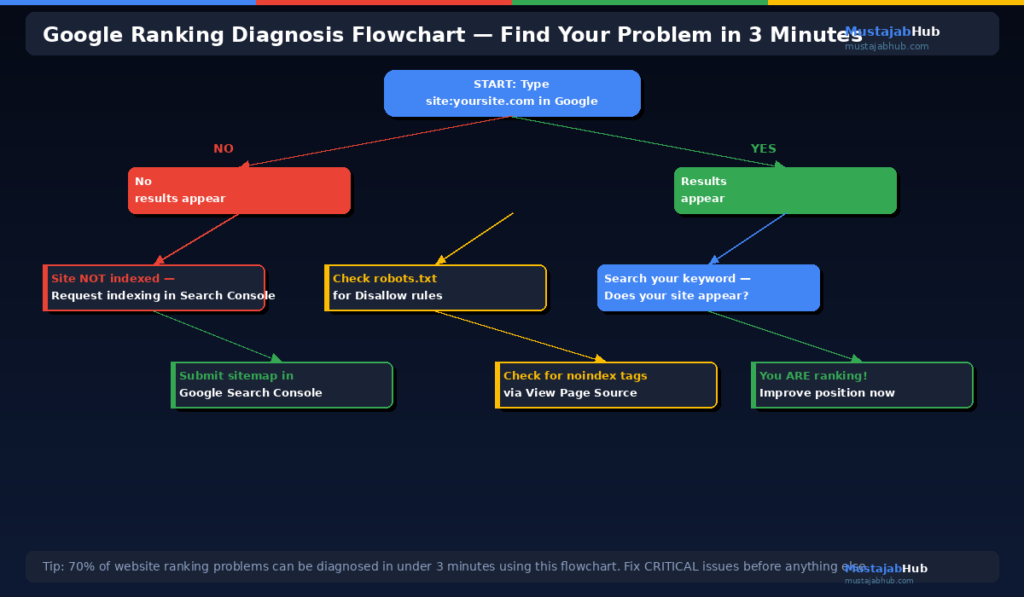
Before anything else, answer this one question: Is your website even in Google’s index?
A website that is not indexed cannot rank — for anything. Google has to first discover, crawl, and index your pages before it can rank them.
How to check if your website is indexed: Open Google and type site:yourdomain.com into the search bar. If you see a list of your pages appear, Google has indexed them. If you see nothing or “Your search did not match any documents,” your site is not indexed.
If you find no pages indexed, stop reading this list and go directly to Google Search Console → URL Inspection → enter your homepage URL → click Request Indexing. Then submit your sitemap. This single step is the most important first action for any new website that is not showing on Google.
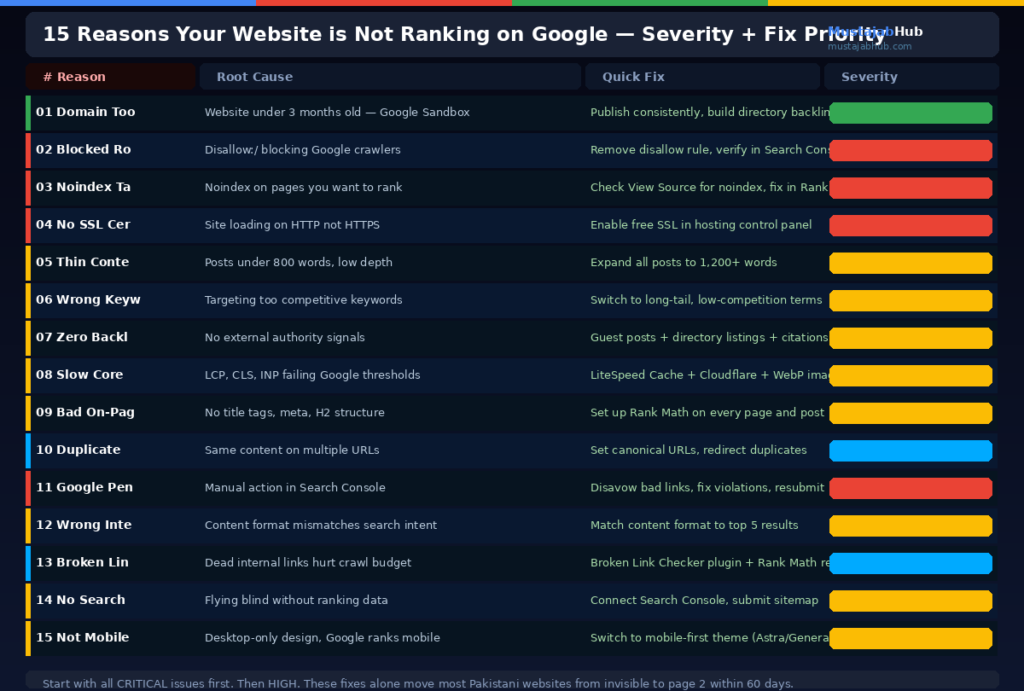
Reason 1: Your Domain Is Too New
If your website launched in the last 3 to 6 months and you cannot find it on Google, there is a good chance you are experiencing what SEOs call the Google Sandbox — an informal term for the observation that new domains have reduced ranking ability for their first several months.
Mistake: Not updating old posts — Google will rank fresher and more up-to-date pages above you. A very quick refresh can expedite your ranking rise. Flaunt My Design
For new domains, patience is not just good advice — it is the only available action. Use this time productively: publish 15 to 25 quality posts, fix all technical SEO, build foundational backlinks through directories and social profiles, & connect Google Search Console. By month 4 to 6, Google begins evaluating your site seriously.
Fix: Continue publishing quality content consistently. Submit every new post URL in Google Search Console for faster indexing. Build directory backlinks to establish your domain’s entity in Google’s knowledge graph.
Reason 2: Google Cannot Crawl Your Website
Google uses software called crawlers (or spiders) to read your website. If your website blocks these crawlers, Google cannot understand what is on your pages and cannot rank them.
How to check: Go to your website URL and add /robots.txt at the end (yoursite.com/robots.txt). Look for a line that says Disallow: /. If you see this, it is blocking Google from crawling your entire website.
This happens surprisingly often on WordPress sites when the development mode setting “Discourage search engines from indexing this site” is accidentally left enabled. Check this in WordPress Settings → Reading → make sure this checkbox is unchecked.
Fix: Remove any Disallow rules that block important pages from your robots.txt. In WordPress, uncheck the “discourage search engines” setting. Use Google Search Console → Coverage report to see which pages have crawl errors.
Reason 3: You Have a Hidden Noindex Tag
A noindex tag tells Google: “Do not include this page in search results.” It is useful for thank-you pages and admin pages that should not rank — but when it appears on pages you want to rank, it is invisible website sabotage.
This happens frequently when: a developer adds noindex during testing and forgets to remove it, a caching plugin adds it accidentally, or a misconfigured SEO plugin like Rank Math or Yoast applies it to categories or tags.
How to check: In your browser, right-click your page → View Page Source → press Ctrl+F and search for “noindex.” If you find it in the head section of a page you want to rank, that page will never appear in Google.
Fix: In Rank Math, go to each page or post and check the Advanced tab — make sure “Follow” and “Index” are both selected. In your SEO plugin’s global settings, verify that posts, pages, and categories are set to Index.
Reason 4: Your Website Has No SSL Certificate
Google confirmed that websites using HTTPS encryption rank higher than sites using HTTP. According to a SearchMetrics study, almost half of the top-ranking websites use HTTPS encryption.
An HTTP website — without the lock icon in the browser — is being outranked by its competitors on HTTPS by design. Google treats HTTP sites as less secure and less trustworthy.
Fix: Install a free SSL certificate through your hosting control panel. On Hostinger, go to hPanel → SSL. On cPanel, use the Let’s Encrypt option. After installing SSL, update your WordPress address in Settings → General to https://. Then redirect all HTTP traffic to HTTPS in your .htaccess file or through Rank Math’s redirections.
Reason 5: Your Content Is Too Short and Too Thin
If your blog posts are 200 to 400 words, they are almost certainly too thin to rank for competitive keywords in 2026. On average, posts in the first 10 positions on Google search have 1,447 words. Google prioritizes content that fully responds to users’ needs and provides detailed solutions.
Thin content does not mean short content alone. A 2,000-word post can be thin if it repeats the same points in different words without actually helping the reader. Thin content means content that does not fully satisfy the searcher’s intent — it answers the question partially and leaves the reader needing to search again.
Fix: Go to your lowest-performing posts and expand them. Add statistics, comparison tables, step-by-step instructions, and FAQ sections. Update the publish date after making substantial improvements. Google treats these updated posts as fresh content with additional ranking consideration.
Reason 6: You Are Targeting Keywords That Are Too Competitive
“SEO services” gets millions of monthly searches globally. It is also one of the most competitive keywords in the world. A new Pakistani website targeting this keyword is competing against Semrush, Moz, Hubspot, Search Engine Journal, and every established SEO agency on the planet.
You will not rank for this keyword in year one. Full stop.
Fix: Target long-tail, specific keywords first. Instead of “SEO services,” target “technical SEO services for small businesses in Pakistan” or “how to fix WordPress SEO issues.” These longer, more specific phrases have lower competition, clearer search intent, and are far more achievable for newer websites.
Use Google Search Console to find keywords your site already ranks for on page 2 or 3 — these are your easiest wins. Improve those specific pages and you can move to page one within weeks.
| Keyword Type | Example | Monthly Volume | Competition | Good for New Site? |
|---|---|---|---|---|
| Broad (avoid for new sites) | “SEO” | 1M+ global | Extremely high | No |
| Medium tail | “SEO services Pakistan” | 1K–10K | Medium | After 6 months |
| Long tail (start here) | “technical SEO for WordPress Pakistan” | 100–1K | Low | Yes — from day 1 |
| Hyper-local | “SEO expert Rawalpindi 2026” | 10–100 | Very low | Yes — fastest wins |
Reason 7: Your Website Has No Backlinks
The top result in Google has significantly more backlinks than positions 2 through 10. 94% of all content published online gets zero backlinks.
Zero backlinks means zero external authority signals. Google has no third-party evidence that your content is worth reading. Even 5 to 10 relevant, quality backlinks can move a new site from page 4 to page 2.
Fix: Start with foundational backlinks that are completely free. Create complete profiles on Google My Business, LinkedIn, Crunchbase, Clutch.co, About.me, and Pakistani business directories. Each profile links to your website. Then pursue guest posts on relevant blogs in your niche. One guest post on a DR 40+ website can produce visible ranking improvements within 30 to 60 days.
Reason 8: Your Site Speed Is Failing Core Web Vitals
Google updated Core Web Vitals in 2026, making Interaction to Next Paint (INP) and scroll performance metrics critical for ranking. LCP, CLS, and INP scores must all be within acceptable thresholds.
A WordPress website on cheap shared hosting with unoptimized images and no caching plugin will almost certainly fail Core Web Vitals. Google’s algorithm uses these scores as a ranking signal — meaning a slow site is algorithmically penalized compared to a fast competitor covering the same topic.
Fix: Install LiteSpeed Cache (free), connect Cloudflare CDN (free), compress all images to WebP format using Smush (free), and update your PHP version to 8.x in your hosting control panel. These four actions alone typically improve mobile PageSpeed scores from 15–35 up to 65–80. See our complete WordPress speed guide on MustajabHub for professional help with Core Web Vitals fixes.
Reason 9: Your On-Page SEO Is Not Set Up Correctly
This is one of the most common and easily fixed problems. Many Pakistani WordPress sites have zero SEO configuration — no title tags set, no meta descriptions written, no focus keywords assigned.
Most common on-page SEO gaps on Pakistani websites:
- Title tag is just the page title with no keyword optimization
- Meta description is empty (Google auto-generates a poor one)
- Images have no alt text
- No H2 or H3 structure inside posts — just one long wall of text
- No internal links between posts
- Permalink contains dates instead of keywords
Fix: Install Rank Math SEO (free). Go through every published post and set: a keyword-rich title under 60 characters, a compelling meta description under 160 characters, a focus keyword, and at least 2 internal links per post. This is 2–4 hours of work that can produce ranking improvements within the same crawl cycle.
Reason 10: You Have Duplicate Content Issues
Google does not like finding the same content in multiple places. It confuses Google about which version to rank and dilutes your ranking signals across duplicates.
Duplicate content on Pakistani WordPress sites most commonly appears because of: category pages showing the same posts as the main blog, pagination generating multiple URLs for the same content, printer-friendly page versions, HTTP vs HTTPS versions of the same page, and www vs non-www versions both being indexed.
Fix: In Rank Math, set canonical URLs to point to the correct version of each page. Use 301 redirects to consolidate all traffic to your preferred domain version (either www or non-www, consistently). Use Google Search Console → Coverage report to find duplicate indexing issues.
Reason 11: Your Website Has a Google Manual Penalty
Google applies manual penalties to websites that violate its webmaster guidelines — mostly for buying spammy backlinks or publishing copied content. A manual penalty can drop your rankings dramatically overnight.
How to check: Google Search Console → Security & Manual Actions → Manual Actions. If you have a penalty, it is listed here with an explanation.
Fix: If you have a manual penalty for unnatural links, use the Google Disavow Links tool to reject the bad backlinks. Then fix the underlying issue (remove or disavow toxic links, remove copied content) and submit a reconsideration request through Search Console.
Reason 12: Your Content Does Not Match Search Intent
You can have perfectly optimized content that never ranks because it answers a different question than what people are searching for.
Example: Someone searches “SEO services Pakistan.” They want to hire someone. If your page is a 3,000-word educational blog post about SEO theory, Google will not rank it for this term — because the intent is commercial (find a service) and your page is informational (learn about SEO).
Fix: Search your target keyword on Google and look at the top 5 results. Are they blog posts, service pages, comparison articles, or how-to guides? The format and type of the top results tells you exactly what intent Google has confirmed for that search term. Match that format.
Reason 13: Broken Links and 404 Errors
A website with many broken internal links and 404 errors sends a negative quality signal to Google. Crawl budget is wasted on pages that no longer exist. Users hit dead ends. Both hurt your ranking over time.
Fix: Install the Broken Link Checker plugin on WordPress. It scans your entire site and lists every broken link. Fix them: update the link to the correct URL, or add a 301 redirect from the broken URL to the correct page using Rank Math’s redirect manager.
Reason 14: No Google Search Console Connection
Only 40% of websites have Search Console properly connected according to an Ahrefs study. Without Search Console, you cannot see which keywords you are ranking for, which pages have indexing errors, which backlinks point to your site, or how your Core Web Vitals look on real visitor data.
It is impossible to improve what you cannot measure.
Fix: Go to search.google.com/search-console. Add your website as a property. Verify ownership using the HTML tag method (Rank Math makes this easy — go to Rank Math → General Settings → Webmaster Tools → paste the verification code). Submit your sitemap at yourdomain.com/sitemap_index.xml.
Reason 15: Your Website Is Not Mobile-Friendly
Google has used mobile-first indexing since 2016. Google’s index gives preference to the mobile version of your website when crawling and ranking. Over 70% of Pakistani internet users browse on mobile. MonetizePros
If your website looks broken on a phone screen — text too small to read, buttons too close together, images overflowing the screen — Google demotes it in rankings for all searches, including desktop searches.
Fix: Test your mobile experience at search.google.com/test/mobile-friendly. Switch to a mobile-first WordPress theme (Astra, GeneratePress, or Blocksy). Use Google Search Console → Mobile Usability report to find specific mobile errors on your pages.
The Complete Website Ranking Diagnosis Checklist
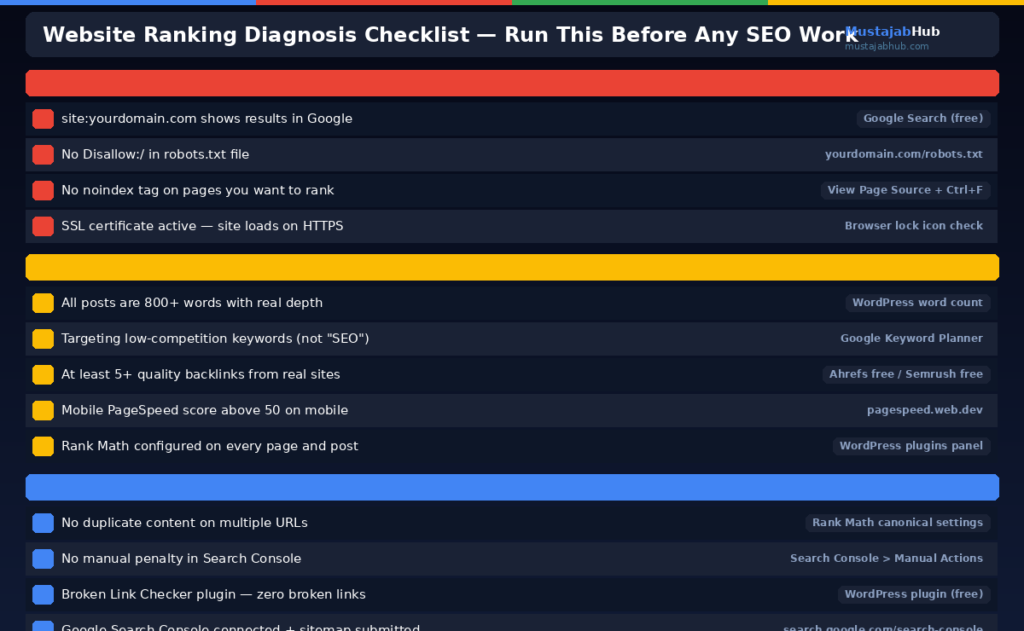
Run through this list and check every box before investing more time in content or backlinks:
| Check | Tool to Use | Status |
|---|---|---|
| Site indexed in Google | site:yourdomain.com in Google | ✓ / ✗ |
| No robots.txt blocking | yourdomain.com/robots.txt | ✓ / ✗ |
| No noindex tags on key pages | View Page Source + Ctrl+F “noindex” | ✓ / ✗ |
| SSL certificate active | Browser lock icon | ✓ / ✗ |
| Mobile-friendly | search.google.com/test/mobile-friendly | ✓ / ✗ |
| PageSpeed mobile above 50 | pagespeed.web.dev | ✓ / ✗ |
| Core Web Vitals passing | Google Search Console | ✓ / ✗ |
| Sitemap submitted | Google Search Console | ✓ / ✗ |
| No manual penalty | Search Console → Manual Actions | ✓ / ✗ |
| No broken links | Broken Link Checker plugin | ✓ / ✗ |
| Rank Math configured | Every post has Title + Meta + Keyword | ✓ / ✗ |
| At least 5 backlinks | Semrush free account / Ahrefs free | ✓ / ✗ |
| Content 800+ words per post | Word count in WordPress editor | ✓ / ✗ |
| Keywords are low competition | Google Keyword Planner | ✓ / ✗ |
Every item marked ✗ is a reason your website is not ranking on Google. Fix them in order from top to bottom — technical issues first, then content, then backlinks.
If you want an expert to audit your website and tell you exactly which of these 15 issues is hurting your ranking most, MustajabHub offers a free website audit for Pakistani small businesses. We identify every problem and give you a priority fix list — no guessing.
Frequently Asked Questions
Why did my Google ranking drop overnight?
Sudden ranking drops are usually caused by: a Google algorithm update (check searchengineland.com for algorithm update announcements), accidentally adding a noindex tag, a Google manual penalty for policy violations, a competitor significantly improving their content, or a technical change on your site that broke crawling. Check Google Search Console → Coverage and Manual Actions immediately to diagnose the cause.
How long does it take for Google to rank a new website?
A completely new website typically takes 4 to 6 months to begin ranking for low-competition keywords. The first 3 months are largely in Google’s evaluation period (sometimes called the Sandbox). Focus this time on publishing quality content, fixing technical SEO, and building foundational backlinks. Do not expect page-one rankings before month 4 even with perfect SEO execution.
Does Google rank websites or pages?
Google’s ranking systems are designed to work on the page level using a variety of signals to understand how to rank individual pages — not entire websites. This means one excellent page on your site can rank on page one while other pages on the same site rank nowhere. Focus on making each individual page as strong as possible rather than trying to improve your “website ranking” as a whole.
Can my website rank on Google without backlinks?
Yes, but only for very low-competition, long-tail keywords. For anything with meaningful competition, backlinks are necessary to differentiate your page from competitors with similar content quality. The good news: even 5 to 10 quality backlinks from relevant websites can make a significant ranking difference for Pakistani websites targeting local and regional keywords with relatively low competition.
Why does my website rank for some keywords but not others?
Your website ranks where its content, authority, and technical health are stronger than the competition for that specific keyword. Every keyword is a separate competition. A page might rank on page one for a long-tail variation but page five for the shorter version of the same topic because the competition is more intense for the broader term. Use Google Search Console to see all keywords you already rank for — then improve the pages that rank on page 2 to 3 for the fastest gains.
For official Google guidance on indexing issues and manual penalties, visit Google Search Central Help.




This is a crucial roadmap for 2026, especially the section on verifying if a site is actually indexed, as that is often the most overlooked technical hurdle for Pakistani website owners. Addressing the ‘hidden Noindex tag’ and crawlability issues first would definitely save many from chasing content strategies without a fundamental foundation.
The point about slow load times from heavy embedded media really hit home for my Pakistani target audience. I had to stop using paid sub tools for converting my long videos into short clips because the bloat was killing my mobile site speed. Fixing those core web vitals finally got my newer pages indexed properly.