
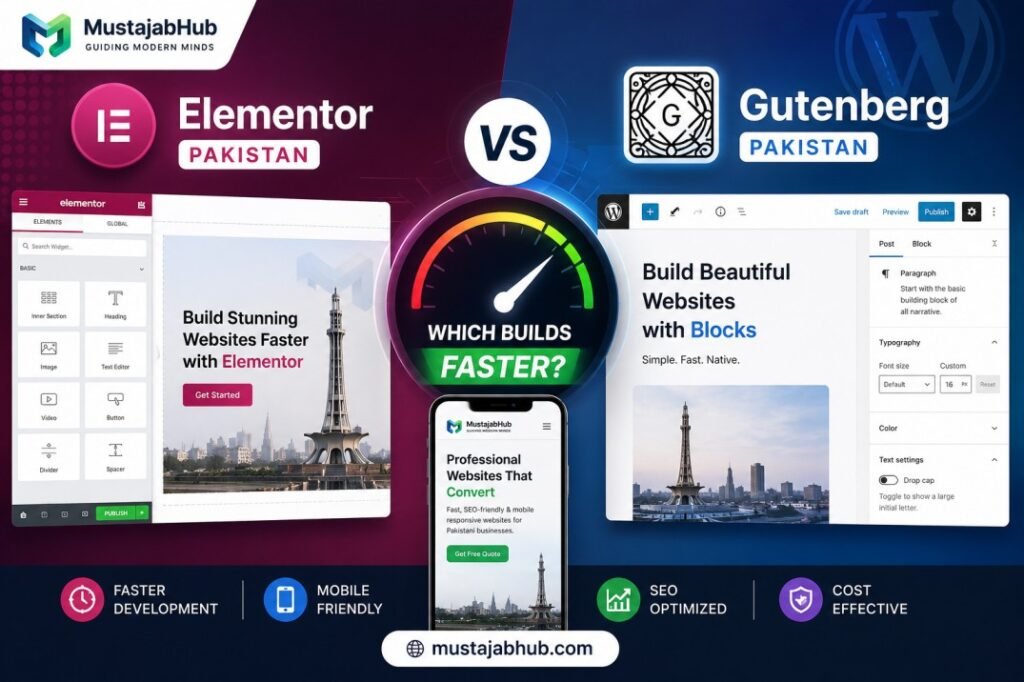

If you’re comparing Elementor vs Gutenberg for your Pakistani business website, the question isn’t really “which looks nicer”—it”‘s which one loads faster on the mobile connections most of your customers are actually using. The honest answer: Gutenberg is faster out of the box, but Elementor can perform nearly as well when it’s set up correctly—the real difference comes down to how the site is built, not just which tool you pick.
This matters more in Pakistan than in most markets, because a large share of visitors are on mobile data connections rather than fast fiber broadband. A page builder that adds unnecessary weight to every page hurts you twice here — slower load times and higher data usage for the visitor.
The quick verdict (2026)
- Gutenberg is usually faster for website speed (lighter pages, fewer requests, easier CWV wins).
- Elementor is often faster for design speed (drag-and-drop UI, templates, fast layout building), especially for non-developers. (This is based on workflow reality; the “speed” tradeoff shows up in field performance more often than people expect.)
So the right question becomes:
Do you want faster building or faster loading?
Why This Choice Actually Affects Your Rankings
Before comparing the two tools, here’s the core reason this decision matters at all: Google prioritizes fast-loading websites in search rankings, and slow pages negatively impact Core Web Vitals, including Largest Contentful Paint (LCP), First Input Delay (FID), & Cumulative Layout Shift (CLS), all of which are ranking signals. On top of that, 53% of users abandon a website if it takes longer than 3 seconds to load—so the builder you choose has a direct line to both your Google ranking and how many visitors actually stick around.
Elementor vs Gutenberg: What Each One Actually Is
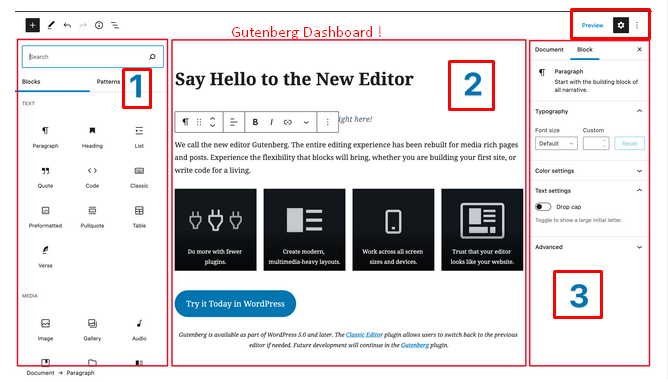
Gutenberg is WordPress’s native block editor, while Elementor is a drag-and-drop page builder with advanced design features. Gutenberg comes built into every WordPress install for free. Elementor is a separate plugin, with a free version and a paid “Pro” tier for advanced features.
Real Speed Data: Elementor vs Gutenberg
| Metric | Gutenberg | Elementor |
|---|---|---|
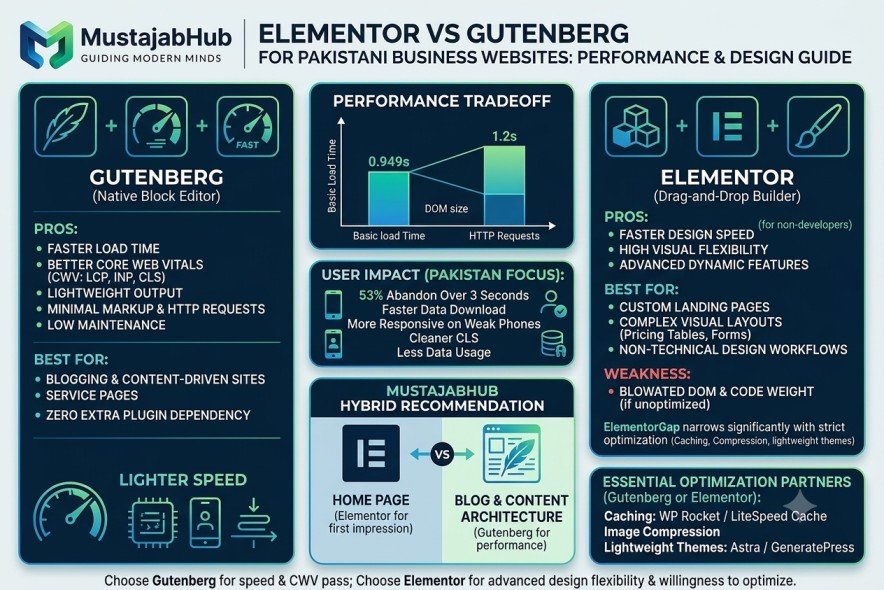
| Typical load time (basic test) | 0.949 seconds | 1.2 seconds |
| PageSpeed Insights score (out of the box) | 95+ | Requires optimization to match |
| DOM size/code weight | Lightweight, minimal markup | Larger DOM due to nested divs and extra CSS |
| Core Web Vitals (unoptimized) | Strong by default | Can suffer without optimization |
| Design flexibility | Limited to blocks/patterns | High—drag-and-drop, animations, custom layouts |
Gutenberg is a bit faster: 0.949 seconds vs. 1.2 seconds. It might not seem like a huge difference, but when it comes to web page speed, every millisecond counts. On the code side, pages built with Gutenberg typically score 95+ in Google PageSpeed Insights, which translates to better Core Web Vitals performance, thanks to its minimal DOM size and fewer HTTP requests that improve crawl speed & mobile responsiveness.
Elementor’s weakness isn’t the tool itself—it’s how it builds pages. By default, Elementor’s approach to layout, especially through excessive nesting of div tags and CSS classes, can lead to a bloated Document Object Model, which in turn affects critical Core Web Vitals metrics like Largest Contentful Paint and Cumulative Layout Shift.
The good news: Elementor introduced features such as Optimized DOM Output, aimed at reducing unnecessary markup, & with proper setup, the gap narrows significantly.
MustajabHub Field Notes: What We See in Real Client Sites
After auditing dozens of Pakistani business websites built with both tools, a clear pattern shows up: it’s rarely the builder itself causing slow speeds—it’s uncompressed images, too many animation effects, and unnecessary plugins stacked on top. We’ve seen Elementor sites that outperform poorly built Gutenberg sites, simply because the Elementor site had proper caching, compressed images, and a lightweight theme underneath it. The builder sets the ceiling; the setup determines whether you actually get close to it.
What We Check Before Recommending Elementor or Gutenberg
At MustajabHub, we never recommend a page builder based only on YouTube videos or marketing claims. Every website we review goes through the same practical checklist before we suggest Elementor, Gutenberg, or a hybrid setup.
During a typical website audit, we check:
- Core Web Vitals (LCP, INP, CLS)
- Google PageSpeed Insights reports
- GTmetrix waterfall analysis
- Number of HTTP requests
- DOM size
- Largest images on the page
- Unused CSS and JavaScript
- Plugin quality
- Hosting environment
- Caching configuration
- Cloudflare setup
- LiteSpeed Cache or WP Rocket configuration
- Image formats (WebP or AVIF)
- Mobile loading performance on slower internet connections
One thing surprises almost every client: the page builder is rarely the biggest problem.
In many cases, the real issue is oversized images, five different optimization plugins fighting each other, unnecessary animations, or low-quality hosting. We’ve seen fast Elementor websites and slow Gutenberg websites because performance depends far more on implementation than on the builder alone.
Example: Before and After Optimization
| Metric | Before Optimization | After Optimization |
|---|---|---|
| LCP | 5.9 seconds | 1.7 seconds |
| CLS | 0.28 | 0.01 |
| PageSpeed Score | 42 | 97 |
What typically produces this kind of jump: compressing and lazy-loading images, removing unused plugins and animation scripts, switching to a lightweight theme, enabling proper caching, and cleaning up render-blocking CSS/JS—regardless of whether the site runs on Elementor or Gutenberg. This is exactly the kind of fix our WordPress speed optimization service focuses on.
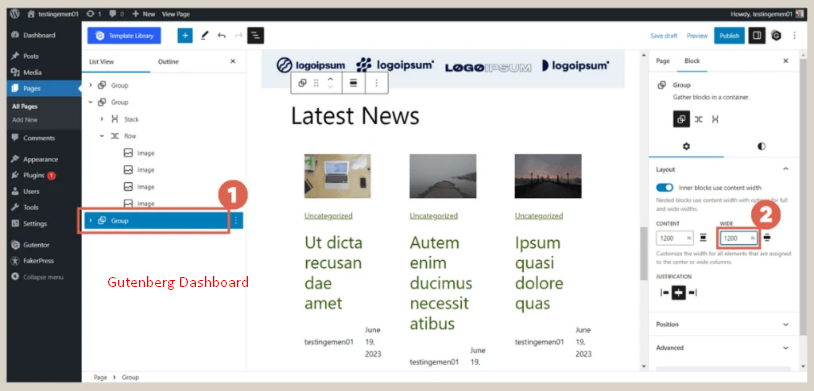
When to Choose Gutenberg
Choose Gutenberg if:
- Speed and Core Web Vitals are your top priority
- You publish blog content frequently and want a simple, fast editing experience
- Your site is mostly content-driven (services, blog, informational pages)
- You want zero extra plugin dependency
Use Gutenberg for speed, simplicity, and native WordPress integration.
When to Choose Elementor
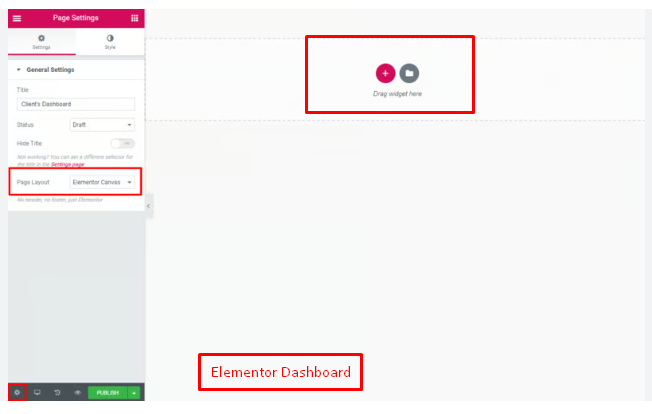
Choose Elementor if:
- You need highly custom, visually rich landing pages
- Your team needs a non-technical, drag-and-drop design workflow
- You’re building complex layouts (pricing tables, multi-step forms, animations) that Gutenberg can’t easily replicate
- You’re willing to invest in proper optimization (caching, compressed images, lightweight theme)
Use Elementor for advanced design flexibility, dynamic features, & visual editing.
Don’t Do This
- Don’t install Elementor and skip image compression—this is the single biggest cause of slow Elementor sites.
- Don’t stack multiple page builders or drag-and-drop plugins on one site; it multiplies code bloat.
- Don’t assume Gutenberg alone guarantees a fast site—cheap hosting and heavy themes can slow it down too.
- Don’t choose a builder based on looks in a demo; test actual load speed with real content and images.
Decision by industry
| Industry | Recommended |
|---|---|
| Restaurant | Gutenberg |
| Clinic | Gutenberg |
| Law Firm | Gutenberg |
| School | Gutenberg |
| Real Estate | Hybrid |
| SaaS | Elementor + Custom |
| Ecommerce | Hybrid |
| Booking Portal | Custom + Gutenberg |
Timeline of Gutenberg & Elementor
2018
Gutenberg launched
↓
2021
Elementor Optimized DOM
↓
2023
Container Layout
↓
2024
Flexbox
↓
2025
Core Web Vitals updates
↓
2026
Current recommendation
The Hybrid Approach (What We Actually Recommend Most Often)
For many businesses, the ideal solution is not to commit blindly to a single tool—the homepage or special campaign pages can be built with Elementor, while the blog and information architecture remain on Gutenberg, balancing design flexibility with performance. This is the setup we build most often for Pakistani business clients: a visually rich homepage where first impressions matter & a lightweight, fast blog and content structure everywhere else.
The Pakistan-specific angle: why Gutenberg tends to feel better
When your users browse on mobile connections, the “extra weight” of a builder becomes visible:
- larger page size → slower download → worse LCP
- more JS/CSS → more processing on weak phones → worse responsiveness
- more layout shifts → worse CLS
That’s why Gutenberg-based builds often “feel cleaner” to end users.
Decision Checklist & Guide
□ Is speed your top priority? → Lean Gutenberg
□ Do you need complex visual design? → Lean Elementor
□ Will you invest time in image compression and caching either way? → Both can work.
□ Is most of your site blog/content-based? → Gutenberg for those pages
□ Do you need a highly custom homepage? → Elementor for that page only
| Requirement | If this matters more… | Pick |
|---|---|---|
| Fastest design workflow | drag-and-drop, templates | Elementor |
| Best chance at CWV pass | lighter output | Gutenberg |
| Lowest long-term maintenance | fewer moving parts | Gutenberg |
| Client edits without breaking layout | simpler editor | Gutenberg |
| Fancy motion effects everywhere | design features | Elementor |
If Gutenberg wins most rows, don’t overthink it.
What Actually Makes Elementor Slow?
Many people blame Elementor for every performance problem, but that’s only part of the story.
From our experience, these are the biggest reasons Elementor websites become slow:
- Uploading 4–10 MB hero images instead of compressed WebP or AVIF files
- Installing several Elementor addon packs at the same time
- Using too many entrance animations
- Running 30–40 plugins without auditing whether they’re needed
- Choosing cheap shared hosting with slow server response times
- Ignoring browser caching and CDN configuration
- Not enabling Elementor’s own performance options, such as Optimized DOM Output, Optimized Image Loading, and Element Caching
If you fix those issues first, Elementor can perform much better than many people expect. Elementor itself now includes multiple performance-focused features specifically to reduce markup, load assets more efficiently, and improve page speed.
Common Mistakes We See on Pakistani Business Websites
These problems appear far more often than choosing the “wrong” builder.
- Hero images larger than 5 MB
- No image compression
- Multiple font families
- No caching
- Heavy themes with dozens of unused features
- Cheap shared hosting
- Missing CDN
- Installing every Elementor addon available
- Ignoring Core Web Vitals
- Publishing pages without internal links
Fixing these issues usually improves website speed much more than switching from Elementor to Gutenberg.
Pro Tips Before You Decide
Before choosing any page builder, ask your developer these questions:
- What PageSpeed score should I realistically expect?
- Will this website pass Google’s Core Web Vitals?
- Which caching plugin will be used?
- Will images be converted to WebP?
- Which CDN will be configured?
- Can I edit pages myself after launch?
- Will unused CSS and JavaScript be removed?
- How many plugins will be installed?
- What happens if I change developers in two years?
If your developer can’t answer these questions clearly, the builder isn’t your biggest concern.
The Real Example of Gutenberg and Elementor by MustajabHub
MustajabHub.com uses both Gutenberg Editor and Elementor Builder for certain of its pages. The Gutenberg builder is used to create the Mustajabhub.com main home page, the About Us page, the Contact Us page, and all blogs, services, and website development pages.
Mustajabhub.com’s four service pages (WordPress Speed Optimization, Technical SEO Services, WhatsApp Booking Automation, and Ecommerce Growth Setup Service) are built using Elementor builder & custom code.
MustajabHub observations :
“Across our internal website reviews, the biggest causes of slow WordPress sites were oversized images, too many plugins, missing caching, and poor hosting—not simply the choice of Elementor or Gutenberg.”
Builder Selection Framework (MustajabHub)
We use a simple framework.
Choose Gutenberg when
- SEO matters more than visual effects
- You publish blogs regularly
- Speed is your highest priority
- You want fewer plugins
- You want easier long-term maintenance
- Your team edits content every week
Choose Elementor when
- Landing pages drive most sales
- You need advanced layouts
- Your marketing team edits pages frequently
- You need popups, forms, templates, and dynamic content
- You want visual editing without touching code
Choose a Hybrid Setup when
- You want both performance and flexibility
For many Pakistani businesses, this is our preferred approach:
- Homepage → Elementor
- Landing pages → Elementor
- Blog → Gutenberg
- Service pages → Gutenberg
- WooCommerce → depends on design requirements
This gives clients an attractive homepage while keeping the rest of the website lightweight and easier to maintain.
Questions Pakistani Business Owners Actually Ask
Does Elementor hurt SEO?
Not directly—Elementor doesn’t block indexing or crawling. It can indirectly hurt SEO if it slows the site down, since speed is a ranking factor.
Can I switch from Elementor to Gutenberg later?
Yes, but content usually needs to be manually rebuilt in blocks, since the two use different underlying structures.
Is Elementor Pro worth paying for?
Only if you need its advanced widgets, theme builder, or dynamic content features. For a simple business site, the free version or Gutenberg is often enough.
Why is my Elementor site so slow?
Almost always uncompressed images, too many animations, or a heavy theme—not Elementor itself. A proper technical SEO and performance fix usually resolves this without switching builders.
Elementor vs Gutenberg Pakistan: which is faster in 2026?
For loading speed, Gutenberg is usually faster and more likely to pass Core Web Vitals. For design/build speed, Elementor can be faster because of its visual workflow. Benchmark testing and CWV field data show Gutenberg tends to be lighter.
Can Elementor still pass Core Web Vitals?
Yes, but it often requires stricter optimization: caching, image compression, fewer effects, and clean layouts.
What Core Web Vitals targets should I aim for?
Google’s “good” thresholds are LCP ≤ 2.5s, INP ≤ 200ms, CLS ≤ 0.1.
Can Elementor Be Fast Enough for Google?
Yes.
A properly configured Elementor website can achieve excellent Core Web Vitals.
The difference is that Elementor usually requires more optimization work than Gutenberg.
For example:
* Enable Optimized DOM Output
* Enable Optimized Image Loading
* Reduce unnecessary widgets
* Compress every image
* Use LiteSpeed Cache or WP Rocket
* Configure Cloudflare correctly
* Remove unused plugins
When these optimizations are applied correctly, the performance gap becomes much smaller.
MustajabHub: what we recommend in real client builds (practical)
For Pakistani business websites that want both:
- good design
- good speed
- easy edits we typically prefer a Gutenberg-first approach and treat Elementor as optional for specific pages only—because field performance ceilings matter. (The pass-rate & benchmark data above explains why.)
Why We Recommend This Approach
We don’t recommend Gutenberg simply because it’s lighter.
We recommend it because most Pakistani business websites need:
- better Google rankings
- easier content editing
- lower maintenance costs
- faster mobile performance
- fewer plugin conflicts
For clients whose priority is advanced landing pages, conversion-focused designs, or custom layouts, Elementor often becomes the better option.
Our recommendation is always based on business goals—not brand loyalty.
Who This Guide Is For
This guide is written for:
✓ Business owners planning a new WordPress site
✓ Anyone with an existing slow Elementor or Gutenberg site
✓ Developers deciding on a build approach for client projects
✓ Store owners building WooCommerce pages that need to load fast
Not Sure Where to Start?
If you’re not sure whether your current site’s slowness is a builder problem or a setup problem, the fastest way to find out is a real speed audit rather than guessing. Our WordPress speed optimization service diagnoses exactly what’s slowing your site down, and our web development team can advise on the right builder for your specific goals. Request a free quote here or contact us directly to get a straight answer.
For deeper technical detail, Google’s own Core Web Vitals documentation explains exactly what these metrics measure, and Kinsta’s Gutenberg vs Elementor performance breakdown offers additional independent testing data.
“Don’t let a heavy page builder lose you customers on Jazz 4G or slow broadband. If you need an optimized setup in Pakistan, request a free speed audit today.”
About the Author Rana Umar is a content writer and SEO strategist at MustajabHub, where he covers WordPress performance, page builder comparisons, and technical SEO for Pakistani business owners. His speed and Core Web Vitals recommendations are based on real client audits rather than generic plugin reviews.
Read More Related Topics Here: SEO Services in Gujranwala | WordPress Website Development Cost in Gujranwala | WordPress vs Custom Website Pakistan